
The best fingerprint door lock for most homes is the Yale Assure Lock 2 Touch: a fingerprint deadbolt with Wi-Fi built in, a touchscreen keypad as a backup and support for Apple Home, Alexa and Google. With a fingerprint door lock, you don’t need to carry a key or remember a code, and you don’t have to hand out spare keys to everyone in the family.
Below are six fingerprint locks for different homes and budgets: a lock under $80, options for Apple Home Key and Matter, a fingerprint-only lock that stores 100 prints and a biometric door lock that also recognizes your face. If app features or phone keys matter more to you than the fingerprint reader, our best smart locks guide covers those.
Quick Recommendations
- Yale Assure Lock 2 Touch — Best overall. A fingerprint reader, a touchscreen keypad and Wi-Fi in one lock that works with Apple Home, Alexa and Google.
- Wyze Lock Bolt v2 — Best budget. A fingerprint reader, a keypad and Wi-Fi for about $79.
- Aqara U400 — Best for Apple Home Key. A fingerprint deadbolt that also unlocks as you walk up with your iPhone.
- ULTRALOQ Bolt SE — Best for Matter. A fingerprint deadbolt you can run on Wi-Fi or on Matter over Thread.
- Kwikset Halo Touch — Best without a keypad. A fingerprint-only lock that stores 100 prints and carries a Grade AAA rating.
- Lockly Visage Zeno — Best face and fingerprint lock. Unlocks with your face or your finger, and works with Apple Home Key.
At-a-Glance Comparison
| Product | Ecosystem | Key Feature | Approx. Price | Best For |
|---|---|---|---|---|
| Yale Assure Lock 2 Touch | Apple, Alexa, Google | Fingerprint + touchscreen, Wi-Fi | ~$175 | Best overall |
| Wyze Lock Bolt v2 | Alexa, Google | 50 prints, Wi-Fi | ~$79 | Lowest price |
| Aqara U400 | Apple, Google, Alexa, SmartThings | Hands-free Home Key | ~$270 | Apple Home Key |
| ULTRALOQ Bolt SE | Apple, Google, Alexa, SmartThings | Wi-Fi or Matter over Thread | ~$120 | Matter |
| Kwikset Halo Touch | Alexa, Google | 100 prints, Grade AAA | ~$159 | Fingerprint only |
| Lockly Visage Zeno | Apple, Alexa, Google | Face + fingerprint | ~$349 | Face recognition |
Compatibility Matrix
| Product | HomeKit | Alexa | Google Home | Matter | Thread | Hub Required | Wiring/Power |
|---|---|---|---|---|---|---|---|
| Yale Assure Lock 2 Touch | Yes | Yes | Yes | No | No | No (Wi-Fi built in) | 4 AA batteries |
| Wyze Lock Bolt v2 | No | Yes | Yes | No | No | No (Wi-Fi built in) | 8 AA batteries |
| Aqara U400 | Yes (Matter + Home Key) | Yes (via Matter) | Yes (via Matter) | Yes | Yes | Thread border router | Rechargeable battery |
| ULTRALOQ Bolt SE | Yes (via Matter) | Yes | Yes | Yes | Yes | No on Wi-Fi, Thread border router for Matter | AA batteries |
| Kwikset Halo Touch | No | Yes | Yes | No | No | No (Wi-Fi built in) | 4 AA batteries |
| Lockly Visage Zeno | Yes (+ Home Key) | Yes | Yes | No | No | No (Wi-Fi built in) | 2 rechargeable batteries |
Three of these locks work with Apple Home directly (the Yale, the Aqara and the Lockly), and the ULTRALOQ joins them in Matter mode. The Aqara and the ULTRALOQ in Matter mode need a Thread border router for remote access, while the others connect to your Wi-Fi without a hub. If Apple Home is your main platform, our guide to the best HomeKit smart locks compares eight locks, including ones without a fingerprint reader.
The Best Fingerprint Door Locks for 2026
Yale Assure Lock 2 Touch — Best Overall
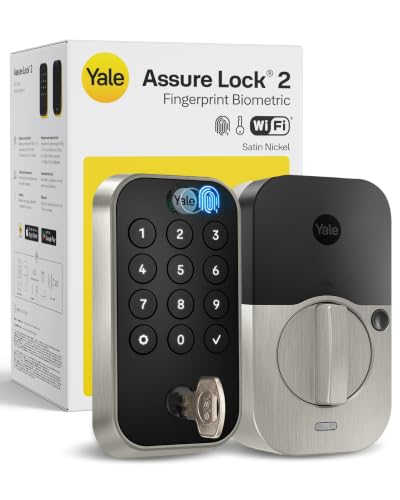
The Assure Lock 2 Touch is the best choice for most homes. The reader sits in the Yale logo, the touchscreen keypad takes a code when a finger doesn’t read, and Wi-Fi is built in, so you don’t need a hub or a bridge.
Best for: Most front doors, and homes with both iPhones and Android phones.
What stands out in real use
You unlock by touching the Yale logo, and the lock stores up to 20 fingerprints. It works in the Apple Home app, so you can ask Siri to lock the door and add it to automations, and it also works with Alexa and Google. Yale’s DoorSense tells the lock when the door is closed, so auto-lock only locks a door that’s shut, and optional auto-unlock opens it as you arrive.
Key specs
- Wi-Fi and Bluetooth built in (you don’t need a hub)
- Fingerprint reader (20 prints), touchscreen keypad, key
- Works with Apple Home, Alexa and Google
- 4 AA batteries (included)
- ANSI/BHMA Grade 2, IPX5, fits doors up to 2-1/4″ thick
Pros
- Works with all three major platforms
- A keypad and a key as backups for the fingerprint reader
- Auto-lock that knows whether the door is closed
- Fits doors up to 2-1/4″ thick
Cons
- Stores only 20 fingerprints
- Doesn’t support Apple Home Key (only the Assure Lock 2 Plus does)
- Doesn’t support Matter
- Yale doesn’t publish a battery life figure
Installation and compatibility notes
It replaces a standard deadbolt and only connects to 2.4GHz Wi-Fi. To control it remotely through Apple Home (rather than the Yale Access app), you also need an Apple home hub, such as a HomePod or an Apple TV. Amazon prices vary by finish, so check the one you want.
Price: ~$175
Wyze Lock Bolt v2 — Best Budget

For about $79, the Lock Bolt v2 gives you a fingerprint reader, a keypad and built-in Wi-Fi. It’s the least expensive fingerprint smart lock here by a wide margin.
Best for: Tight budgets, and families with kids who would rather use a fingerprint than remember a code.
What stands out in real use
The reader stores up to 50 fingerprints and the keypad up to 50 codes, including one-time codes for guests. Wyze keeps the fingerprint data on the lock, not in the cloud. You can type random digits before or after your code, so someone watching can’t easily learn it. If the batteries die, you can plug a USB-C power bank into the lock and use your fingerprint or code.
Key specs
- 2.4GHz Wi-Fi and Bluetooth (you don’t need a hub)
- Fingerprint reader (50 prints), backlit touch keypad (50 codes), key
- Works with Alexa and Google Home
- 8 AA batteries (included), up to 8 months
- BHMA Grade 2, IP53
Pros
- Lowest price here
- Fingerprint reader, keypad and Wi-Fi at this price
- USB-C emergency power, plus a key
- You don’t need a subscription
Cons
- Doesn’t work with Apple Home or Matter
- Takes eight AA batteries
- PCWorld’s reviewer found the fingerprint reader sometimes missed a scan
Installation and compatibility notes
It replaces a standard single-cylinder deadbolt on doors 1-3/8″ to 2-11/64″ thick, and it needs a 2.4GHz Wi-Fi signal at the door. It doesn’t have a door sensor, so it can’t tell you the door was left open.
Price: ~$79
Aqara U400 — Best for Apple Home Key

The U400 is the fingerprint deadbolt for iPhone homes. Besides the fingerprint reader, it supports Apple Home Key, both as a tap with your iPhone or Apple Watch and hands-free: with UWB, the door unlocks as you walk up to it from outside.
Best for: Apple Home users who want the most ways in, and anyone who often arrives with full hands.
What stands out in real use
The fingerprint reader stores up to 50 prints, and there’s a touchscreen keypad for codes. Hands-free unlocking uses UWB to measure where you are and which way you’re moving, so it unlocks for you as you approach, not as you walk past inside. The lock uses Matter over Thread, so it also works with Google Home, Alexa, SmartThings and Home Assistant. In the Aqara app, Night Latch Mode lets only admins and keys unlock the door at night.
Key specs
- Matter over Thread and UWB, Apple Home Key
- Fingerprint reader (50 prints), touchscreen keypad, NFC card (sold separately), key
- Works with Apple Home, Google Home, Alexa, SmartThings and Home Assistant
- Removable rechargeable battery, up to 6 months per charge, USB-C charging
- BHMA certified, IP65, rekeyable
Pros
- Fingerprint, hands-free Home Key and tap-to-unlock in one lock
- Works with every major platform through Matter
- Recharge it in place over USB-C, without taking it off the door
- IP65 outside panel
Cons
- One of the most expensive locks here
- Hands-free unlocking needs an iPhone 11 or later (not the SE or 16e) on iOS 18.5 or later, or an Apple Watch Series 6 or later (not the SE)
- Aqara doesn’t publish its BHMA grade
- The battery needs a recharge about every six months
Installation and compatibility notes
Home Key and remote access need a Thread-enabled Apple home hub: such as a HomePod mini, a HomePod (2nd gen) or an Apple TV 4K. Other platforms need their own Thread-enabled Matter controller. Our Apple Home Key guide explains how Home Key works and compares more locks with it.
Price: ~$270
ULTRALOQ Bolt SE — Best for Matter

The Bolt SE is the least expensive way to get a fingerprint deadbolt with Matter. You choose how it connects: Wi-Fi, which needs no hub, or Matter over Thread, which puts it in Apple Home, Google Home, Alexa and SmartThings at the same time.
Best for: Homes that already have a Thread border router, and anyone who wants Matter for about $120.
What stands out in real use
The lock stores up to 50 fingerprints and 50 codes, and it also unlocks from the app, with auto-unlock as you arrive or with an Apple Watch. It runs in one mode at a time. On Wi-Fi, you get remote control in ULTRALOQ’s Xthings Home app plus Alexa and Google. On Matter over Thread, the lock uses less power: ULTRALOQ rates it at up to a year on alkaline AA batteries, compared with up to 8 months on Wi-Fi.
Key specs
- Wi-Fi (2.4GHz) or Matter over Thread, plus Bluetooth
- Fingerprint reader (50 prints), keypad (50 codes), 2 keys
- Works with Apple Home (via Matter), Alexa, Google Home and SmartThings
- AA batteries, up to 1 year on Thread (1.5 years with lithium)
- 128-bit AES encryption, fits doors 1-3/8″ to 1-3/4″ thick
Pros
- Matter at a budget price
- Choose Wi-Fi or Thread for your home
- Longer battery life in Thread mode
- 50 fingerprints and 50 codes
Cons
- Remote access in Matter mode needs a Thread border router
- ULTRALOQ doesn’t publish a BHMA grade
- A door sensor isn’t included
Installation and compatibility notes
If you use Matter, you need a Thread border router such as a HomePod mini, a HomePod (2nd gen) or an Apple TV 4K. Our best Matter hub guide compares the options for every platform. Doors thicker than 1-3/4″ need ULTRALOQ’s thick door kit.
Price: ~$120
Kwikset Halo Touch — Best Without a Keypad

The Halo Touch is a fingerprint deadbolt without a keypad: you unlock it with your finger, the Kwikset app or a key. It stores up to 100 fingerprints, the most on this list, and carries Kwikset’s Grade AAA rating. Our Schlage vs Kwikset comparison explains how Kwikset’s other locks compare with Schlage’s.
Best for: Families who only want fingerprints, and anyone who doesn’t want a code someone could learn by watching.
What stands out in real use
You can add up to 100 fingerprints for 50 users and limit each one to certain dates, days or times, which is useful for a cleaner or a dog walker. Kwikset encrypts the prints and stores them on the lock, not in the cloud. To lock the door, you touch the sensor with any finger, and only a registered finger unlocks it. The app can also unlock the door as you get home, using your phone’s location.
Key specs
- Wi-Fi built in (you don’t need a hub)
- Fingerprint reader (100 prints, 50 users), app, key (no keypad)
- Works with Alexa and Google Home
- 4 AA batteries (included)
- ANSI/BHMA Grade AAA, SmartKey
Pros
- Stores the most fingerprints here
- Grade AAA rating
- Schedules for each user
- Rekey it yourself with SmartKey
Cons
- No keypad, so the key is the only backup at the door
- Doesn’t work with Apple Home or Matter
- Kwikset doesn’t publish a battery life figure
Installation and compatibility notes
It replaces a standard deadbolt and needs a 2.4GHz Wi-Fi network. You register each fingerprint in the Kwikset app while you’re near the lock. If you’d rather have a code as a backup, our keypad door lock guide has locks built around the keypad.
Price: ~$159
Lockly Visage Zeno — Best Face and Fingerprint Lock
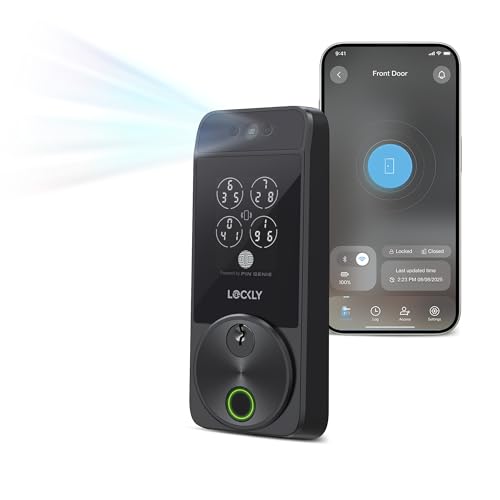
The Visage Zeno unlocks when it recognizes your face, so you don’t even need to touch it. It also has a fingerprint reader for up to 99 prints, a keypad and Apple Home Key.
Best for: Apple Home users who want hands-free entry without UWB, and households where some people find fingerprint readers unreliable.
What stands out in real use
Face recognition holds up to 100 face images, and Lockly stores that data on the lock. Wi-Fi is built in, and the lock works with Apple Home, Alexa and Google. You can also tap your iPhone or Apple Watch to unlock with Home Key. It runs on two rechargeable batteries, each rated for up to 8 months, so you can charge one while the other is in the lock, and a USB-C port gives emergency power.
Key specs
- Wi-Fi built in, Bluetooth, NFC for Apple Home Key
- Face recognition (100 faces), fingerprint reader (99 prints), keypad, key
- Works with Apple Home, Alexa and Google
- Two 10,000mAh rechargeable batteries, up to 8 months each, USB-C backup
- Built to ANSI Grade 2, IP65, fits doors 1-3/8″ to 3-1/8″ thick
Pros
- Unlocks with your face, your finger, a code or Home Key
- Face data stays on the lock
- Two batteries, so you can swap one while the other charges
- Fits very thick doors
Cons
- The most expensive lock here
- Apple Home only holds 16 codes (49 in the Lockly app)
- Doesn’t support Matter
Installation and compatibility notes
Remote access and Home Key sharing through Apple Home need an Apple home hub. The Lockly Home app works without one over Wi-Fi. Lockly also sells a version with a 2K doorbell camera, the Vision Zeno, which is in our guide to the best smart locks with a camera.
Price: ~$349
How to Choose a Fingerprint Door Lock
A backup way in. Fingerprint readers don’t read every finger every time. Every lock here takes a key, and most also have a keypad. The Kwikset Halo Touch is the exception: without a keypad, its key is the only backup at the door. The same applies to a fingerprint padlock on a gate or a locker, and our guide to the best smart padlocks notes the backup for each one.
How many fingerprints. The locks here store 20 to 100 prints. Register two fingers for each person, so a cut or very dry skin on one finger doesn’t lock anyone out. Kwikset’s advice for a finger that won’t read is to delete it and register it again, or to use a different finger.
Where your prints are stored. Kwikset and Wyze store fingerprint data on the lock, not in the cloud, and Lockly does the same with face data. On those locks, your prints don’t leave the door.
Your platform. For Apple Home, choose the Yale, the Aqara or the Lockly, or the ULTRALOQ in Matter mode. Alexa and Google work with all six. A Matter over Thread lock needs a Thread border router, which you may already have in a HomePod mini, an Apple TV 4K or a Nest Hub (2nd gen).
Power. AA locks (the Yale, Wyze, ULTRALOQ and Kwikset) are easy to keep going with fresh batteries. The Aqara and the Lockly use rechargeable packs, which you charge every several months.
Door fit. Measure your door’s thickness and backset (the distance from the door edge to the center of the hole) before you buy. Our smart lock installation guide explains the measurements, and a fingerprint deadbolt installs the same way.
Conclusion
The Yale Assure Lock 2 Touch is the best fingerprint door lock for most homes: a reliable reader, a touchscreen keypad as a backup and support for Apple Home, Alexa and Google. The Wyze Lock Bolt v2 is the one to buy on a tight budget. Choose the Aqara U400 for hands-free Apple Home Key, or the ULTRALOQ Bolt SE for Matter at a low price. The Kwikset Halo Touch stores the most fingerprints, and the Lockly Visage Zeno adds face recognition.
What is the best fingerprint door lock?
For most homes, the Yale Assure Lock 2 Touch is the best fingerprint door lock. It has a fingerprint reader, a touchscreen keypad as a backup and built-in Wi-Fi, and it works with Apple Home, Alexa and Google. On a budget, the Wyze Lock Bolt v2 costs about $79.
Are fingerprint door locks safe?
Check the BHMA rating as you would for any deadbolt: the Yale and the Wyze are Grade 2 and the Kwikset Halo Touch is Grade AAA. Kwikset and Wyze store fingerprint data on the lock, not in the cloud, and every lock in this guide also takes a regular key.
What happens if a fingerprint lock doesn’t recognize my finger?
Use the backup: most fingerprint locks have a keypad, and all the locks in this guide take a key. To make reads more reliable, register two fingers per person. Kwikset suggests deleting a finger that won’t read and registering it again, or using a different finger.
Which fingerprint smart lock works with Apple Home?
The Yale Assure Lock 2 Touch, the Aqara U400 and the Lockly Visage Zeno work with Apple Home, and the ULTRALOQ Bolt SE does in Matter mode. The Aqara and the Lockly also support Apple Home Key, and the Aqara adds hands-free unlocking with UWB.
How many fingerprints can a fingerprint door lock store?
It depends on the model. The Yale Assure Lock 2 Touch stores 20 fingerprints, the Wyze Lock Bolt v2, Aqara U400 and ULTRALOQ Bolt SE store 50, the Lockly Visage Zeno stores 99 and the Kwikset Halo Touch stores 100.
What is the difference between a fingerprint lock and a biometric door lock?
A fingerprint lock is one kind of biometric door lock. Biometric locks recognize something about your body, and besides fingerprints that can be your face, like the Lockly Visage Zeno, or the veins in your palm on some newer locks.

Written by Evan Mercer
Founder & Lead Researcher, Smart Home Matrix
Evan digs through spec sheets, firmware changelogs, and thousands of owner reviews so you don’t have to. Every guide starts with a compatibility check and ends with picks he would install in his own home. Read more about Evan and this site, or see exactly how we choose products.