
A Matter camera is a security camera that streams its video through Matter, the smart home standard that lets one device work in Apple Home, Google Home, Alexa and SmartThings. Matter 1.5 added cameras and video doorbells in November 2025, so on paper the answer is yes. In practice, as of October 2026, Samsung SmartThings is the only major platform that can show a Matter camera’s video, and only a handful of cameras are certified.
This guide explains what Matter 1.5 changes for cameras, which platforms support them, which cameras are certified, and what to buy if you want a camera in your smart home today.
Quick answer: Partly. Matter 1.5 supports security cameras and video doorbells, but SmartThings is the only major platform that supports them so far. Apple Home, Google Home, Alexa and Home Assistant can’t show a Matter security camera yet. The Aqara Camera Hub G350 was the first certified Matter camera, and Tapo, EZVIZ and Ulticam have certified models too. Ring, Google Nest and eufy don’t sell one. If you don’t use SmartThings, choose a camera that works with your platform’s own integration (HomeKit Secure Video for Apple Home) and treat Matter as a bonus.
What Matter 1.5 Adds for Cameras
Until Matter 1.5, every camera reached every platform through a separate, brand-specific integration: HomeKit Secure Video for Apple Home, a skill for Alexa, a cloud link for Google Home. That’s why a Ring camera works with Alexa but not with Apple Home, and why the list of compatible cameras is different on every platform.

Matter 1.5, released by the Connectivity Standards Alliance (CSA) on November 20, 2025, adds cameras, video doorbells and intercoms to the standard. A certified Matter camera should work with any platform that supports Matter cameras, without the camera brand building an integration for each one. According to the CSA’s Matter 1.5 announcement, the camera specification covers:
- Live video and two-way audio over WebRTC, the same technology video calls in a web browser use
- Viewing at home and away from home
- Pan, tilt and zoom control
- Detection zones and privacy zones
- Continuous or event-based recording, to local storage or the cloud
Matter 1.5.1 followed on March 31, 2026 with camera improvements, including several video streams at once (for example a high-resolution stream for recording and a lighter one for your phone).
Matter cameras connect over Wi-Fi or Ethernet. Thread, the low-power mesh network many Matter sensors and locks use, is far too slow to carry video. Our Matter vs Thread guide explains how the two fit together.
Which Platforms Support Matter Cameras
Platform support is the real limit right now. Here’s where each major platform stands in October 2026.
| Platform | Matter cameras? | What to use instead |
|---|---|---|
| SmartThings | Yes (with a SmartThings hub) | Not needed |
| Apple Home | No | HomeKit Secure Video cameras |
| Google Home | No (Matter doorbell button only) | Nest cameras or Works with Google Home cameras |
| Alexa | No | Camera brands’ Alexa skills |
| Home Assistant | Not yet (in development) | Brand integrations or RTSP |

SmartThings. Samsung announced on December 19, 2025 that SmartThings was the first platform to support Matter cameras, and it started rolling the update out at the end of December. Samsung lists live video, two-way audio, motion detection, event history and pan-tilt-zoom control. SmartThings runs Matter through a SmartThings hub, such as the Aeotec Smart Home Hub 2. Some Samsung TVs and appliances have a hub built in.
Apple Home. Apple’s list of Matter accessory types (last updated May 2026) doesn’t include cameras or doorbells, and iOS 27 didn’t add them in September. Apple improved HomeKit Secure Video instead: iOS 27 brings 4K recording to compatible cameras and AI descriptions of clips. HomeKit Secure Video needs an iCloud+ plan and a home hub. Our guide to HomeKit Secure Video covers the plans and the cameras, and if your clips stop appearing, see our fixes for HomeKit Secure Video not recording.
Google Home. Google’s official list of supported Matter device types, updated October 8, 2026, has no camera type. It does support a Matter doorbell, but only as a button that rings a chime, with no video. Google’s own Nest cameras and doorbells don’t use Matter either.
Alexa. Echo devices run Matter but support only some of its device types, and Amazon’s list doesn’t include cameras. Cameras still appear on an Echo Show through each brand’s own Alexa skill.
Home Assistant. Home Assistant has started work on Matter cameras, but the code that shows them as cameras was still an unfinished draft in mid-October 2026. For now, use the camera’s own integration or its RTSP stream.
For the device types each platform does support over Matter, see our guide to Matter-compatible devices.
Which Security Cameras Work With Matter
Only a few cameras have Matter certification so far, and most of them are indoor pan-tilt cameras.
| Camera | Type | Matter certified | US availability |
|---|---|---|---|
| Aqara Camera Hub G350 | Indoor 4K pan-tilt, two lenses | February 2026 (the first) | Amazon (Aqara’s store) |
| Ulticam IQ V2 | 4K PoE or Wi-Fi camera | March 2026 | Not on Amazon US |
| EZVIZ C6c 4K | Indoor 4K pan-tilt | June 2026 | Not on Amazon US |
| Tapo C260, C560WS, C660 | 4K cameras | By June 2026 | Matter firmware not announced in the US yet |
The Tapo and EZVIZ certifications come from the CSA’s certification records, as reported by Matter Alpha. A certified camera still needs the Matter firmware on your unit, and TP-Link’s US firmware notes for the C560WS don’t mention Matter yet. Check the Tapo app before you buy one for Matter.
The biggest camera brands haven’t released a Matter security camera at all. Ring hasn’t certified any Matter device, Google’s Nest cameras and doorbells don’t support it, and eufy has no Matter-certified camera. A few eufy cameras do work with Apple Home natively; here’s which eufy devices work with HomeKit.
One thing confuses people when they shop: “Matter” on a camera’s box doesn’t always mean a Matter camera. Several Aqara cameras, including the Camera Hub G5 Pro and the G410 doorbell, act as Matter hubs for other devices, but their video doesn’t go through Matter. Look for “Matter camera” or Matter 1.5 certification specifically.
If you use Apple Home, you don’t need Matter to get a good camera today. Our guide to the best HomeKit security cameras covers cameras that work with HomeKit Secure Video now.
How to Set Up a Matter Camera in SmartThings
Here’s the setup with the Aqara Camera Hub G350, the Matter camera you can buy most easily in the US:
- Check your hub. You need a SmartThings hub, either a dedicated one such as the Aeotec Smart Home Hub 2 or a Samsung TV or appliance with a hub built in.
- Set the camera up in the Aqara Home app first. Install the latest firmware. Matter support needs firmware 4.5.20_0020.0017 or later.
- Get a Matter code from the Aqara app. One reviewer found that scanning the QR code printed on the camera failed, while a new pairing code from the app worked.
- Add it in SmartThings. Tap +, choose Add device, scan the code and pick a room.
- Keep the Aqara app. You’ll still use it for firmware updates and for the features Matter doesn’t carry.
Once it’s added, the camera shows a live view in SmartThings, with two-way talk and motion events you can use in routines.
Limitations and What to Watch For
Matter cameras are new, and a few limits are worth knowing before you buy one for Matter:
- One platform. A Matter camera’s video only works in SmartThings today. Apple, Google and Amazon haven’t announced when they’ll add Matter cameras.
- Fewer features than the maker’s app. Matter carries the basics, not everything. On the G350, owners testing it in SmartThings found that detection zones, microSD recordings, HDR and the second lens stay in the Aqara app.
- Firmware decides what works. Features arrive through camera firmware and SmartThings updates. The G350’s first Matter firmware couldn’t pan or tilt the camera from SmartThings, and owners report that later firmware added it. A camera can be certified long before the Matter firmware reaches your unit.
- Wi-Fi has to keep up. A Matter camera streams over Wi-Fi or Ethernet like any other camera, so place it where your signal is strong.
Matter Cameras You Can Buy Now
If you use SmartThings and want a Matter camera today, these two products are what you need: the camera, and a hub to run it if you don’t already have one.
Aqara Camera Hub G350 — Best Matter Camera

The G350 was the first Matter-certified camera, and it’s the easiest one to buy in the US. It also works in Apple Home through HomeKit Secure Video, so it’s useful even before other platforms add Matter cameras.
Best for: SmartThings homes, and Apple Home users who want a camera that’s ready for Matter.
What stands out in real use
The G350 has two lenses: a 4K wide lens for the whole room and a 2.5K telephoto lens with 9x hybrid zoom for detail, on a base that pans 360 degrees. In SmartThings it gives live view, two-way talk and motion events over Matter, while tracking, face recognition and the full settings stay in Aqara Home. It’s also a Zigbee hub and a Thread border router for Aqara’s sensors.
Key specs
- 4K wide lens (133°) plus 2.5K telephoto lens (43°), 9x hybrid zoom
- 360° pan with tilt and auto tracking
- Dual-band Wi-Fi 6
- microSD card up to 512 GB
- Matter camera, HomeKit Secure Video, Alexa, Google Home
- USB-C power
Pros
- The first certified Matter camera
- Works with every major platform in one way or another
- HomeKit Secure Video support for Apple Home
- Also acts as a Zigbee hub and Thread border router
Cons
- Indoor use only
- Its Matter video only works in SmartThings for now
- The box has a USB-C cable but no power adapter
- Pan and tilt can’t be controlled from Apple Home
Installation and compatibility notes
Set it up in Aqara Home and update the firmware first. Then add it to SmartThings with a Matter code from the Aqara app, or to Apple Home through HomeKit. Our guide to the best indoor security cameras compares it with other indoor options.
Price: ~$140
Aeotec Smart Home Hub 2 — Best SmartThings Hub for Matter Cameras
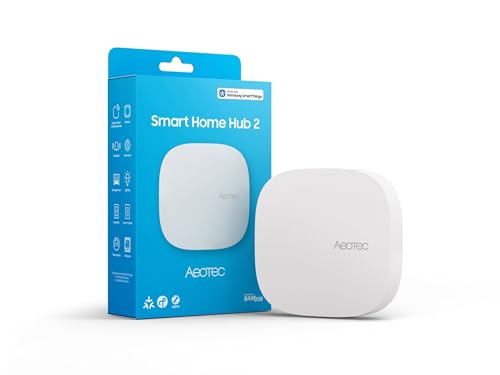
SmartThings needs a hub to run Matter devices, and the Aeotec Smart Home Hub 2 is the current hub made for it. Aeotec’s Smart Home Hubs are on the list of hubs that support Matter cameras in SmartThings.
Best for: SmartThings users who don’t have a Samsung TV or appliance with a hub built in.
What stands out in real use
The Hub 2 acts as the Matter controller for SmartThings, so Matter cameras, locks and sensors join through it. It’s also a Thread border router and a Zigbee 3.0 hub for up to 150 Zigbee devices, and it connects to your router over Wi-Fi or Ethernet.
Key specs
- Matter controller and Thread border router
- Zigbee 3.0 (up to 150 devices)
- Wi-Fi and Ethernet
- Bluetooth for setup
- USB-C power
Pros
- Runs Matter devices, including cameras, in SmartThings
- Thread border router for Matter-over-Thread devices
- Small and easy to place
- Costs less than the earlier Aeotec hub
Cons
- Doesn’t support Z-Wave
- Only useful if you use SmartThings
Installation and compatibility notes
Plug it in, connect it to your router and add it in the SmartThings app. If you have Z-Wave devices, choose the earlier Aeotec Smart Home Hub instead, which keeps Z-Wave and costs about $30 more.
Price: ~$130
The Bottom Line
Matter camera support is real, but in October 2026 it only works in SmartThings. Here’s what that means when you’re buying a camera now:
- SmartThings: a Matter camera works today. The Aqara G350 is the easiest one to buy.
- Apple Home: buy a camera with HomeKit Secure Video. The G350 covers both, if you want a camera that’s ready for Matter.
- Google Home or Alexa: buy a camera that already works with your platform, such as Nest for Google Home or Ring for Alexa.
A Matter security camera is a good bonus, not a reason to buy yet. Matter cameras should get more useful as Apple, Google and Amazon add support, but none of them has given a date, so choose the camera that works best with your platform today. For outdoor picks sorted by platform, see our guide to the best outdoor security cameras.
Do security cameras work with Matter?
Partly. Matter 1.5 added security cameras and video doorbells in November 2025, but as of October 2026 SmartThings is the only major platform that supports them. Apple Home, Google Home, Alexa and Home Assistant can’t show a Matter camera yet.
Does Apple Home support Matter cameras?
Not yet. Apple’s list of supported Matter accessories doesn’t include cameras, and iOS 27 didn’t add them. Cameras work in Apple Home through HomeKit Secure Video instead.
Does Google Home support Matter cameras?
Not yet. Google’s official list of supported Matter device types has no camera type. It supports a Matter doorbell only as a button that rings a chime, without video.
Which cameras support Matter?
The Aqara Camera Hub G350 was the first Matter-certified camera, and it’s the easiest to buy in the US. The Ulticam IQ V2, EZVIZ C6c 4K and Tapo C260, C560WS and C660 are certified too, but they aren’t sold with Matter in the US yet or aren’t on Amazon US.
Do Matter cameras need a hub?
They need a Matter controller that supports cameras. In SmartThings, that’s a SmartThings hub, such as the Aeotec Smart Home Hub 2 or a Samsung TV or appliance with a hub built in.
Do Matter cameras use Thread?
No. Matter cameras connect over Wi-Fi or Ethernet, because Thread is too slow to carry video.

Written by Evan Mercer
Founder & Lead Researcher, Smart Home Matrix
Evan digs through spec sheets, firmware changelogs, and thousands of owner reviews so you don’t have to. Every guide starts with a compatibility check and ends with picks he would install in his own home. Read more about Evan and this site, or see exactly how we choose products.