
Most people who look for Ring alternatives want one of three things: a doorbell that saves video without a monthly plan, one that works with Apple Home or Google Home, or simply a company that isn’t Amazon after the Search Party controversy. The best option for most homes is the eufy Video Doorbell E340, because it saves clips to storage inside the doorbell, has a second camera for packages and works on battery or doorbell wiring like a Ring battery doorbell.
This guide covers video doorbells only. Every option below records video without a doorbell subscription, except the Google Nest Doorbell, which gives you more for free than Ring does. For indoor and outdoor cameras, see our guide to the best security cameras without a subscription.
Quick Recommendations
- eufy Video Doorbell E340 — Best overall. Saves clips to 8 GB of built-in storage and watches packages with a second camera, without a subscription.
- Google Nest Doorbell (Wired, 3rd Gen) — Best for Google Home. Free person, package and vehicle alerts, and works with Alexa too.
- Aqara G410 — Best for Apple Home. Records to HomeKit Secure Video, and its chime is also a Matter and Thread hub.
- Reolink Video Doorbell WiFi — Best for 24/7 local recording. Records around the clock to a microSD card or a Reolink NVR.
- Tapo D260 — Best 4K option. 4K video, radar and free face recognition for less than a Ring 4K Pro.
- Tapo D210 — Best budget. A 2K battery doorbell with a chime in the box for under $60.
Top Choices at a Glance
| Product | Ecosystem | Key Feature | Approx. Price | Best For |
|---|---|---|---|---|
| eufy Video Doorbell E340 | Alexa, Google Assistant | 8 GB built-in storage, two cameras | ~$150 | Best overall |
| Google Nest Doorbell (Wired, 3rd Gen) | Google Home, Alexa | Free smart alerts | ~$199 | Google Home |
| Aqara G410 | Apple Home, Alexa, Google Home | HomeKit Secure Video | ~$145 | Apple Home |
| Reolink Video Doorbell WiFi | Alexa, Google Assistant | 24/7 recording to microSD or NVR | ~$150 | Local 24/7 recording |
| Tapo D260 | Alexa, Google Assistant, SmartThings | 4K with radar | ~$220 | 4K video |
| Tapo D210 | Alexa, Google Assistant | Chime included | ~$58 | Budget |
Compatibility Matrix
| Product | HomeKit | Alexa | Google Home | Matter | Hub Required | Wiring/Power |
|---|---|---|---|---|---|---|
| eufy Video Doorbell E340 | No | Yes | Google Assistant displays only | No | No (HomeBase optional) | Rechargeable battery, or doorbell wiring |
| Google Nest Doorbell (Wired, 3rd Gen) | No | Yes (Google Nest skill) | Yes | No | No | 16-24 VAC doorbell wiring |
| Aqara G410 | Yes (HomeKit Secure Video) | Yes | Yes | Controller (in the chime) | Included chime | 6 AA batteries, or 12-24V AC/DC wiring |
| Reolink Video Doorbell WiFi | No | Yes | Google Assistant | No | No | 12-24 VAC or 24 VDC (adapter included) |
| Tapo D260 | No | Yes | Google Assistant | No | No | Rechargeable battery, or 8-24 VAC wiring |
| Tapo D210 | No | Yes | Google Assistant | No | No | Built-in rechargeable battery only |
The Aqara G410 is the only doorbell here that works with Apple Home, and the Nest Doorbell is the only one that shows up in the Google Home app. The others work with Google Assistant, which means you can see the camera on a Nest Hub display but not control it in the Google Home app.
Why People Switch From Ring
You need a plan to save video. Without a subscription, a Ring doorbell gives you live view (up to 10 minutes at a time), motion and doorbell alerts and Two-Way Talk, but it doesn’t save any recordings and you don’t get person detection. Ring Solo costs $4.99 a month for one device, and our guide to whether you need a subscription for Ring explains every plan.
There’s no real local storage. Ring’s only local option, Ring Edge, needs a Ring Alarm Pro base station, a microSD card and a Ring subscription. A standalone Ring doorbell can’t record to a card.
It only works with Alexa. Ring doesn’t support Apple Home or Google Home, and it doesn’t have any Matter devices. Apple users can only bridge it with unofficial tools, as we explain in does Ring work with HomeKit.
Privacy and the police. Ring’s Super Bowl ad in February 2026 for Search Party, an AI feature that scans outdoor Ring cameras for lost dogs, drew a lot of criticism, especially after reports that cameras were turned on for it by default. Ring then cancelled a planned integration with Flock Safety, a police surveillance company. Ring’s Community Requests feature, run with Axon, still lets local police ask nearby Ring users for video, although sharing is voluntary. If you decide to keep your Ring doorbell, Ring explains how to turn off Search Party in the app.
If Amazon itself is the concern, keep in mind that Blink is owned by Amazon too, so it isn’t a real Ring doorbell alternative for that reason.
The Best Ring Alternatives in 2026
eufy Video Doorbell E340 — Best Overall
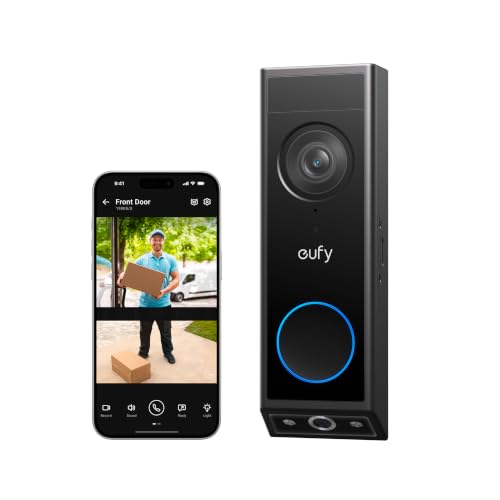
The E340 is the best Ring alternative for most people because it fixes Ring’s biggest limitation: it saves video without any subscription. It also installs the same way as a Ring battery doorbell.
Best for: Ring owners who want to stop paying for video history and keep a similar battery-or-wired setup.
What stands out in real use
Clips are saved to 8 GB of storage inside the doorbell, which eufy says holds about 90 days of video at 30 short clips a day. The E340 has two 2K cameras: one looks at your visitors and the second one points down at your doorstep, so you can see packages left right in front of the door. Person and package detection and face recognition work without a plan. If you want more storage or eufy cameras around the house, you can add a eufy HomeBase later, but you don’t need one. Our eufy vs Ring comparison explains how the two brands handle storage and privacy.
Key specs
- Two 2K cameras (front and package view)
- 8 GB built-in storage, optional eufy HomeBase
- Removable rechargeable battery, or existing doorbell wiring
- Person and package detection, face recognition
- 2.4 GHz Wi-Fi only
- Alexa and Google Assistant
Pros
- Saves video without a subscription
- Second camera for packages at your door
- Works on battery or doorbell wiring
- Smart detection is free
Cons
- Built-in storage can’t be expanded
- No support for Apple Home
- With Google, live view only works on Nest displays, not in the Google Home app
- 2.4 GHz Wi-Fi only
Installation and compatibility notes
Charge the battery pack before you mount it, and check the Wi-Fi signal at your door: the E340 only uses 2.4 GHz, which reaches a front door better than 5 GHz anyway. With Alexa, you can see the camera on an Echo Show. With Google, eufy’s integration streams to Nest Hub displays with “Hey Google, show”, but the camera doesn’t appear in the Google Home app.
Price: ~$150
Google Nest Doorbell (Wired, 3rd Gen) — Best for Google Home

If you’re leaving Ring because it doesn’t work with Google Home (our guide on whether Ring works with Google Home explains why), the Nest Doorbell is the best choice. It’s also the most generous doorbell from a big brand when you don’t pay for a plan.
Best for: Google Home households with doorbell wiring who want a polished app and free smart alerts.
What stands out in real use
Without a subscription, you still get person, animal, vehicle and package alerts, and the doorbell keeps 10-second previews of each event for 6 hours. Ring gives you neither without a plan. The 2K video has a square, head-to-toe view, so you see packages on the ground. If you want longer history, Google Home Premium Standard costs $10 a month and adds 30 days of events and familiar face alerts, and Advanced at $20 a month adds 24/7 recording. It also works with Alexa through the Google Nest skill, so you can see who’s at the door on an Echo Show. Our Ring vs Nest doorbell comparison covers the rest of the differences between the two brands.
Key specs
- 2K HDR video (2048 x 2048), 166° diagonal view
- Wired: 16-24 VAC, 10-40 VA transformer
- Chime connector included for mechanical and digital chimes
- IP65 weather rating
- Google Home and Alexa
Pros
- Free person, package, animal and vehicle alerts
- Works in the Google Home app and with Alexa
- Rings your existing indoor chime
- Good video quality with HDR
Cons
- Only 6 hours of event previews without a plan
- Wired only, no battery option
- No local storage
- No support for Apple Home
Installation and compatibility notes
You need existing doorbell wiring with a 16-24 VAC transformer. Install the included chime connector so your existing chime keeps working. Familiar face alerts need at least the Standard plan and aren’t available in Illinois.
Price: ~$199
Aqara G410 — Best for Apple Home

Ring doesn’t work with Apple Home at all, and the G410 is one of the few doorbells built for it. It records to HomeKit Secure Video, so your clips are stored in iCloud instead of a doorbell subscription.
Best for: iPhone households with a HomePod or Apple TV who want the doorbell in the Home app.
What stands out in real use
With HomeKit Secure Video, your HomePod or Apple TV analyzes the video at home, and clips are saved encrypted in iCloud for 10 days. A 50 GB iCloud+ plan covers one camera. Aqara says the doorbell records at up to 1200p in Apple Home, while its own Aqara app shows the full 2K picture. The included chime is also a Zigbee hub, a Thread border router and a Matter controller, and you can put a microSD card in it to save video locally. It also works with Alexa and Google Home, which is useful if your household uses more than one platform.
Key specs
- 2K camera, up to 1200p in HomeKit Secure Video
- mmWave radar and local face recognition
- 6 AA batteries (up to 5 months) or 12-24V AC/DC wiring
- Chime with Zigbee hub, Thread border router and Matter controller
- microSD up to 512 GB in the chime
- Apple Home, Alexa, Google Home, SmartThings
Pros
- Records to HomeKit Secure Video without a doorbell subscription
- Works with Apple Home, Alexa and Google Home
- Battery or wired installation
- The chime is also a smart home hub
Cons
- Reviewers report only an IPX3 splash rating
- HomeKit video is lower resolution than in the Aqara app
- Bulky compared to most doorbells
- HomeKit Secure Video needs a HomePod or Apple TV and iCloud+
Installation and compatibility notes
Because of the IPX3 rating reported in reviews, mount it under a porch roof or overhang rather than on a door exposed to heavy rain. It runs on six AA batteries, so you don’t have to charge anything, but wiring it to 12-24V means you don’t have to replace them.
Price: ~$145
Reolink Video Doorbell WiFi — Best for 24/7 Local Recording

The Reolink is the most private option in this guide. It records 24/7 to a microSD card or a Reolink NVR in your home, and you don’t need any cloud service to use it.
Best for: Privacy-minded owners with doorbell wiring who want continuous recording kept at home.
What stands out in real use
You can choose 24/7, motion-triggered or scheduled recording, and everything stays on the card or your NVR. It also works locally with Home Assistant, which is useful if you want to keep your doorbell off the cloud entirely. The 5MP camera has a 180° diagonal view, and the black version uses a 4:3 shape that shows more of your porch. It connects to 2.4 GHz or 5 GHz Wi-Fi, and Reolink includes its own plug-in chime.
Key specs
- 5MP video (2560 x 1920), 180° diagonal view
- 24/7, motion or scheduled recording
- microSD up to 256 GB, or a Reolink NVR
- Wired: 12-24 VAC or 24 VDC (power adapter included)
- Dual-band Wi-Fi
- Reolink Chime included, Alexa and Google Assistant
Pros
- Records 24/7 locally without a subscription
- Works with Home Assistant
- Dual-band Wi-Fi
- Plug-in chime included
Cons
- Wired only
- Doesn’t ring your existing mechanical chime
- Won’t run on an 8V transformer
- Package detection only on the white version
Installation and compatibility notes
Check your transformer before you buy: the doorbell needs 12-24 VAC, and some older homes have an 8V or 10V one. Reolink includes a power adapter if you don’t have suitable wiring. For true round-the-clock recording, a Reolink NVR is a better place to store video than a microSD card, which wears out faster with continuous writes.
Price: ~$150
Tapo D260 — Best 4K Option

The D260 is the alternative to Ring’s 4K Pro doorbells: it has 4K video and radar too, but its smart detection and face recognition are free and run on the doorbell itself.
Best for: Buyers who want the sharpest video and smart alerts without paying a monthly fee.
What stands out in real use
Radar and two motion sensors work together to cut down on alerts from branches, shadows and passing cars, and the D260 shows whether a visitor walked up to your door or just walked past. It recognizes people, pets, vehicles and packages for free, and you can build a library of familiar faces that stays on the doorbell instead of online. On battery it lasts up to 180 days, and if you wire it you can turn on 24/7 recording with pre-roll, so clips start a few seconds before the motion.
Key specs
- 4K video, 180° diagonal view
- Radar plus two motion sensors
- Rechargeable battery (up to 180 days) or 8-24 VAC wiring
- microSD up to 512 GB (not included) or a Tapo Hub
- Free face, person, pet, vehicle and package detection
- IP66, Alexa, Google Assistant and SmartThings
Pros
- Sharp 4K video
- Free AI detection and face recognition
- Battery or wired, with 24/7 recording when wired
- Costs less than Ring’s 4K Pro doorbells
Cons
- No support for Apple Home or Matter
- Chime alerts need a Tapo Hub or a smart speaker
- Very new, so long-term reviews are limited
- Face recognition isn’t available in Illinois and Texas
Installation and compatibility notes
To use 24/7 recording, you need existing doorbell wiring with an 8-24 VAC transformer of at least 10 VA. Buy a high-endurance microSD card for local recording. Tapo sends chime alerts through a Tapo Hub, an Echo or a Google speaker, so plan for one of those if you want to hear the doorbell inside.
Price: ~$220
Tapo D210 — Best Budget

The D210 is the cheapest way to leave Ring without giving up the basics: 2K video, free person detection, local recording and an indoor chime in the box.
Best for: Renters and anyone on a tight budget who doesn’t have doorbell wiring.
What stands out in real use
It runs on a 6,400 mAh battery that Tapo rates at up to 6 months, and you save clips to a microSD card, so you don’t need a subscription. The plug-in chime is included, which most Ring doorbells don’t include. When someone presses the button, the Tapo app can call your phone so you can answer it like a normal call. The 160° view is wide enough for most doorways, and a 15° wedge is included if your door is at an angle to the path.
Key specs
- 2K (3MP) video, 160° diagonal view
- 6,400 mAh battery, up to 6 months
- microSD up to 512 GB (not included)
- Free person detection
- Chime included, IP65
- 2.4 GHz Wi-Fi, Alexa and Google Assistant
Pros
- Very affordable
- Chime included in the box
- Local recording without a subscription
- Free person detection
Cons
- Battery only, no wiring option
- Person detection only, no package detection
- 2.4 GHz Wi-Fi only
- Works only with Tapo chimes
Installation and compatibility notes
The D210 can’t connect to doorbell wiring, so your existing chime won’t ring: use the included Tapo chime instead. It mounts with screws, and you’ll need to take it down to charge it every few months.
Price: ~$58
How to Choose a Ring Alternative
Decide where your video goes. This is the main difference between Ring and these Ring alternatives. The eufy E340 saves clips inside the doorbell, the Tapo doorbells and the Reolink use a microSD card, and the Aqara G410 uses HomeKit Secure Video in iCloud. The Nest Doorbell is the only one that still needs a plan for real video history. For more options, see our guide to the best doorbell cameras without a subscription.
Match it to your smart home. If you use Apple Home, the Aqara G410 is the only option here. If you use Google Home, choose the Nest Doorbell. If you use Alexa, all six work with an Echo Show, so you won’t lose the “who’s at the door” view you had with Ring.
Check your wiring and chime. Battery doorbells like the E340 and D210 install anywhere. Wired doorbells need the right transformer: the Nest works with 16-24 VAC, the Tapo D260 with 8-24 VAC and the Reolink with 12-24 VAC. The Nest comes with a connector that keeps your existing chime working. The Reolink and the Tapo D210 use their own plug-in chime, and the D260 rings through a Tapo Hub or a smart speaker.
Know what you give up. Ring’s Neighbors feed and its deep Alexa integration don’t come with any of these doorbells. And if your video is stored only on the doorbell itself (the E340 without a HomeBase, or a microSD card in the Tapo and Reolink doorbells), a thief who takes the doorbell takes the recordings too. A hub or NVR inside the house avoids that.
Turn off features you don’t want. Even on another brand, check the privacy settings after setup: turn off face recognition if you don’t need it, and set activity or privacy zones so the camera doesn’t record the street or your neighbors’ doors.
Conclusion
Of all the Ring alternatives in this guide, the eufy Video Doorbell E340 is the best for most homes: it saves video without a subscription, watches your packages with a second camera and installs like a Ring battery doorbell. Choose the Google Nest Doorbell (Wired, 3rd Gen) for Google Home and the Aqara G410 for Apple Home. If privacy matters most, the Reolink Video Doorbell WiFi records 24/7 to storage in your home, the Tapo D260 gives you 4K and free face recognition, and the Tapo D210 is the cheapest Ring doorbell alternative with a chime in the box. If you’re still open to Ring, our guide to the best doorbell cameras compares the top picks from every brand.
What is the best alternative to a Ring doorbell?
The eufy Video Doorbell E340 is the best Ring doorbell alternative for most homes. It saves video to 8 GB of built-in storage without a subscription, has a second camera for packages, and runs on battery or existing doorbell wiring.
Is there a video doorbell that doesn’t need a subscription?
Yes. The eufy Video Doorbell E340 saves video inside the doorbell, and the Tapo D210, Tapo D260 and Reolink Video Doorbell WiFi record to a microSD card. The Aqara G410 records to HomeKit Secure Video, which uses your iCloud+ plan instead of a doorbell subscription.
Which Ring alternative works with Apple HomeKit?
The Aqara G410 works with Apple Home and records to HomeKit Secure Video, which needs a HomePod or Apple TV as a home hub and an iCloud+ plan. Ring doorbells don’t work with Apple Home.
Does Ring work without a subscription?
Partly. Without a plan, a Ring doorbell gives you live view, motion and doorbell alerts and Two-Way Talk, but it doesn’t save any recordings and you don’t get person detection. Ring Solo costs $4.99 a month for one device.
Can I turn off Ring Search Party instead of replacing my doorbell?
Yes. In the Ring app, open the menu, go to Control Center and select Search Party, where you can turn off Search for Lost Pets for every camera or for individual ones. Ring says no video is shared unless you choose to share it.

Written by Evan Mercer
Founder & Lead Researcher, Smart Home Matrix
Evan digs through spec sheets, firmware changelogs, and thousands of owner reviews so you don’t have to. Every guide starts with a compatibility check and ends with picks he would install in his own home. Read more about Evan and this site, or see exactly how we choose products.