
A Ring doorbell sends alerts to your phone, but if you want to hear it ring inside the house, you need a chime. That’s why the Ring Chime vs Chime Pro question comes up so often: both plug into an outlet and play a sound when someone presses the doorbell, but the Chime Pro also boosted Wi-Fi for Ring devices.
There’s one important update for 2026: Ring no longer sells the Chime Pro new. Ring’s lineup is now the Chime (3rd Gen) and the new Chime Plus, and neither one extends Wi-Fi. This guide explains what each chime does, what happened to the Chime Pro, and which one fits your home.
Ring Chime vs Chime Pro: The Short Answer
Quick answer: if you only need to hear your doorbell and cameras indoors, get the Ring Chime. The Chime Pro used to be the choice when your doorbell had weak Wi-Fi, because it acted as a Wi-Fi extender for Ring devices, but Ring has replaced it with the Chime Plus, which adds a night light and Ring sensor alerts but doesn’t extend Wi-Fi. If your doorbell’s signal is weak, fix the Wi-Fi itself with a mesh system.
These are the two Ring chimes you can buy new today:
- Ring Chime (3rd Gen) — Best for most homes, at about $35.
- Ring Chime Plus — Best if you want a night light, schedules or alerts from Ring sensors, at about $60.
What the Ring Chime Does
A smart doorbell chime is a small speaker that plugs into a wall outlet and connects to your Wi-Fi. When someone presses a linked Ring doorbell, or a linked Ring camera detects motion, it plays a tone, so you hear it even if your phone is in another room.
You need one in a few common situations:
- Your doorbell doesn’t ring your old chime. The Ring Wired Doorbell 2K, for example, uses a bypass cable during installation, so the existing chime stops working. Ring points owners to a Ring Chime or an Echo instead. Our video doorbell installation guide explains how each type of doorbell works with an existing chime.
- You have a battery doorbell and no wired chime. Without a chime, a battery doorbell only alerts your phone.
- You want to hear camera motion indoors. A chime can play a different tone for motion on a camera than for a doorbell press.
The current model is the Chime (3rd Gen), which went on sale in late 2025. It has an upgraded speaker, classic and seasonal tones, adjustable volume, and a snooze setting for when you don’t want to be disturbed. It connects to 2.4GHz Wi-Fi only and uses Bluetooth during setup, which makes the first connection easier. Ring says it works with all existing Ring video doorbells and security cameras.
What Happened to the Ring Chime Pro
The Ring Chime Pro did everything the regular Chime did, plus two extra things. It had a built-in night light, and it acted as a Wi-Fi extender for Ring devices. You plugged it in halfway between your router and your doorbell, connected the doorbell to the Chime Pro’s own network, and the doorbell got a stronger signal. The second-generation model connected to your router on either 2.4GHz or 5GHz.
The extender only worked for Ring devices. Your phone, laptop and other smart home gear couldn’t use it, which is why Ring positioned it as a fix for a doorbell or camera at the edge of your Wi-Fi.
The Ring Chime Pro is now gone from Ring’s lineup. Amazon lists it as currently unavailable, and Ring’s own Chime Pro page now sends you to the Chime Plus. Ring’s support site only lists the Chime (3rd Gen) and the Chime Plus as current chimes.
If you already own a Chime Pro, keep using it. Ring still has a support page for it, and the Ring chime setup guide still covers connecting devices to the Chime Pro network. You’ll only find one now as used stock, so if you buy one secondhand, check that it’s the second generation and that the seller can remove it from their Ring account first.
The New Ring Chime Plus
The Chime Plus is Ring’s replacement at the top of the range. It went on sale on Amazon in April 2026 and costs about $60. Here’s what it adds over the regular Ring Chime:
- Alerts from Ring sensors. It’s Ring’s first chime that can sound for sensors, not just doorbells and cameras. It works with select Ring sensors built on Amazon Sidewalk: the newest Window & Door Sensor, Outside Door Sensor and Motion Detector.
- A night light. You can set its brightness and schedule when it turns on and off.
- Schedules for the chime. You decide when it plays alerts, so it can stay silent overnight.
Ring says the Chime Plus has an upgraded speaker for louder, clearer alerts. Like the Chime (3rd Gen), it connects to 2.4GHz Wi-Fi only and uses Bluetooth for setup.
What it doesn’t do is extend Wi-Fi. Ring doesn’t list Wi-Fi extension as a feature on the Chime Plus, and its setup guide only describes the extender network for the Chime Pro. So even though Ring’s Chime Pro page now leads to it, the Chime Plus isn’t a direct replacement for anyone who bought the Pro for range.
Ring Chime vs Chime Pro vs Chime Plus Side by Side
Here’s how the three chimes compare:
| Feature | Chime (3rd Gen) | Chime Pro (2nd Gen) | Chime Plus |
|---|---|---|---|
| Sold new | Yes | No | Yes |
| Approx. price | ~$35 | Used only | ~$60 |
| Doorbell and camera alerts | Yes | Yes | Yes |
| Ring sensor alerts | No | No | Yes, select Sidewalk sensors |
| Wi-Fi extender for Ring devices | No | Yes | No |
| Wi-Fi band | 2.4GHz | 2.4GHz or 5GHz | 2.4GHz |
| Bluetooth setup | Yes | No | Yes |
| Night light | No | Yes | Yes, with schedules |
| Tone per device and snooze | Yes | Yes | Yes |
Wi-Fi range
This was the main reason to choose the Chime Pro over the regular Chime, and it’s the biggest gap in Ring’s current lineup. If your doorbell keeps dropping offline or its video stutters, start by checking its signal. In the Ring app, go to the device’s Device Health screen and look at the signal strength. Ring rates anything from 0 to -60 as great and -60 to -70 as okay. Below -70 counts as poor or very poor, and that’s where delays and dropouts start.
With a poor signal, a mesh Wi-Fi system is now the better fix. A mesh node placed between the router and the front door helps the doorbell and everything else in that part of the house. Our guide to why a smart camera keeps going offline covers the other common causes, and if the doorbell still won’t connect, see how to reset a Ring doorbell.

Sensors and night light
If you use Ring’s newer sensors built on Amazon Sidewalk, the Chime Plus is the only chime that can sound for them. Check the compatible list before you buy, though: Ring names three of its newest sensors, so older sensors may not be supported.
The night light is a smaller point, but it’s useful in a hallway. The Chime Pro had one too, and the Chime Plus adds a schedule, so it doesn’t stay on all day.
Which Should You Choose?
In most homes, the regular chime is enough. These are the situations where the choice changes:
- You just want to hear the doorbell indoors: get the Ring Chime (3rd Gen).
- You want a night light or quiet hours: get the Ring Chime Plus.
- You have Ring sensors on Amazon Sidewalk: get the Chime Plus, the only Ring chime that sounds for them.
- Your doorbell has weak Wi-Fi: neither new chime will help. Add a mesh Wi-Fi node near the door, then add whichever chime you like.
- You already own a Chime Pro: keep it. It still works as both a chime and an extender for Ring devices.
- You have Echo speakers: you may not need a chime at all. Alexa can announce doorbell presses and motion on Echo devices, and an Echo Show also shows the doorbell’s live view after a press. Our guide to the best Alexa devices covers which Echo to get.
- Your house is large: you can link more than one chime to the same doorbell, for example one downstairs and one upstairs.
If you’re still choosing the doorbell itself, our best Ring doorbells guide compares every current model, including which ones ring an existing chime. To fit one, see our guide on how to install a Ring doorbell.
Which Ring Chime to Buy
Ring Chime (3rd Gen) — Best for Most Homes
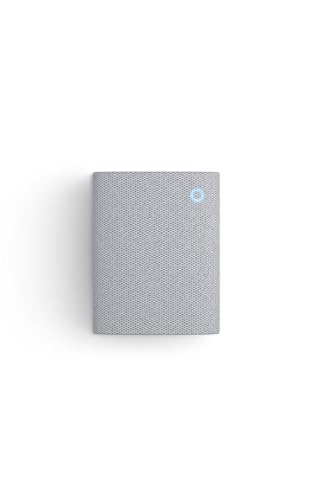
Ring’s current basic chime, with an upgraded speaker, classic and seasonal tones, snooze, and Bluetooth setup. It does the one job most people need a chime for, at the lowest price.
Best for: anyone who wants to hear a Ring doorbell or camera alert anywhere in the house.
Price: ~$35
Ring Chime Plus — Best for Night Light and Sensor Alerts
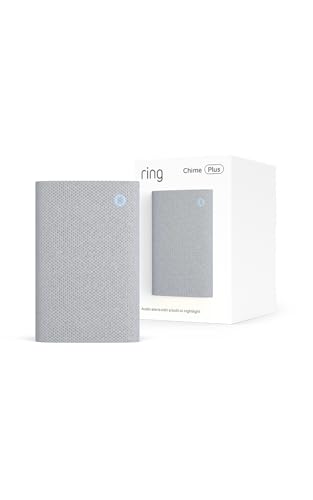
Ring’s most advanced chime, with a scheduled night light, quiet hours, a louder speaker, and alerts from select Ring sensors on Amazon Sidewalk. It doesn’t extend Wi-Fi like the old Chime Pro.
Best for: hallways and bedrooms, and homes with the newest Ring sensors.
Price: ~$60
The Bottom Line
The Ring Chime vs Chime Pro choice used to come down to Wi-Fi: the Pro was the chime that also boosted your doorbell’s signal. With the Chime Pro no longer sold new, the real choice now is the Chime (3rd Gen) for about $35 or the Chime Plus for about $60, and the Plus is worth the extra only if you want the night light, schedules or sensor alerts. If Wi-Fi range was the reason you wanted a Chime Pro, put the money toward a mesh node near the front door instead.
What is the difference between the Ring Chime and Chime Pro?
Both plug into an outlet and play a tone when a linked Ring doorbell is pressed or a camera detects motion. The Chime Pro also acted as a Wi-Fi extender for Ring devices, connected on 2.4GHz or 5GHz, and had a night light.
Is the Ring Chime Pro discontinued?
It’s no longer sold new. Amazon lists it as currently unavailable, and Ring’s Chime Pro page now leads to the Chime Plus. Ring still supports existing Chime Pros, so you can keep using one you already own.
Does the Ring Chime Plus extend Wi-Fi?
No. The Chime Plus adds a scheduled night light, quiet hours and alerts from select Ring sensors on Amazon Sidewalk, but Ring doesn’t list Wi-Fi extension as a feature. For a doorbell with weak Wi-Fi, a mesh Wi-Fi node near the door is the better fix.
Do I need a Ring Chime for my Ring doorbell?
Only if you want to hear it inside and it doesn’t ring an existing chime. The Ring Wired Doorbell 2K, for example, bypasses the old chime during installation, and battery doorbells without a wired chime only alert your phone. Echo devices can announce doorbell presses instead.
Can I use more than one Ring Chime?
Yes. You can link several chimes to the same doorbell or camera from its Linked Chimes setting in the Ring app, as long as they’re set up at the same location.

Written by Evan Mercer
Founder & Lead Researcher, Smart Home Matrix
Evan digs through spec sheets, firmware changelogs, and thousands of owner reviews so you don’t have to. Every guide starts with a compatibility check and ends with picks he would install in his own home. Read more about Evan and this site, or see exactly how we choose products.