
No, and Chamberlain hasn’t announced any plan to change that. myQ HomeKit support ended in 2022, when Chamberlain stopped making the bridge that connected its garage door openers to Apple Home, and the company now lists Apple HomeKit and Siri among the platforms myQ doesn’t support.
You don’t need to replace the opener, though. A small add-on controller can put the same Chamberlain, LiftMaster or Craftsman opener into Apple Home for $50 to $70, and the myQ app keeps working next to it. This guide explains what happened, what still works on an iPhone, and which controller fits your opener.
Quick answer: No. myQ doesn’t work with HomeKit, Apple Home or Siri, and it doesn’t support Matter either. Chamberlain discontinued its HomeKit bridge in 2022 and blocked the unofficial workarounds in 2023. To use a myQ garage door opener in Apple Home, add a HomeKit controller to it: the Meross MSG150HK or a ratgdo board for openers with a yellow, purple, red or orange learn button, or a controller that presses your remote (such as the ThirdReality Smart Garage Door Opener) for newer openers with a white learn button.
Why myQ Doesn’t Work With Apple Home
myQ is the smart system built into most Chamberlain, LiftMaster and Craftsman garage door openers, and it’s also sold as an add-on hub for older ones. It runs through Chamberlain’s cloud and the myQ app, and Chamberlain decides which other platforms can connect to it.
Apple Home used to be one of them. Chamberlain sold the myQ Home Bridge, a separate box (about $90) that added myQ openers to HomeKit. Here’s how that ended:
- August 2022: Chamberlain discontinued the Home Bridge and said fewer than 1% of myQ users had one.
- November 2023: Chamberlain blocked third-party access to myQ. That stopped Homebridge and Home Assistant, the two unofficial routes into Apple Home, from controlling myQ openers.
- April 2024: The Homebridge plugin for myQ was retired.
- Late 2025: New Chamberlain and LiftMaster openers moved to Security+ 3.0, which most add-on controllers can’t work with.
Today, Chamberlain’s list of myQ integrations names Apple HomeKit and Siri voice commands and shortcuts as unsupported, together with Matter, Thread, Google Home and SmartThings. The same page says Chamberlain blocks unapproved third-party integrations. So if you searched “does myQ work with HomeKit” hoping for a setting in the myQ app, you won’t find one.
If you still own a Home Bridge that works, you can keep using it. Chamberlain doesn’t make it anymore and lists HomeKit as unsupported, so it isn’t worth buying a used one.
What Still Works on an iPhone
You can still use myQ on Apple devices, only not through Apple Home. The myQ app runs on the iPhone and has an Apple Watch app, so you can open and close the door and get alerts from both.
Here’s what you don’t get:
- A garage door tile in the Home app
- Siri voice control, including Siri Shortcuts
- Apple Home scenes and automations, such as closing the door when the last person leaves
- Apple’s garage door suggestions on the CarPlay Dashboard, which only work with HomeKit garage door openers

For control from the car, myQ connects to the car makers’ own systems instead (Tesla, Honda and Kia are among the supported brands). A myQ Apple Home setup has to fill the rest of that list, and it takes a second device.
How to Add a myQ Opener to Apple Home
You can’t link the myQ app or your myQ account to Apple Home, so every working myQ HomeKit setup uses the same idea: a small controller that connects to the opener itself and works with Apple Home. To the opener, a command from the controller looks the same as a press of its wall button or remote.
The controller doesn’t replace myQ. The opener stays in the myQ app, so features that depend on myQ (such as Amazon Key in-garage delivery) still work, and Apple Home controls the same door through the controller.

Check your learn button first
The learn button is on the opener’s motor unit, usually under the light cover. Its color tells you which version of Chamberlain’s Security+ system the opener uses, and that decides which controllers work.
| Learn button | Security+ version | What works with Apple Home |
|---|---|---|
| Yellow | Security+ 2.0 | Meross MSG150HK, Meross MSG100HK, ratgdo32 |
| Purple, red or orange | Security+ 1.0 | ratgdo32, Meross MSG100HK, Meross MSG150HK (purple and red) |
| White | Security+ 3.0 | A controller that presses your remote, such as the ThirdReality |
White is the difficult one. Security+ 3.0 openers (Chamberlain and LiftMaster models from late 2025 onward) communicate with their wall control and accessories over encrypted Bluetooth, and the wall-button wires only carry power. A wired controller has nothing to connect to: Meross, ratgdo, Tailwind and Konnected all say they don’t support these openers. What still works is a controller that presses the button on one of your own remotes.
What you get in Apple Home
A controller with native HomeKit support (the Meross models and ratgdo) appears in Apple Home as a garage door. You get a tile with open and closed states, Siri commands like “close the garage door”, scenes and automations, and Apple’s CarPlay suggestions when you get close to home.
A Matter controller is different. The Matter garage controllers on sale today are certified as switches, so Apple Home shows a switch and not a garage door. It still opens and closes the door, but you don’t get the garage door tile or its states.
At home, your iPhone controls any of them directly. To open the door when you’re away, or to use it in automations, Apple Home needs a home hub (a HomePod or Apple TV). Our guide on whether HomeKit needs a hub covers the options.
The Best myQ Alternatives for Apple Home
If you want a myQ alternative that works with Apple Home, these four options cover every type of myQ opener.
Meross MSG150HK — Best myQ Alternative for Most Homes
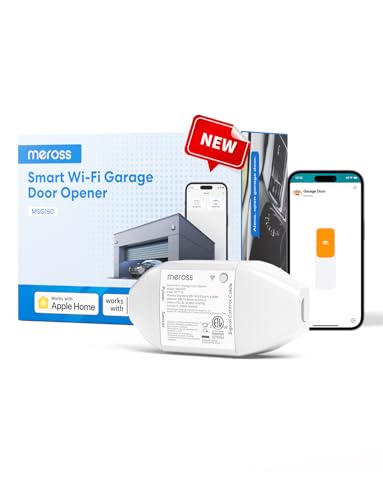
The MSG150HK is made for Chamberlain, LiftMaster and Craftsman openers, has native HomeKit support and is the easiest of the four to install.
Best for: Openers with a yellow, purple or red learn button, when you want the quickest route into Apple Home.
What stands out in real use
Most garage controllers need a separate sensor on the door to know if it’s open. Meross says the MSG150HK doesn’t: it works without a separate door sensor or an adapter, which removes the two slowest parts of the install. In Apple Home it’s a garage door with Siri control. The Meross app adds automatic closing after a set time or at a scheduled hour, and alerts when the door has been left open, all without monthly fees.
Key specs
- Native Apple HomeKit, plus Alexa, Google Assistant and SmartThings
- Chamberlain, LiftMaster and Craftsman openers only
- Security+ 1.0 and 2.0 (not Security+ 3.0)
- Controls one door
- 2.4 GHz Wi-Fi
Pros
- You don’t have to wire a door sensor
- Appears as a garage door in Apple Home
- Auto-close timer and scheduled closing
- Doesn’t cost monthly fees
Cons
- Doesn’t work with white learn button openers
- Only works with these three opener brands
- Costs about $20 more than the MSG100HK
Installation and compatibility notes
The controller mounts next to the opener, connects to its wall-control terminals and plugs into a power outlet. Meross points owners of red learn button openers with three terminals to the MSG100HK instead.
Price: ~$70
ratgdo32 — Best for Local Control
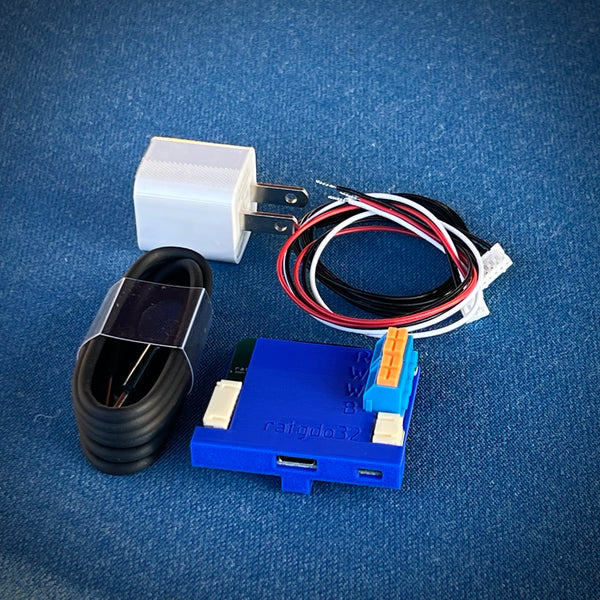
The ratgdo32 is a small board that connects to the opener’s own data line, so Apple Home gets more than open and close, and everything runs on your home network.
Best for: People who are comfortable installing firmware and want control that doesn’t depend on any company’s cloud.
What stands out in real use
A ratgdo HomeKit setup takes more work at the start, and it gives you the most in return. The board uses the same wired connection as the wall control, so Apple Home sees the door’s real state together with the opener’s light, its motion sensor and its obstruction sensors. The HomeKit firmware is free and open source, and ratgdo says it works locally on your network without a cloud service. It’s also actively maintained: the latest release came out in September 2026.
Key specs
- Native HomeKit firmware (ESPHome firmware is available for Home Assistant)
- Security+ 1.0, Security+ 2.0 and dry contact openers (not Security+ 3.0)
- One board per door
- USB-C power, 2.4 GHz Wi-Fi
- Board, case, USB cable, power supply and wire harness included
Pros
- Works locally, without an account or cloud service
- Adds the opener’s light, motion and obstruction sensors to Apple Home
- The myQ app keeps working next to it
- Also works with other opener brands that support dry contact control
Cons
- You install the firmware yourself, with a computer and a USB cable
- Doesn’t work with white learn button openers
- Alexa and Google Home only work through Home Assistant
Installation and compatibility notes
You install the HomeKit firmware from a browser such as Chrome, join the board to your Wi-Fi and choose your opener’s Security+ version. Then you connect its wire harness to the opener’s wall-control and safety-sensor terminals and scan the pairing code in the Home app. The ratgdo32 disco (about $94) adds a laser sensor that detects when your car arrives or leaves.
Price: ~$62
Meross MSG100HK — Best Budget Option

The MSG100HK is Meross’s universal controller. It costs about $50 and works with myQ openers and with almost any other brand.
Best for: The lowest price, or a controller that still works if you change opener brands later.
What stands out in real use
In Apple Home it behaves the same way as the MSG150HK: a garage door tile, Siri control, scenes and automations. The difference is the installation. A wired sensor on the door tells the controller if the door is open or closed, so there’s one more cable to run, and some yellow learn button openers need an adapter that Meross sends for free if you ask.
Key specs
- Native Apple HomeKit, plus Alexa, Google Assistant and SmartThings
- Works with over 200 brands and 1,600 opener models
- Security+ 1.0 and 2.0 (not Security+ 3.0)
- Wired door sensor included
- 2.4 GHz Wi-Fi
Pros
- The lowest price here for native HomeKit
- Works with almost any opener brand
- Appears as a garage door in Apple Home
- Doesn’t cost monthly fees
Cons
- You need to run a sensor wire to the door
- Some yellow learn button openers need an adapter
- Doesn’t work with white learn button openers
- Controls one door
Installation and compatibility notes
Two wires connect to the opener’s wall-button terminals, and the sensor mounts next to the door track. If the controller drops offline later, our smart garage door opener troubleshooting guide has the fixes.
Price: ~$50
ThirdReality Smart Garage Door Opener — Best for White Learn Button Openers

The ThirdReality presses the button on one of your own remotes, so it doesn’t depend on which Security+ version the opener uses.
Best for: Newer Chamberlain and LiftMaster openers with a white learn button, and anyone who can’t touch the opener’s wiring.
What stands out in real use
You place a spare remote (one that’s already paired with your opener) in the controller. When Apple Home sends a command, the controller presses the remote’s button, and the opener receives a normal remote signal. A tilt sensor on the door reports if it’s open or closed. However, it’s a Matter device, so Apple Home shows it as a switch: you turn it on and off, and you don’t get the garage door tile. ThirdReality doesn’t mention Security+ 3.0 by name, so check that your remote fits before you mount anything.
Key specs
- Matter over Wi-Fi (Apple Home, Alexa, Google Home, SmartThings)
- Operates your existing remote, without opener wiring
- Tilt sensor for door status
- USB-C power
- Sectional doors only
Pros
- Works where wired controllers can’t
- You don’t wire anything to the opener
- Works with every major platform through Matter
Cons
- Appears as a switch in Apple Home, not a garage door
- Needs a spare remote that stays in the controller
- Doesn’t work with rolling or sliding garage doors
Installation and compatibility notes
Fit the remote, power the controller over USB-C, attach the tilt sensor to the door and scan the Matter code in the Home app. Give the switch a clear name like “Garage Door” and keep it out of lighting scenes, so that turning off the lights can’t open the door.
Price: ~$50
For controllers that handle two or three doors, or a driveway gate, see our guide to the best HomeKit garage door openers. If you’d prefer to replace the whole opener, start with our smart garage door opener guide.
How to Set It Up
The steps are similar for all four controllers:
- Find the learn button. Note its color and choose a controller from the table above.
- Unplug the opener. Do this before you connect any wires to its terminals.
- Connect the controller. A wired controller goes on the wall-control terminals. The ThirdReality only needs a paired remote.
- Add it in the Home app. Tap +, then Add Accessory, and scan the HomeKit or Matter code.
- Name it and test it. Open and close the door a few times while you’re standing next to it.
- Leave myQ as it is. You don’t have to remove anything from the myQ app.
Limitations and What to Watch For
- White learn button openers have fewer options. Wired controllers don’t work with Security+ 3.0. Meross documents a workaround that solders its controller to the original remote, but that’s a job for confident DIYers.
- Garage Wi-Fi. All four controllers use 2.4 GHz Wi-Fi, and the garage is often where the signal is weakest. Check it at the opener before you buy.
- One door per controller. Each controller here handles a single door, so a two-door garage needs two.
- A home hub for away control. Without a HomePod or Apple TV, Apple Home only controls the door while you’re at home.
- Matter doesn’t solve this. myQ doesn’t support Matter, and Matter garage controllers still appear as switches in Apple Home. Our guide to Matter-compatible devices explains where the standard stands.
The Bottom Line
myQ HomeKit support ended in 2022, and Chamberlain now lists Apple Home, Siri and Matter as unsupported. The opener itself is still fine: add a controller and Apple Home can open it, close it and automate it while the myQ app keeps working. For a yellow, purple or red learn button, the Meross MSG150HK is the simplest choice and the ratgdo32 is the most complete. For a white learn button, the ThirdReality is the practical option. For the rest of an Apple setup, see our guide to the best HomeKit devices.
Does myQ work with HomeKit?
No. Chamberlain lists Apple HomeKit and Siri as unsupported, and it discontinued its myQ Home Bridge in 2022. You can still add the same opener to Apple Home with a HomeKit controller such as the Meross MSG150HK or a ratgdo board.
Can I control myQ with Siri?
Not through myQ. Chamberlain’s support page lists Siri voice commands and shortcuts as unsupported. Siri works once the opener is in Apple Home through a HomeKit controller.
What is the best myQ alternative for Apple Home?
For most Chamberlain, LiftMaster and Craftsman openers it’s the Meross MSG150HK, which has native HomeKit support and works without a separate door sensor. The ratgdo32 is the better choice if you want local control and don’t mind installing firmware.
Does ratgdo work with HomeKit?
Yes. ratgdo32 boards run free HomeKit firmware that you install from a browser, and they work on your local network without a cloud account. They support Security+ 1.0 and 2.0 openers, not Security+ 3.0.
Will a HomeKit controller work with a white learn button opener?
Wired controllers won’t. A white learn button means Security+ 3.0, which Meross, ratgdo, Tailwind and Konnected all say they don’t support. A controller that presses your existing remote, such as the ThirdReality Smart Garage Door Opener, is the practical option, and Apple Home shows it as a switch.
Do I have to stop using myQ if I add a HomeKit controller?
You can keep it. The controller works next to myQ, so the myQ app keeps working while Apple Home controls the same door.

Written by Evan Mercer
Founder & Lead Researcher, Smart Home Matrix
Evan digs through spec sheets, firmware changelogs, and thousands of owner reviews so you don’t have to. Every guide starts with a compatibility check and ends with picks he would install in his own home. Read more about Evan and this site, or see exactly how we choose products.