
A motion sensor light switch replaces a regular wall switch and turns the lights on when you walk in, then off again a few minutes after you leave. It’s the simplest way to stop lights staying on in an empty laundry room, garage or closet. For most homes, the best motion sensor light switch is the Lutron Maestro MS-OPS2: it costs about $25, works with any bulb type and doesn’t need a neutral wire.
You don’t need a smart switch for this. The two Lutron and Leviton options below work on their own, without an app or Wi-Fi. A smart motion sensor switch costs a bit more, but you can change its settings from your phone and use it in Apple Home, Alexa or Google Home.
Quick Recommendations
- Lutron Maestro MS-OPS2 — Best overall. A reliable occupancy sensor switch that works without a neutral wire, for about $25.
- Leviton Decora Smart D2MSD — Best smart motion switch. A Wi-Fi dimmer that works with Apple Home, Alexa and Google Home.
- Kasa Smart Motion Switch ES20M — Best budget smart option. A Wi-Fi motion dimmer for Alexa and Google Home.
- Leviton Decora DOS05 — Best for 3-way and fans. Works with your existing 3-way switch and can run a small fan.
- Enbrighten Z-Wave Motion Switch 26931 — Best for Z-Wave hubs. A motion switch for SmartThings, Hubitat and Home Assistant.
Top Choices at a Glance
| Product | Ecosystem | Key Feature | Approx. Price | Best For |
|---|---|---|---|---|
| Lutron Maestro MS-OPS2 | None (works on its own) | No neutral needed, detects small movements | ~$25 | Best overall |
| Leviton Decora Smart D2MSD | Apple Home, Alexa, Google Home, Matter | Smart dimmer with 3-way companions | ~$47 | Smart homes |
| Kasa Smart Motion Switch ES20M | Alexa, Google Home, SmartThings | Low-cost Wi-Fi motion dimmer | ~$30 | Budget smart |
| Leviton Decora DOS05 | None (works on its own) | 3-way and fan support | ~$23 | 3-way circuits |
| Enbrighten Z-Wave Motion Switch 26931 | Z-Wave hubs | Z-Wave Plus, large load rating | ~$56 | Z-Wave homes |
Compatibility Matrix
| Product | HomeKit | Alexa | Google Home | Matter | Thread | Hub Required | Wiring/Power |
|---|---|---|---|---|---|---|---|
| Lutron Maestro MS-OPS2 | No | No | No | No | No | No (not connected) | No neutral, ground required, single pole |
| Leviton Decora Smart D2MSD | Yes | Yes | Yes | Yes (firmware update) | No | No (Wi-Fi) | Neutral required, 3-way with companion |
| Kasa Smart Motion Switch ES20M | No | Yes | Yes | No | No | No (Wi-Fi) | Neutral required, single pole only |
| Leviton Decora DOS05 | No | No | No | No | No | No (not connected) | Neutral optional (ground otherwise), single pole or 3-way |
| Enbrighten Z-Wave Motion Switch 26931 | No | Via Z-Wave hub | Not stated | No | No | Z-Wave hub | Neutral required, 3-way with Enbrighten add-on |
The Leviton D2MSD is the only option here that works in Apple Home. Both smart Wi-Fi switches need a neutral wire, while the two plain switches from Lutron and Leviton can use the ground wire instead.
Occupancy vs Vacancy Mode
Every switch in this guide is an occupancy sensor switch that also has a vacancy mode, and the difference matters more than most product pages suggest.
- Occupancy mode (auto-on, auto-off): the light turns on when you walk in and off after the room has been empty for the timeout you set. It’s the right choice for laundry rooms, garages, pantries and closets, where your hands are often full.
- Vacancy mode (manual-on, auto-off): you press the switch to turn the light on, and it still turns off by itself. It’s better for bedrooms, kids’ rooms and rooms with pets, where you don’t want the light coming on every time someone moves. The U.S. Department of Energy notes that manual-on sensors usually save more energy than automatic ones.
Most of these switches also have an ambient light sensor, so they don’t turn the light on in a room that already has daylight. You can also choose how long the light stays on after the last movement, for example from 1 to 30 minutes on the Lutron.
The Best Motion Sensor Light Switches in 2026
Lutron Maestro MS-OPS2 — Best Overall

The Lutron Maestro MS-OPS2 is the motion switch most people should buy: it’s cheap, it works with any bulb, and it doesn’t need a neutral wire, which many older switch boxes don’t have.
Best for: bathrooms, laundry rooms, closets and garages where you just want the light to turn on and off by itself.
What stands out in real use
The most common complaint about any motion sensor switch is the light turning off while you’re still in the room. Lutron says its XCT sensing detects fine movements like typing or turning a page, which helps in a home office or a bathroom where you stand still for a while. It’s a passive infrared (PIR) sensor with a 180° view, and Lutron rates it for reliable switching up to 30 feet. You set the timeout (1, 5, 15 or 30 minutes), the sensitivity and the mode on the switch itself. It doesn’t connect to anything, so you can’t change it from your phone or use it in an automation. If you want a Lutron motion sensor switch for a small room, this is the one to get.
Key specs
- Passive infrared sensor, 180° field of view
- About 900 sq ft of coverage for walking movement
- Up to 150 W LED or CFL, 250 W incandescent (2 A)
- Timeout of 1, 5, 15 or 30 minutes
- Occupancy or vacancy mode, ambient light detection
Pros
- No neutral wire needed
- Works with LED, CFL and incandescent bulbs
- Detects small movements better than most cheap sensors
- Low price
Cons
- Single pole only, not for 3-way circuits
- 150 W LED limit, so it isn’t meant for very large rooms
- Not a smart switch, so no app or voice control
Installation and compatibility notes
The MS-OPS2 replaces a single-pole switch. It needs a ground wire in the box, but not a neutral. For a light with two switches, see the Leviton DOS05 below.
Price: ~$25
Leviton Decora Smart D2MSD — Best Smart Motion Switch

The Leviton D2MSD is a Wi-Fi dimmer with a motion sensor that works with Apple Home, Alexa, Google Home and SmartThings, without a hub.
Best for: smart homes, and especially Apple Home users who want a motion switch they can also control from the Home app.
What stands out in real use
It works like a regular motion switch on its own, and the My Leviton app adds the rest: you can change the timeout, the sensitivity and the light level, choose occupancy or vacancy mode, and set a schedule for when motion detection is active. Leviton says Matter support comes with a firmware update in the My Leviton app, and PCWorld found the HomeKit setup code on a sticker under the faceplate. For a 3-way setup, you add a Leviton companion: the wired DD00R or DD0SR, or the wire-free DAWDC or DAWSC, which needs no extra wiring. PCWorld gave it an Editors’ Choice, but found the medium and low sensitivity settings too insensitive, so start on high. It’s also a large switch, which can make it hard to fit in a crowded box.
Key specs
- 2.4 GHz Wi-Fi, no hub needed
- Passive infrared sensor, 180°, up to 900 sq ft
- Up to 300 W LED or CFL, 450 W incandescent
- Occupancy or vacancy mode, ambient light sensor
- Works with Apple Home, Alexa, Google Home, SmartThings and Matter (after the update)
Pros
- Works in Apple Home, Alexa and Google Home
- Dimmer with a 300 W LED rating
- 3-way with a wired or wire-free companion
- Schedules and detailed settings in the app
Cons
- Needs a neutral wire
- Low sensitivity settings are very weak
- Large body for a crowded switch box
- Costs more than the Kasa
Installation and compatibility notes
You need a neutral wire and a 2.4 GHz Wi-Fi network. Check the firmware in the app after setup, since PCWorld said the app doesn’t prompt you to update. If you’re new to wiring a smart switch, our guide on how to install a smart switch walks through the neutral, line and load wires. For Apple Home users who don’t need motion sensing, our best HomeKit light switches guide has more options.
Price: ~$47
Kasa Smart Motion Switch ES20M — Best Budget Smart Option
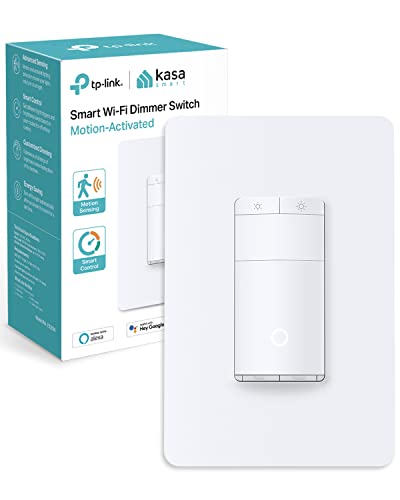
The Kasa ES20M is the cheapest way to get a smart motion sensor switch, and it works with Alexa, Google Home and SmartThings without a hub.
Best for: Alexa and Google Home users who want app control and a motion sensor for less than $30.
What stands out in real use
The Kasa app lets you set the motion sensitivity, the timeout and the ambient light level, so the light only comes on when the room is actually dark. It’s also a dimmer, and you can choose a different brightness for the motion trigger. However, PCWorld found the motion range weak: even on the most sensitive setting, the light didn’t turn on until the reviewer was several steps into the room. Kasa rates the sensor for up to 25 feet. It doesn’t work with Apple Home or Matter, and it only works as a single-pole switch, so it isn’t an option for a light with two switches.
Key specs
- 2.4 GHz Wi-Fi, no hub needed
- Motion sensor up to 25 ft, ambient light sensor
- Dimmer, up to 150 W dimmable LED, 300 W incandescent
- Works with Alexa, Google Home and SmartThings
- Single pole only
Pros
- Lowest price for a smart motion switch
- Detailed motion and light settings in the app
- Dimmer included
- No hub needed
Cons
- Needs a neutral wire
- Shorter motion range than the others
- Doesn’t work with Apple Home or Matter
- Not for 3-way circuits
Installation and compatibility notes
It replaces a single-pole switch and needs a neutral wire. If your box has no neutral, our guide to the best smart switches without a neutral wire covers switches that don’t need one, and the two plain switches in this guide work with the ground wire instead.
Price: ~$30
Leviton Decora DOS05 — Best for 3-Way and Fans

The Leviton DOS05 is a plain motion sensor switch with a higher load rating than the Lutron, and it works in a 3-way circuit together with the switch you already have.
Best for: hallways and stairs with two switches, larger rooms with more lights, and bathrooms where the switch also runs an exhaust fan.
What stands out in real use
In a 3-way circuit, the DOS05 replaces one of the two switches and the other one stays. Leviton rates it at 5 A, which covers 300 W of LED lighting or a 1/4 HP motor, so it can control a small fan. It can use a neutral wire if your box has one, or the ground wire if it doesn’t. The settings work the same way as on the Lutron: occupancy mode by default, an optional vacancy mode, an ambient light override and a timeout of 1, 5, 10 or 20 minutes. There’s also a button on the front to turn the light off by hand. It comes in white, with ivory and light almond paddles.
Key specs
- Passive infrared sensor, 180°, about 900 sq ft
- Up to 300 W LED or CFL, 600 W incandescent, 1/4 HP motor
- Single pole or 3-way with an existing switch
- Timeout of 1, 5, 10 or 20 minutes
- Occupancy or vacancy mode, ambient light override
Pros
- Works in a 3-way circuit
- Can run a small fan
- Neutral wire optional
- Costs less than most motion switches
Cons
- Not a smart switch
- Longest timeout is 20 minutes
- No app or voice control
Installation and compatibility notes
Leviton’s wiring diagrams show the travelers, line, load and ground for a 3-way install, so follow the sheet in the box carefully. Turn the power off at the breaker before you start.
Price: ~$23
Enbrighten Z-Wave Motion Switch 26931 — Best for Z-Wave Hubs
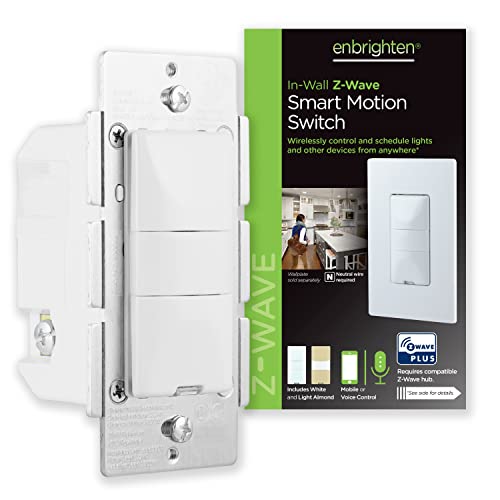
The Enbrighten 26931 is a Z-Wave Plus switch with a built-in motion sensor, for homes that already run a Z-Wave hub like SmartThings, Hubitat or Home Assistant.
Best for: Z-Wave users who want a motion switch they can manage from their hub.
What stands out in real use
It has three modes: occupancy, vacancy and manual, where the sensor is off and it works as a regular smart switch. Occupancy mode can be limited to dark rooms only. Because it’s on your Z-Wave network, you can change its settings from the hub and use the switch in your hub’s automations. Amazon’s listing names SmartThings and Alexa, and Alexa works through your hub, since no Echo speaker has Z-Wave. It has the highest load rating here (960 W incandescent or a 1/2 HP motor), but it needs a neutral wire, and a 3-way setup needs Enbrighten’s own Z-Wave add-on switch.
Key specs
- Z-Wave Plus (500 series), Z-Wave hub required
- Occupancy, vacancy or manual mode
- Up to 960 W incandescent, 1/2 HP motor, 1800 W resistive
- 3-way with up to three Enbrighten add-on switches
- White and almond paddles included
Pros
- Works with the major Z-Wave hubs
- Highest load rating in this guide
- Manual mode turns it into a regular smart switch
- Two paddle colors in the box
Cons
- Needs a Z-Wave hub and a neutral wire
- Doesn’t work with Apple Home or Matter
- Older Z-Wave 500 series hardware
- Enbrighten doesn’t list the sensor’s range
Installation and compatibility notes
You add it to your hub like any other Z-Wave device, and the hub’s skill or integration connects it to Alexa. For more Z-Wave options without a motion sensor, see our best Z-Wave light switches.
Price: ~$56
How to Choose a Motion Sensor Light Switch
Check your wiring first. Open the switch box with the power off and look for a neutral wire (usually a bundle of white wires). The Kasa, the Leviton D2MSD and the Enbrighten need one. The Lutron MS-OPS2 and the Leviton DOS05 can use the ground wire instead, so they work in most older homes.
Count the switches for that light. If two switches control the same light, you need a 3-way model. The Leviton DOS05 works with your existing 3-way switch, while the D2MSD and the Enbrighten need their own companion switches. The Lutron MS-OPS2 and the Kasa are single pole only.
Decide if you need a smart switch. A plain motion sensor switch does the job in a closet or a garage, and it costs less. Choose a smart one if you want to change settings from your phone, use the switch in routines or control it by voice.
Think about where people sit still. A motion sensor switch only sees movement, so it can turn the light off while someone is reading or sitting at a desk. A longer timeout helps. For a living room or an office, a presence sensor that detects people sitting still works better, and our guide to presence sensors vs motion sensors explains the difference. If you want one, our roundup of the best presence sensors for HomeKit and Matter compares the top picks. Also keep the switch out of view of a busy hallway, or it may turn the light on every time someone walks past.
Check the load. Add up the watts of the bulbs on the circuit. The Lutron handles up to 150 W of LED, which is plenty for most small rooms, while the Leviton switches handle 300 W of LED.
Conclusion
The Lutron Maestro MS-OPS2 is the best motion sensor light switch for most homes: it’s cheap, it works with any bulb and it doesn’t need a neutral wire. Choose the Leviton DOS05 for a 3-way circuit or a bathroom fan. If you want a smart switch, the Leviton D2MSD is the best choice and the only one here that works with Apple Home, while the Kasa ES20M costs less if you use Alexa or Google Home. If you don’t need the motion sensor, see our picks for the best smart switches for Google Home. For a Z-Wave hub, the Enbrighten 26931 is the motion switch to get.
Do motion sensor light switches need a neutral wire?
Some do. Smart Wi-Fi motion switches like the Kasa ES20M and the Leviton D2MSD need a neutral wire. Plain motion switches like the Lutron Maestro MS-OPS2 and the Leviton DOS05 can use the ground wire instead.
What is the difference between an occupancy sensor switch and a vacancy sensor switch?
An occupancy sensor switch turns the light on when you walk in and off after the room is empty. A vacancy sensor switch needs you to turn the light on by hand, then turns it off by itself. Most switches in this guide can work either way.
Which Lutron motion sensor switch should I buy?
For a single switch controlling LED or other bulbs in a small room, the Lutron Maestro MS-OPS2 is the usual choice. It costs about $25, detects small movements and doesn’t need a neutral wire.
Can a motion sensor switch work in a 3-way circuit?
Yes, if you choose a 3-way model. The Leviton DOS05 replaces one of the two switches and works with the existing 3-way switch. The Leviton D2MSD and the Enbrighten 26931 need their own companion switches.
Does any motion sensor light switch work with Apple Home?
Yes. The Leviton Decora Smart D2MSD works with Apple Home, and Leviton says it also gets Matter through a firmware update in the My Leviton app. The Kasa ES20M doesn’t work with Apple Home.

Written by Evan Mercer
Founder & Lead Researcher, Smart Home Matrix
Evan digs through spec sheets, firmware changelogs, and thousands of owner reviews so you don’t have to. Every guide starts with a compatibility check and ends with picks he would install in his own home. Read more about Evan and this site, or see exactly how we choose products.