
Govee HomeKit support depends on one thing: Matter. Govee doesn’t make HomeKit-certified devices, but many of its recent lights are Matter certified, and Apple Home accepts them like any other Matter accessory. If your Govee light has the Matter logo, it works with Apple Home. If it doesn’t, you’ll need a third-party bridge.
This guide covers which Govee products work with Apple Home, what you can and can’t control once they’re added, how to set them up, and what to do with the Govee lights that don’t have Matter.
Quick answer: Yes, if the Govee product supports Matter. That covers many of Govee’s recent lights, including the Strip Light 2 and 2 Pro, Floor Lamp 3, Permanent Outdoor Lights Pro and Christmas Lights 2. In Apple Home you can turn them on and off, dim them and change the color or white temperature. Govee’s scenes, multi-color effects and music modes stay in the Govee Home app. Older Govee lights without Matter (and Govee’s sensors) don’t work with Apple Home unless you use a bridge such as Homebridge.
Which Govee Devices Work With Apple Home
Govee sells hundreds of products, and Govee HomeKit compatibility goes model by model. Here’s where the main product lines stand.
| Govee product | Works with Apple Home? | How it connects |
|---|---|---|
| Strip Light 2, Strip Light 2 Pro | Yes | Matter over Wi-Fi |
| LED Strip Light M1, Neon Rope Light 2 | Yes | Matter over Wi-Fi |
| Floor Lamp 2, Floor Lamp 3, Floor Lamp 3 Lite | Yes | Matter over Wi-Fi |
| Ceiling Light Ultra, Sky Ceiling Light | Yes | Matter over Wi-Fi |
| TV Backlight 3, TV Backlight 3 Pro | Yes (basic control) | Matter over Wi-Fi |
| Permanent Outdoor Lights Pro, Lights 2, 2 Pro | Yes | Matter over Wi-Fi |
| Christmas Lights 2, C9 String Lights, Icicle Lights, Curtain Lights Pro | Yes | Matter over Wi-Fi |
| Smart bulbs with the Matter logo (A19, GU10, G25) | Yes | Matter over Wi-Fi |
| Smart Plug Pro, 52-inch smart ceiling fan (H1310) | Yes | Matter over Wi-Fi |
| Older strips, bulbs, lamps and TV backlights without Matter | No | Bridge only |
| Thermometers, hygrometers and leak detectors | No | Bridge only |
The quickest check is the Matter logo. Look for it on the box, on the product page, or as a Matter option in the device’s settings in the Govee Home app.
Go by the logo and not the product name, because Govee sells some products in versions with and without Matter. The Strip Light 2 only gained Matter in August 2026, the 16.4ft LED Strip Light M1 needs the Matter version of its control box, and Govee’s standard A19 bulbs were certified in 2025, so older stock may not have it.
If you’re still choosing lights, our guides to the best smart light strips and the best Apple Home light bulbs cover options from other brands too. For a ceiling fan, our guide to the best smart ceiling fans compares the H1310 with native HomeKit fans from Hunter.
How Govee Connects to Apple Home

Govee Matter devices use Matter over Wi-Fi. The light joins your 2.4 GHz Wi-Fi network directly and works with Apple Home through Matter, so you don’t need a Govee hub or bridge. Govee doesn’t use Thread (the low-power mesh network some Matter devices rely on), so you don’t need a Thread border router either. Our Matter vs Thread guide explains the difference.
You also don’t need a home hub to get started. Apple says an iPhone on iOS 18 or later can add and control Matter accessories in the Home app by itself. A HomePod or Apple TV set up as a home hub adds three things: control when you’re away from home, sharing with other people, and automations. If you want your Govee lights to turn on at sunset or when you arrive, you’ll need one. Our guide on whether HomeKit needs a hub covers the options.
People search for “does Govee work with Apple Home” and “does Govee work with HomeKit” as if they were two questions. They’re the same one: Apple Home is the app, HomeKit is the technology behind it, and Govee reaches both through Matter.
Matter also lets one device belong to several apps at once. A Govee light can stay in the Govee Home app and be in Apple Home, Alexa and Google Home at the same time. That’s important, because Apple Home only gets part of what a Govee light can do.
What You Can Control in Apple Home

In Apple Home, a Govee light is a single light with basic controls. Govee lists four features that work over Matter: on and off, brightness, color and color temperature.
What works in Apple Home:
- Turning the light on and off, and dimming it
- Setting one color or one white temperature for the whole light
- Siri voice control
- Apple Home scenes, schedules and automations
- Grouping it with lights from other brands in the same room
What stays in the Govee Home app:
- Govee’s preset scenes and animated effects
- Different colors on different segments of a strip (RGBIC)
- Music modes and DreamView sync with other Govee lights
- Camera calibration on TV backlights
- Firmware updates
So the two apps end up with different jobs. Apple Home is good for everyday control and automation: a reviewer at 9to5Mac runs Govee’s Permanent Outdoor Lights Pro entirely on automations (on at sunset, off at around 11 p.m.). Govee Home is where you go for the effects Govee is known for, like a color gradient along a strip or a holiday animation on the roofline.
How to Add Govee to Apple Home
Setup takes a few minutes for a Govee light with Matter:
- Plug the light in. Connect your iPhone to your 2.4 GHz Wi-Fi network and turn on Bluetooth.
- Find the Matter code. It’s on a tag on the power cable or control box, and it’s also in the device’s settings in the Govee Home app.
- Add it in the Home app. Tap +, then Add Accessory, and scan the code.
- Choose a room and a name. The light then appears with your other accessories.
- Keep it in Govee Home too. You’ll use that app for effects and firmware updates.
Apple’s guide to pairing Matter accessories has the full Home app steps. Three things are worth knowing before you start:
- 2.4 GHz Wi-Fi only. Govee’s Matter lights use 2.4 GHz Wi-Fi, not 5 GHz.
- Keep the code. Take a photo of the Matter code before the tag ends up behind a TV or under an eave.
- Don’t change networks in Govee Home. Govee says that switching the light to another Wi-Fi network from its app disables the light’s Matter function.
If the light shows “No Response” later, restart it, check Govee Home for a firmware update and restart your router. Our HomeKit not responding guide has the rest of the fixes.
Govee Devices Without Matter
Govee says its older products can’t get Matter through an update, because Matter needs a newer chip. For those, Govee HomeKit control needs a third-party bridge.
The usual choice is Homebridge with the homebridge-govee plugin. Homebridge is free software that runs on an always-on computer (such as a Raspberry Pi) and presents unsupported devices to Apple Home. For the details, see what Homebridge is and how it works. The plugin signs in with your Govee account, or controls some lights locally over your network, and it covers lights, plugs and some Govee appliances and sensors.
It works, but keep your expectations modest. It’s a community project that isn’t made or supported by Govee or Apple, so a change on Govee’s side can break it until the plugin is updated. If you’re buying new lights for an Apple home, a Govee model with Matter is the simpler choice.
Govee’s sensors are a separate case. Its Bluetooth thermometers and hygrometers and its GoveeLife leak detectors don’t support Matter or Apple Home. For sensors that do, see our guide to HomeKit temperature sensors and, for leak sensors, our guide to the best water leak detectors.
Limitations and What to Watch For
Govee Apple Home support has a few limits worth knowing before you buy:
- One light, one color. Apple Home treats a 100ft run of roofline lights the same way it treats a single bulb. You can’t set segments or start a Govee scene from the Home app or with Siri.
- Wi-Fi has to reach the light. Govee doesn’t use Thread, so the lights don’t form a mesh that extends their range. Govee’s install guide for its permanent outdoor lights recommends a router within 30 feet.
- Same name, different hardware. Some Govee products exist with and without Matter. Check the listing for the Matter logo before you buy, especially on discounted older stock.
- Govee’s Matter FAQ is out of date. It still names only the LED Strip Light M1. Go by the product page for the model you’re buying.
Govee Lights That Work With Apple Home
If you’re buying Govee for an Apple home, these four all have Matter, and they cover the most common uses: a lamp, an indoor strip, permanent roofline lights and holiday lights.
Govee Floor Lamp 3 — Best Govee Lamp for Apple Home

The Floor Lamp 3 is the easiest way to add Govee lighting to an Apple home: it stands in a corner, plugs into the wall and pairs with the Home app through Matter.
Best for: Living rooms and bedrooms where you want indirect light without installing anything.
What stands out in real use
At 2,100 lumens it’s bright enough to light a room, not only to add accent color. The white range runs from a very warm 1000K to a cool 10000K, so the same lamp works for a relaxed evening and for reading. In Apple Home it behaves like any color lamp, while the color-gradient effects need the Govee Home app.
Key specs
- 2,100 lumens, color plus 1000K to 10000K whites
- 59.9 inches tall
- 2.4 GHz Wi-Fi and Bluetooth
- Matter (Apple Home, SmartThings), Alexa, Google Assistant
Pros
- Bright enough to be a room’s main lamp
- Wide range of white tones
- Works with every major platform through Matter
- Doesn’t need any installation
Cons
- Gradient effects aren’t available in Apple Home
- 2.4 GHz Wi-Fi only
- Costs more than the Floor Lamp 3 Lite
Installation and compatibility notes
Assemble the pole, plug it in and scan the Matter code in the Home app. Add it to Govee Home as well for effects and firmware updates.
Price: ~$170
Govee Strip Light 2 Pro — Best Govee Light Strip for Apple Home

The Strip Light 2 Pro is Govee’s main indoor strip with Matter, and its dedicated white LEDs make it useful for task lighting as well as color.
Best for: Under-cabinet, shelf and TV-wall lighting you want in Apple Home automations.
What stands out in real use
Each meter has 60 LEDs and puts out 340 lumens, and you can cut the strip at 10 points per meter to fit a shelf or a cabinet run. In Apple Home the whole strip shows one color or one white tone. Segment colors and animated scenes stay in Govee Home.
Key specs
- 16.4ft, 60 LEDs per meter, 340 lumens per meter
- RGBWWIC LEDs, 1000K to 10000K whites
- Can be cut at 10 points per meter
- Wi-Fi and Bluetooth, Matter
Pros
- White light that’s good enough for task lighting
- Easy to cut to length
- Also sold in 6.56ft and 32.8ft lengths
- Works with Apple Home through Matter
Cons
- One color at a time in Apple Home
- Costs more than the standard Strip Light 2
Installation and compatibility notes
Clean the surface, stick the strip down and plug in the controller. Then scan the Matter code in the Home app to pair it.
Price: ~$100 (for the 16.4ft strip)
Govee Permanent Outdoor Lights Pro — Best Govee Outdoor Lights for Apple Home

The Permanent Outdoor Lights Pro brings year-round roofline lighting into Apple Home, where a sunset automation can turn it on every evening.
Best for: Homeowners who want permanent eave lighting that follows Apple Home schedules.
What stands out in real use
The 100ft set has 60 lights with warm and cool white LEDs as well as color, so it works as everyday accent lighting between holidays. You can cut and splice the run to fit your roofline and extend it up to 200ft. Apple Home handles on, off, brightness and a single color. Holiday animations and per-light colors come from Govee Home.
Key specs
- 100ft, 60 RGBWWIC lights, 50 lumens per light
- 2700K to 6500K whites
- IP67 lights, IP65 control box
- Can be cut, spliced and extended to 200ft
- Matter over Wi-Fi, Alexa, Google Assistant
Pros
- White light for everyday use, not only color
- Can be cut to fit your roofline
- Works with Apple Home through Matter
- Extends to 200ft
Cons
- The most expensive option here
- One color for the whole run in Apple Home
- Installation takes a few hours on a ladder
Installation and compatibility notes
Plan the run before you stick anything, keep the power adapter somewhere dry, and make sure your 2.4 GHz Wi-Fi reaches the control box. Our guide to installing permanent outdoor lights covers the full process.
Price: ~$440 (for the 100ft set)
Govee Christmas Lights 2 — Best Govee Holiday Lights for Apple Home
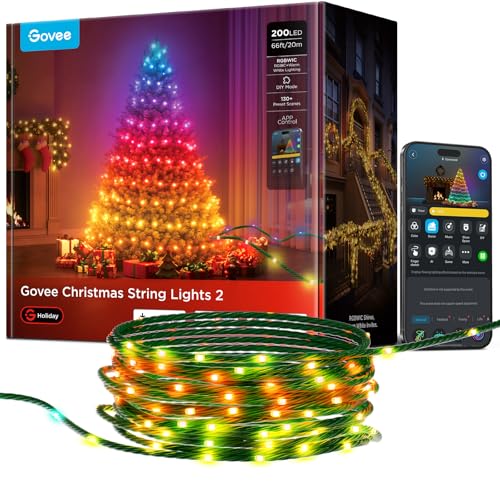
The Christmas Lights 2 are Govee’s Matter string lights for a tree or the outside of the house, so your holiday lights can follow the same Apple Home schedule as everything else.
Best for: Trees, railings and bushes you want on an Apple Home schedule.
What stands out in real use
The 66ft string has 200 LEDs, and Govee Home can map the string’s shape with your phone’s camera to run effects across the tree. Apple Home can’t run those effects, but it handles the daily schedule: on at dusk, off at bedtime.
Key specs
- 66ft, 200 RGBWIC LEDs
- IP65 lights, IP44 power adapter
- 130+ preset scenes in Govee Home
- Matter over Wi-Fi, Alexa, Google Assistant
Pros
- Works indoors and outdoors
- Camera shape mapping for effects
- Also sold in 99ft, 164ft and 328ft lengths
- Works with Apple Home through Matter
Cons
- Strings can’t be connected end to end
- Scenes and shape mapping need the Govee Home app
- The power adapter is less weather resistant than the lights
Installation and compatibility notes
Outdoors, plug the adapter in somewhere sheltered, because IP44 only covers splashes. Pair the string in the Home app with its Matter code, then use Govee Home for the shape mapping.
Price: ~$100 (for the 66ft string)
For more options from Govee and other brands, see our guides to the best permanent outdoor lights and the best smart Christmas lights.
The Bottom Line
Govee HomeKit support is real, but it runs through Matter and only through Matter. If the Govee light you own or want has the Matter logo, it’ll pair with Apple Home in a few minutes and work with Siri, scenes and automations, with one color per light. Govee’s effects stay in Govee Home, and the two apps work side by side. If the light doesn’t have Matter, Homebridge is the only way in, and for a new purchase it’s easier to choose a Matter model.
Does Govee work with HomeKit?
Yes, if the Govee product supports Matter. Govee doesn’t make HomeKit-certified devices, but its Matter lights pair with the Apple Home app and work with Siri, scenes and automations.
Which Govee lights work with Apple Home?
Govee lights with the Matter logo, including the Strip Light 2 and 2 Pro, Floor Lamp 3, Permanent Outdoor Lights Pro and Christmas Lights 2. Check the box or product page for the Matter logo, because some Govee products are sold with and without it.
Do I need a hub to use Govee with Apple Home?
You don’t need one to get started. An iPhone on iOS 18 or later can add and control Matter accessories without a home hub. A HomePod or Apple TV adds control away from home, sharing and automations.
Can I use Govee scenes in Apple Home?
Govee scenes aren’t available in Apple Home. Apple Home controls power, brightness, color and white temperature, while Govee’s preset scenes, segment colors and music modes are only in the Govee Home app. You can keep using both apps side by side.
Does Govee use Thread?
Govee doesn’t use Thread. Its Matter devices connect over 2.4 GHz Wi-Fi, so you don’t need a Thread border router.
Can older Govee lights be added to HomeKit?
Only with a third-party bridge. The homebridge-govee plugin for Homebridge brings Govee devices without Matter into Apple Home, but it’s a community project that Govee doesn’t support.

Written by Evan Mercer
Founder & Lead Researcher, Smart Home Matrix
Evan digs through spec sheets, firmware changelogs, and thousands of owner reviews so you don’t have to. Every guide starts with a compatibility check and ends with picks he would install in his own home. Read more about Evan and this site, or see exactly how we choose products.