
Do you need a subscription for Ring? No. A Ring doorbell or camera works without one: you get live video, motion alerts and two-way talk for free. However, Ring doesn’t save any video unless you pay, so if you miss an alert, you can’t go back and see what happened.
This guide explains what works without a subscription, what each Ring plan costs in 2026, and when it’s worth paying.
The Short Answer
- Do you need a subscription for Ring: no. Ring devices work without one, but they don’t record anything.
- What’s free: Live View, motion and doorbell alerts, two-way talk, motion zones and Alexa.
- What you pay for: recorded video (kept for up to 180 days), person and package alerts, and video previews in your notifications.
- How much is Ring a month: $4.99 for one device (Ring Solo), $9.99 for every device at one address (Ring Multi), or $19.99 with AI features and professional monitoring (Ring Pro).
- When you can skip it: if you only want to see and answer the door live. If you want to check what happened while you were away, you’ll need a subscription or a doorbell that records without fees.
What Works on Ring Without a Subscription
Using Ring without subscription fees gives you everything that happens live. According to Ring, these features are free on every doorbell and camera:
- Live View: open the Ring app and watch live video, for up to 10 minutes at a time.
- Motion alerts: a notification on your phone when the camera detects movement.
- Doorbell alerts: a notification when someone presses the button, so you can answer from your phone.
- Two-Way Talk: hear and talk to whoever is at the door.
- Motion Zones: choose which areas trigger alerts, so cars on the street don’t.
- Quick Replies: a recorded message that answers the door for you (doorbells only).
- Alexa: ask Alexa to show live video on an Echo Show or a Fire TV.
So a Ring doorbell without subscription fees still works as a doorbell: you see who’s there and you can talk to them. What it doesn’t do is save video. Ring’s support pages say that reviewing recorded video requires a subscription, which means:
- You can’t watch a motion event or a doorbell press after it happens.
- Alerts don’t tell you whether the camera saw a person, a package or a vehicle.
- Notifications don’t include a preview of the video.
- There are no clips to download, because nothing was saved.
Ring doorbells and cameras don’t have a memory card slot, so you can’t save video on the device instead. Ring also records events only after you subscribe, so signing up after a package was stolen won’t bring that video back. The diagram below shows what you get with and without a subscription.

If you use Apple Home, there’s one workaround: a bridge app can send Ring cameras to HomeKit Secure Video, which records to iCloud instead. It needs a computer that’s always on and an iCloud+ subscription. Our guide on whether Ring works with HomeKit explains how.
What a Ring Subscription Adds
Every Ring subscription includes the same basic features:
- Video history: every motion event and doorbell press is recorded and kept for up to 180 days.
- Person, Package and Vehicle Alerts: the notification tells you what the camera saw, and you can turn off the alerts you don’t need.
- Video previews: a short preview of the event inside the notification.
- Snapshot Capture: photos taken between motion events, kept for 14 days.
- Longer Live View: up to 30 minutes per session instead of 10.
- Downloads: save clips to your phone or computer, up to 50 at a time.
A new Ring doorbell or camera comes with a 30-day trial that starts when you set it up, so you can try these features before you decide. The trial isn’t offered if you already have a subscription at that address. If your camera stopped saving video even though you have a subscription, our Ring camera troubleshooting guide covers the other causes.
Ring Subscription Cost: Solo, Multi and Pro
How much is Ring a month? Between $4.99 and $19.99 in the US, depending on how many devices you have and which features you want. If you pay yearly, you pay about the same as ten months.
| Plan | Per month | Per year | Covers | What it adds |
|---|---|---|---|---|
| Ring Solo | $4.99 | $49.99 | One doorbell or camera | Video history, smart alerts and previews |
| Ring Multi | $9.99 | $99.99 | Every Ring device at one address | The same for all devices, plus an extended warranty |
| Ring Pro | $19.99 | $199.99 | Every Ring device at one address | AI features and professional monitoring for Ring Alarm |
Ring Solo is enough if you own one doorbell or one camera.
Ring Multi covers every doorbell and camera at one address for the price of two Solo subscriptions, so it’s the better choice as soon as you have a second device.
Ring Pro adds Ring’s AI features: Video Descriptions (a text summary of what happened), Familiar Faces, Video Search and Active Warnings. It also includes 24/7 professional monitoring if you have a Ring Alarm. Familiar Faces isn’t available in Illinois, Texas or Portland, Oregon.
There are also two add-ons. Pro Intelligence brings the AI features to one device on a Solo or Multi subscription for $5 a month. 24/7 Recording costs $3 a month per camera and keeps continuous video for up to 14 days. It only works on cameras and doorbells with constant power (not on battery or solar).
If you’ve seen other plan names, it’s because Ring has renamed them twice. Ring Protect became Ring Home in late 2024 (Basic, Standard and Premium), and in January 2026 it went back to Ring Protect with Solo, Multi and Pro. Ring’s plan comparison page shows the current prices.
Other brands that save video to the cloud charge for it too. Blink costs a little less for one camera and Arlo costs about twice as much: our Ring vs Blink and Arlo vs Ring comparisons have the details, and our guide to Blink subscriptions explains what each Blink plan costs. Google’s Nest plans start at $10 a month, but its doorbells give you person and package alerts for free, as our Ring vs Nest doorbell comparison shows.
Is a Ring Subscription Worth It?
For one doorbell, the Ring subscription cost over three years is about $150 on Ring Solo, which is more than the doorbell itself. Here’s how that adds up, using regular prices and yearly billing:
- Ring Battery Doorbell 2K + Ring Solo: about $100 for the doorbell and $150 for the subscription, so $250 over three years.
- The same doorbell + Ring Multi (if you add cameras): about $100 and $300, so $400.
- eufy Video Doorbell E340 (saves video on built-in storage): about $150, and nothing after that.
- Tapo Video Doorbell D210 (saves video on a microSD card): about $58 plus the card, and nothing after that.
The diagram below shows the same numbers.

A subscription is worth paying for if:
- You want to check what happened while you were away, or you often miss alerts.
- You get a lot of alerts and only want to hear about people or packages.
- You have several Ring devices or a Ring Alarm, because Ring Multi covers all of them for $9.99 a month.
You can skip it if you only want to see who’s at the door and answer live. And if you haven’t bought anything yet and don’t want a monthly fee, choose a doorbell that records without one. Our eufy vs Ring comparison explains that choice in detail.
One thing to know before you cancel: you lose access to all your recorded videos, so download the ones you want to keep first. Ring doesn’t give refunds when you cancel, but the subscription keeps working until the end of the period you paid for. If you’re cancelling because you’re selling the doorbell, remove it from your account too: our guide on how to reset a Ring doorbell explains how.
Ring Alarm Without a Subscription
Do you need a subscription for Ring Alarm? In practice, yes. Without one, you can only arm and disarm the alarm from its keypad. If the alarm is triggered, the siren sounds, but you don’t get a notification on your phone and nobody requests emergency services.
A Ring subscription adds control from the Ring app and alerts on your phone. Professional monitoring, where a monitoring center can send emergency services, is part of Ring Pro. It’s available in the US and in Canada (except Quebec). Our SimpliSafe vs Ring Alarm comparison covers what both alarm systems cost.
Doorbells and Cameras With and Without Monthly Fees
If you’re still deciding what to buy, these are the options we’d look at first: one Ring doorbell if you don’t mind paying for a subscription, and three alternatives that save video without one. For more choices, see our guide to the best Ring alternatives.
Ring Battery Doorbell 2K — Best Ring Doorbell for Most Homes

Ring’s lowest-priced battery doorbell has 2K video, a head-to-toe view and up to 6x zoom. The battery is built in, so you take the doorbell down to charge it, or keep it charged from your doorbell wires. You’ll need a Ring subscription to save video.
Best for: Alexa homes and anyone who’s fine with paying $4.99 a month for recorded video.
Price: ~$100
eufy Video Doorbell E340 — Best Doorbell Without a Subscription
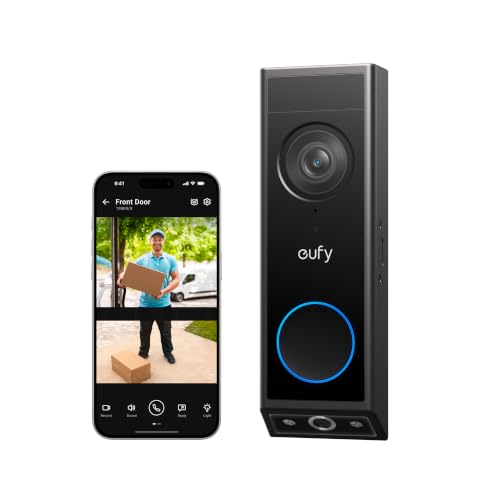
It has two cameras (a 2K front camera and a second one that points down at your doorstep) and 8 GB of built-in storage, so it records without a subscription or a memory card. Person and package alerts are free too. It runs on a removable battery or on doorbell wires.
Best for: anyone who wants recorded video and smart alerts without a monthly fee.
Price: ~$150
Tapo Video Doorbell D210 — Best Budget Option

A 2K battery doorbell that records to a microSD card (up to 512 GB, not included) and comes with a plug-in chime. Person detection is free. It only runs on its battery, so you can’t connect it to doorbell wires.
Best for: renters and anyone who wants to spend less than $60.
Price: ~$58
eufy SoloCam S340 — Best Camera Without a Subscription

If you were considering a Ring camera, this is a good alternative without fees: a solar battery camera with a 3K wide lens, a 2K telephoto lens, pan and tilt, and 8 GB of built-in storage.
Best for: anyone who wants an outdoor camera that records for free and rarely needs charging in a sunny spot.
Price: ~$200
For more options, see our guides to the best doorbell cameras without a subscription and the best security cameras without a subscription.
The Bottom Line
So, do you need a subscription for Ring? Not to use it: live video, alerts and two-way talk are free. You do need one to save video, and at $4.99 a month for one device or $9.99 for a whole home, it’s one of the cheaper camera subscriptions. If you want recorded video without paying every month, buy a doorbell or camera with local storage instead.
Does a Ring doorbell work without a subscription?
Yes. You get live video, motion and doorbell alerts, two-way talk and motion zones for free. Without a subscription it doesn’t save any video, so you can’t watch an event after it happens.
How much is a Ring subscription per month?
In the US, Ring Solo costs $4.99 a month for one device, Ring Multi costs $9.99 for every device at one address, and Ring Pro costs $19.99 with AI features and professional monitoring. Yearly billing costs $49.99, $99.99 and $199.99.
Can you save Ring videos without a subscription?
No. Ring doorbells and cameras don’t have a memory card slot, and recorded video is only available with a subscription. Ring also records events only after you subscribe, so earlier events can’t be recovered.
Does Ring have a free trial?
Yes. A new Ring doorbell or camera comes with a 30-day trial that starts when you set it up. It isn’t offered if the address already has a Ring subscription.
What happens if I cancel my Ring subscription?
You lose access to all your recorded videos, so download the ones you want to keep first. Ring doesn’t give refunds for cancellations, but the subscription keeps working until the end of the period you paid for.
Does Ring Alarm work without a subscription?
Only from the keypad. You can arm and disarm it there and the siren sounds when it’s triggered, but you don’t get phone notifications and nobody requests emergency services. Professional monitoring is part of Ring Pro.

Written by Evan Mercer
Founder & Lead Researcher, Smart Home Matrix
Evan digs through spec sheets, firmware changelogs, and thousands of owner reviews so you don’t have to. Every guide starts with a compatibility check and ends with picks he would install in his own home. Read more about Evan and this site, or see exactly how we choose products.