
Almost every Kwikset smart lock battery is a standard AA: the Halo, Halo Touch, Halo Select, Aura, Aura Reach, SmartCode, Premis, Kevo and Obsidian locks all run on four AA alkaline batteries. The one exception is the SmartCode 955 keypad lever, which takes a single 9V. Changing them takes a few minutes, and Kwikset says your user codes aren’t lost when the batteries come out.
This guide covers which battery your model takes, the battery replacement steps for each lock family, how long a set should last, and what to do if the batteries die, using Kwikset’s own support pages.
Quick Answer
- Halo, Halo Touch, Aura and Aura Reach: 4 AA alkaline batteries. The battery pack slides up and out.
- Halo Select and Halo Select Plus: 4 AA alkaline batteries. Press the tab and pull the battery pack out.
- SmartCode, HomeConnect, Premis, Kevo and Obsidian: 4 AA alkaline batteries behind the inside cover, which is often held by screws.
- SmartCode 955: one 9V battery, rated for at least 3 years.
- Use name-brand alkaline batteries. Kwikset doesn’t recommend rechargeable batteries, and says not to use rechargeable or lithium-ion batteries in the Halo.
- Your codes stay on the lock when you change the batteries.
Which Battery Does Your Kwikset Lock Take?
Here’s every current and recent Kwikset smart lock, with the battery life Kwikset gives for it where it publishes one:
| Lock | Batteries | Kwikset’s battery life estimate | If the batteries die |
|---|---|---|---|
| Halo Touchscreen and Halo Keypad (Wi-Fi) | 4 AA alkaline | About 6 months | Use the key |
| Halo Touch (fingerprint) | 4 AA alkaline | Not published | Use the key |
| Halo Select and Halo Select Plus | 4 AA alkaline | About 6 months (Halo Select) | Use the key |
| Aura and Aura Reach | 4 AA alkaline | Not published | Use the key |
| SmartCode 260 and other SmartCode deadbolts | 4 AA alkaline | At least 12 months (260) | Use the key |
| HomeConnect 620 (Z-Wave) | 4 AA alkaline | Not published | Use the key |
| Premis and Kevo | 4 AA alkaline | About 1 year at 10 uses a day | Use the key |
| Obsidian (keyless) | 4 AA alkaline | Not published | 9V jump start |
| SmartCode 955 keypad lever | One 9V | At least 3 years | Use the key |
The SmartCode keypad deadbolts are the simplest of these locks; our guide to the best keypad door locks shows the SmartCode 260 and 270 next to the Halo Keypad if you’re not sure which one you have.
Why alkaline matters. Kwikset says rechargeable batteries won’t harm the lock, but it still doesn’t recommend them. The lock and the Kwikset app are tuned to the way an alkaline battery runs down. Rechargeable cells hold a flatter voltage, so the battery percentage can read wrong and you might not get a low battery warning before they’re empty. For the Halo and Obsidian, Kwikset goes further: alkaline batteries from a major brand, and no rechargeable or lithium-ion batteries. It also says not to mix new and used batteries, so always change all four at once.
These two packs are name-brand alkalines sold by Amazon:
Duracell Coppertop AA Batteries — Best for 4-AA Kwikset Locks
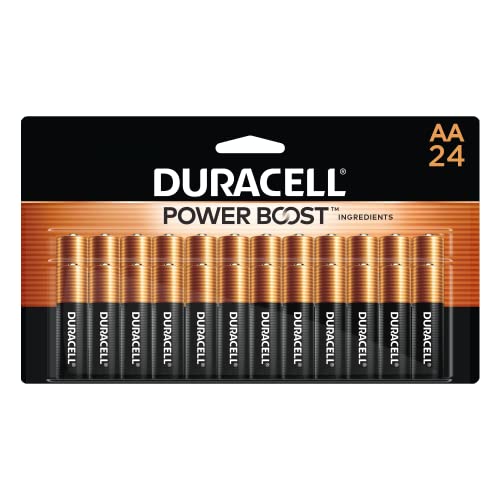
A 24-pack of alkaline AA batteries, which is six full changes for a Halo, Aura, SmartCode or Premis lock. At Kwikset’s six-month estimate for a Halo, that’s about three years of spares for one lock.
Best for: the Halo, Halo Touch, Halo Select, Halo Select Plus, Aura, Aura Reach, SmartCode, HomeConnect, Premis, Kevo and Obsidian locks.
Price: ~$24 (for a 24-pack)
Energizer MAX 9V Batteries — Best for the SmartCode 955 and Obsidian

A 4-pack of alkaline 9V batteries. The SmartCode 955 runs on one, and an Obsidian owner should keep one in the car or a bag for a jump start, since you need it on the outside of the door when the AA batteries die.
Best for: the SmartCode 955 keypad lever, and as an emergency battery for the Obsidian.
Price: ~$17 (for a 4-pack)
How to Change the Battery in a Kwikset Smart Lock
A Kwikset battery replacement is done from inside the house, and you don’t have to reprogram anything. Kwikset says user codes aren’t lost when the batteries die or are removed, and the Kevo keeps its paired phones and fobs too.
A few things before you start:
- Have four new batteries ready. Don’t mix new and used ones.
- Check for screws. Many SmartCode and HomeConnect covers are held by small screws (a Phillips screwdriver or the 3/32″ Allen wrench that came with the lock), and a Halo cover can be screwed shut during setup.
- Match the battery diagram. Each battery tray shows which way the positive end goes.
Halo, Halo Touch, Aura and Aura Reach
Here’s the Kwikset smart lock battery replacement for these four, per Kwikset’s support page:
- Slide the battery pack up and out of the inside part of the lock.
- Take out the old batteries.
- Put four new AA alkaline batteries in the tray.
- Slide the battery pack back down into the battery compartment.
Halo Select and Halo Select Plus
- Press down on the tab to release the battery pack.
- Pull the pack out, away from the lock.
- Put in four new AA alkaline batteries, checking the polarity.
- Set the bottom tabs of the pack into the slots of the lock, then push it in. It should sit flush.
Kwikset’s Halo Select Plus guide asks for “new, non-rechargeable alkaline batteries only”.
SmartCode and HomeConnect Locks
- Remove the battery cover from the inside part of the lock (take out its screws first if it has them).
- Lift the battery pack out of the lock.
- Put four new AA batteries in the pack.
- Put the pack back with the “DOOR” arrows on it pointing toward the door, then refit the cover.
On a SmartCode lever with a deadbolt above it, you have to take off the lever’s interior assembly to reach the batteries. If a Z-Wave SmartCode or HomeConnect lock stops responding in your hub app afterward, Kwikset’s steps say to start the pairing process at your smart home controller again.
If a lock acts strangely after a battery change, take the battery pack out for a few seconds and put it back. Our guide on how to reset a Kwikset smart lock covers the next step if that doesn’t help.
Premis, Kevo, Obsidian and Powerbolt
The older locks follow the same idea with a different cover:
- Premis: slide the cover up and take out the battery pack. On the Premis Traditional, unscrew the interior cover first.
- Kevo: remove the interior screws, turn the thumbturn to vertical, slide the cover off and replace the batteries in the pack.
- Obsidian: remove the screw on each side of the casing and lift the battery pack out of the top.
- Powerbolt: remove the three screws around the cover (or lift it off if there are none). The holder says “Door”, with arrows that point toward the door.
SmartCode 955
The 955 keypad lever takes one 9V battery. Remove the interior cover, disconnect the old battery and connect a new 9V, fit it back into the interior assembly and put the cover back on.
How Long a Kwikset Lock Battery Lasts
Kwikset rates the SmartCode 260 for at least 12 months and the SmartCode 955 for at least 3 years. The Premis and Kevo should last about a year at 10 uses a day. The Wi-Fi Halo uses the most power: Kwikset puts it at about six months with around a dozen lock and unlock cycles a day, and the Halo Select’s spec sheet gives the same six months. Kwikset doesn’t publish a figure for the Halo Touch, Halo Select Plus, Aura or Aura Reach.
If your batteries don’t last that long, Kwikset lists these causes:
- The door isn’t aligned. Kwikset calls this “by far the most common contributor” to short battery life. If the bolt rubs on the strike plate, the motor works harder on every lock and unlock. Lock the door while it’s open: if the bolt moves freely then but struggles with the door shut, adjust the strike plate.
- The lock is loose on the door. A loose lock adds friction too, so tighten it, and make sure the cable inside isn’t pinched.
- Weak Wi-Fi. A Halo far from the router uses more power. Kwikset suggests a stronger signal or a mesh Wi-Fi system, and our guide on why a smart lock won’t connect covers how to improve it.
- Sounds and lights. Turning off lock sounds and the LED status light in the Kwikset app saves power.
- The wrong batteries. Rechargeable, lithium-ion or mixed old and new batteries all shorten the time between changes.
Kwikset also says Thread uses less power than Wi-Fi. If battery life matters to you, a Halo Select or Aura Reach set up with Matter over Thread is worth considering, and our guide to the best Matter smart locks explains what you need for it.
On a Z-Wave SmartCode, the hub itself can drain the batteries if it checks on the lock too often. Kwikset’s fix is to lower the controller’s ping frequency. If the batteries die within a day, Kwikset says the lock has to be replaced, so contact its support.
How to Tell the Battery Is Low
Kwikset’s newer locks warn you at three levels: Low, Very Low and Critically Low. Kwikset recommends changing the batteries at the first one. The Kwikset app’s main screen shows “Replace Batteries” and the lock’s battery level.
The lock warns you too:
- Halo, Halo Touch and Aura: a low battery warning when you lock or unlock at 20%, and a warning tone from 10%. On every Halo and Aura lock, the interior status light blinks red instead of amber.
- Halo Keypad and Aura: the keypad flashes red with fast beeping for 3-4 seconds.
- Halo Touchscreen: the checkmark and lock symbols flash five times with five beeps.
- Halo Touch: all the outside lights blink red.
- Halo Select and Halo Select Plus: the low battery icon and tone start at 10%, and the battery icon turns solid red when it’s very low.
- SmartCode: the inside status light and the keypad flash red.
- SmartCode 955: it beeps 10 times and flashes red about six weeks before the battery runs out.
Don’t wait for the last warning on a Halo Select. At Critically Low it turns off its Wi-Fi, so remote locking, auto-lock and firmware updates stop working.
If your hub says a SmartCode’s battery is low but you’re not sure, check at the lock. Turn on switch #1 on the back of the lock so the status light flashes every six seconds: amber or green followed by red means the batteries really are low. If no red flash appears, the alert is a hub error, which usually clears after you lock or unlock the door by hand.
If the Battery Dies
A dead Kwikset smart lock battery doesn’t lock you out. Kwikset says its locks stay in their last position when the batteries run out, and nearly all of them have a keyhole.

- Use the key. The Halo, Halo Touch, Halo Select, Aura, Aura Reach, SmartCode, HomeConnect, Premis and Kevo locks all take a key, so don’t leave your only key inside the house.
- Jump the Obsidian with a 9V. It doesn’t have a keyhole. Touch a 9V battery to the terminals under the touchscreen and keep it there: wait for the screen to light up, enter your code, and let the motor pull the bolt back. Then change the AA batteries inside right away.
- The 905 Keyless works the same way. Hold the 9V to the terminals below the keypad until you hear three beeps, then enter your code. If nothing happens, flip the battery around or try a new one.
If you’re weighing a replacement lock, our Schlage vs Kwikset comparison covers how the two brands’ current models compare.
The Bottom Line
A Kwikset smart lock battery change is a few minutes’ job: four AA alkaline batteries in almost every model, or one 9V in the SmartCode 955. Use name-brand alkalines, change all four together, and your codes stay put. If a set dies much sooner than Kwikset’s estimate, check the door alignment and the Wi-Fi signal first. Kwikset keeps its own battery life tips for the Halo and Aura locks, and if you also have a Schlage, our Schlage lock battery guide covers those models.
What battery does a Kwikset smart lock take?
Almost every Kwikset smart lock takes four AA alkaline batteries, including the Halo, Halo Touch, Halo Select, Aura, Aura Reach, SmartCode, Premis, Kevo and Obsidian. The SmartCode 955 keypad lever takes one 9V battery.
Will I lose my codes when I change the batteries in my Kwikset lock?
No. Kwikset says user codes aren’t lost when the batteries die or are removed. You don’t need to reprogram the lock after a battery change.
How long do Kwikset smart lock batteries last?
Kwikset puts the Wi-Fi Halo at about six months and rates the SmartCode 260 for at least 12 months. The Premis and Kevo last about a year at 10 uses a day, and the SmartCode 955’s 9V battery at least three years.
Can I use rechargeable or lithium batteries in a Kwikset lock?
Kwikset doesn’t recommend rechargeable batteries, because the battery reading and low battery warnings may be wrong. For the Halo and Obsidian it says not to use rechargeable or lithium-ion batteries. Use name-brand alkaline batteries.
How do I open a Kwikset lock with a dead battery?
Use the key on the Halo, Aura, SmartCode, Premis and Kevo locks. The keyless Obsidian has 9V terminals under the touchscreen: hold a 9V battery to them, enter your code and change the AA batteries once you’re inside.

Written by Evan Mercer
Founder & Lead Researcher, Smart Home Matrix
Evan digs through spec sheets, firmware changelogs, and thousands of owner reviews so you don’t have to. Every guide starts with a compatibility check and ends with picks he would install in his own home. Read more about Evan and this site, or see exactly how we choose products.