
Eufy and Wyze both sell security cameras that cost well under $100 and record to storage at home, so neither forces you into a monthly plan. The eufy vs Wyze choice mostly comes down to what you get for free. Wyze cameras cost less, but their person and package alerts need a Cam Plus plan. Eufy cameras cost a little more, but they detect people on the camera itself at no extra cost, and a few of them work with Apple Home.
The two brands also differ in their plan prices, cloud history and privacy records. This guide compares all of it, then lists the Wyze and eufy cameras and doorbells worth buying.
Eufy vs Wyze: The Short Answer
Quick answer: choose Wyze if you want the cheapest cameras, the cheapest one-camera plan, or an unusual camera like one built into a light bulb. Choose eufy if you want person alerts without a subscription, 30 days of cloud history when you do pay, or a camera that works with Apple Home. Both record to local storage for free and work with Alexa and Google.
If you already know which way you’re leaning, these are the eight products worth looking at:
- Wyze Cam v4 — Best Wyze plug-in camera, with 24/7 recording to a microSD card for about $45.
- eufy Indoor/Outdoor Camera C31 — Best eufy plug-in camera, a pan-and-tilt camera with free person detection.
- Wyze Cam Pan v4 — Best Wyze pan-tilt camera, with 4K video and 5 GHz Wi-Fi.
- eufy Indoor Cam E30 — Best eufy pan-tilt camera, and the one to buy for Apple Home.
- Wyze Solar Cam — Best Wyze solar camera, with a detachable panel in the box.
- eufy SoloCam S220 — Best eufy solar camera, with storage built into the camera.
- Wyze Battery Video Doorbell — Best Wyze doorbell, with a head-to-toe view.
- eufy Video Doorbell C31 — Best eufy doorbell, with 24/7 recording when it’s wired.
What Wyze Does Best
Wyze’s biggest advantage is price. A Wyze Cam v4 costs about $45, and most Wyze cameras have a microSD slot, so plug-in models can record around the clock or only when they detect motion. You buy the card separately, but there’s no hub and no monthly fee. Our best Wyze cameras guide compares every current model.
Wyze’s plans are cheap too. Cam Plus costs $2.99 a month per camera and adds full-length cloud clips plus person, package, vehicle and pet alerts. Wyze also sells some cameras eufy doesn’t, like a pan-tilt camera built into a light bulb.
There are some downsides. Without a plan, a current Wyze camera sends only a snapshot to the cloud when it detects motion, and it can’t tell you whether that motion was a person. No Wyze camera works with Apple Home. And many Wyze cameras, including the Cam v4 and the Solar Cam, use 2.4 GHz Wi-Fi only.
What Eufy Does Best
Eufy’s main strength is what it gives you without a subscription. Eufy cameras detect people on the camera (or on a HomeBase, eufy’s optional hub), and many models also recognize vehicles and pets, at no extra cost. Video is saved to a microSD card, storage built into the camera, or a HomeBase, so it stays in your home.
Eufy is also the only one of the two that works with Apple Home, though only on a short list of models. The Indoor Cam E30 and the eufyCam S3 Pro are the current cameras on that list. Our guide to whether eufy works with HomeKit covers each model and how to set it up.
The downsides are cost and consistency. In each matchup in this guide, the eufy model costs $10 to $35 more than the Wyze one, and eufy’s cloud plans cost more as well. Features also vary more from model to model: the SoloCam S220 can’t use eufy’s cloud at all, and the S220 and Indoor Cam E30 use 2.4 GHz Wi-Fi only. Our best eufy cameras guide lists what each model supports.
Eufy and Wyze Side by Side
Here’s how the two brands compare on the points that matter most:
| Factor | Wyze | Eufy |
|---|---|---|
| Typical prices | About $45 to $70 for a camera, $66 for a battery doorbell | About $60 to $100 for a camera, $100 for a battery doorbell |
| Save video without a plan | Yes, on a microSD card | Yes, on a microSD card, built-in storage or a HomeBase |
| 24/7 recording without a plan | Yes, on plug-in cameras | Yes, on plug-in cameras |
| Person alerts without a plan | No (Cam Plus) | Yes |
| One-camera plan | $2.99 a month | $3.99 a month |
| Whole-home plan | $9.99 a month | $13.99 a month |
| Cloud video history | 14 days (60 days on the top plan) | 30 days |
| Hub needed | No | No (HomeBase optional) |
| Apple Home | No | A few models (Indoor Cam E30, eufyCam S3 Pro) |
| Alexa | Yes | Yes |
| Google Assistant and the Google Home app | Google Assistant and the Google Home app | |
| Matter | No | No |
What you get without a subscription
This is where the two brands differ most. Both give you live view, two-way audio, motion alerts and free local recording. The difference is how smart those alerts are.
A plug-in Wyze camera with a microSD card records every motion event, or every minute of the day, to that card. Without Cam Plus, though, you get a basic motion alert with a snapshot, not a person alert, and nothing but snapshots goes to the cloud. The Cam Pan v4 can still follow a person or a pet as it moves, but the smart alerts need a plan. Our guide to whether Wyze needs a subscription explains each plan.
A eufy camera does the detection itself, so it can tell you when it sees a person without any plan. Your video stays on the camera, the microSD card or a HomeBase, and you watch it in the eufy app. If you use a lot of cameras, a HomeBase S380 collects their video in one place with room for a hard drive.
On battery cameras, neither brand records 24/7. The Wyze Solar Cam and the eufy SoloCam S220 both save motion events instead, to a microSD card on the Wyze and to 8 GB of storage inside the eufy.

Subscription prices
For one camera, Wyze is cheaper. Cam Plus costs $2.99 a month or $29.99 a year and keeps 14 days of full-length clips. Eufy’s Cloud Backup Basic costs $3.99 a month or $39.99 a year for one device and keeps 30 days.
For a whole home, Wyze is cheaper too, but eufy keeps video longer. Cam Unlimited costs $9.99 a month for every camera on your account, with 14 days of history and Friendly Faces recognition. Eufy’s Cloud Backup Plus costs $13.99 a month ($139.99 a year) for all your devices, with 30 days of history.
Wyze also sells Cam Unlimited Pro for $19.99 a month, with up to 60 days of history and AI video search. Eufy doesn’t charge for its person detection, so its Cloud Backup plans only add cloud storage. Our guide to whether eufy requires a subscription explains which eufy cameras can use Cloud Backup.

Apple Home, Alexa and Google
Both brands work with Alexa, so an Echo Show can bring up live view from either one, and both work with Google Assistant on a Nest Hub or a Chromecast. Google’s August 2026 update to the Google Home app added Eufy and Wyze to the camera brands you can view inside the app, according to Google’s release notes.
Apple Home is the clear difference. No Wyze camera works with Apple Home or HomeKit Secure Video. On the eufy side, the Indoor Cam E30 and the eufyCam S3 Pro work with Apple Home, but they stream and record at 1080p there, and features like 4K and tracking stay in the eufy app. For more choices, see our best HomeKit security cameras.
Neither brand sells a Matter camera.
Privacy and security record
Both brands have had serious security problems, and both say they’ve fixed them.
In 2022, researchers found that some eufy live streams weren’t end-to-end encrypted and could be opened without logging in by anyone with the right link. In January 2025, eufy’s US distributors paid the New York Attorney General $450,000 and agreed to stronger encryption and regular security testing.
Wyze had a smaller incident in September 2023 and a bigger one in February 2024. After an outage, about 13,000 Wyze users were shown thumbnails from other people’s cameras, and 1,504 of them tapped one. Wyze blamed a third-party software library and added an extra check before event videos open.
Whichever brand you choose, turn on two-factor authentication. With either brand, keeping video on a microSD card or a HomeBase means less of it sits on a company’s servers.
Which Should You Choose?
When people compare Wyze vs eufy, the answer usually depends on these situations:
- You want the lowest price: Wyze. Its cameras usually cost less than the closest eufy model.
- You never want to pay a monthly fee: eufy. Both record locally for free, but only eufy sends person alerts without a plan. Our guide to the best security cameras without a subscription compares more brands.
- You use Apple Home: eufy, with the Indoor Cam E30 or the eufyCam S3 Pro.
- You’ll pay for one or two cameras: Wyze. Cam Plus is the cheapest plan of the two.
- You want longer cloud history: eufy, with 30 days on either plan, unless you pay $19.99 a month for Wyze’s top plan.
- You want an unusual camera: Wyze, for example a pan-tilt camera built into a light bulb.
- You want a doorbell that records 24/7: eufy. The Video Doorbell C31 records 24/7 when it’s wired.
Which Eufy or Wyze Products to Buy
Wyze Cam v4 — Best Wyze Plug-In Camera

A plug-in 2.5K camera (2560 x 1440) with color night vision, a spotlight and a siren. It’s rated IP65 for outdoor use (with Wyze’s outdoor power adapter) and records 24/7 or on motion to a microSD card without a plan. It uses 2.4 GHz Wi-Fi only.
Best for: anyone who wants an inexpensive camera that records around the clock.
Price: ~$45
eufy Indoor/Outdoor Camera C31 — Best Eufy Plug-In Camera

A 1080p camera that pans and tilts for 360° coverage and follows people, vehicles and pets. It’s rated IP66, records 24/7 to a microSD card (up to 256 GB), and detects people, vehicles, pets and crying for free.
Best for: a porch, a garage or a room where you want person alerts without a plan.
Price: ~$60
Wyze Cam Pan v4 — Best Wyze Pan-Tilt Camera

Wyze’s first 4K camera (3840 x 2160). It pans 360° and tilts 180°, follows a person, a pet or a car, and works on 2.4 GHz or 5 GHz Wi-Fi. It records 24/7 to a microSD card, and tracking works without a plan.
Best for: covering a whole room or a backyard with one camera.
Price: ~$60
eufy Indoor Cam E30 — Best Eufy Pan-Tilt Camera
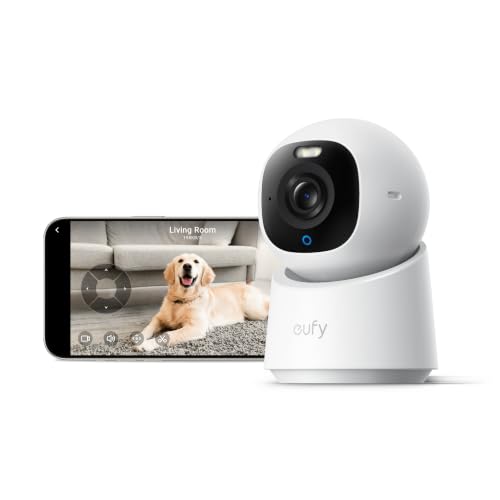
A 4K indoor camera that pans and tilts, tracks people and pets, and records 24/7 or only events to a microSD card (up to 128 GB). It’s one of the few eufy cameras that works with Apple Home, at 1080p there. It uses 2.4 GHz Wi-Fi only.
Best for: Apple Home users, and anyone watching a nursery or a pet.
Price: ~$70
Wyze Solar Cam — Best Wyze Solar Camera

A 2K battery camera (2304 x 1296) with a 5,200 mAh battery and a detachable solar panel on a 10 ft cable, so the camera can sit in the shade while the panel gets sun. Wyze says one hour of direct sunlight a day keeps it charged. It saves motion events to a microSD card.
Best for: a fence, a shed or a driveway with no outlet nearby.
Price: ~$70
eufy SoloCam S220 — Best Eufy Solar Camera

A 2K battery camera with a solar panel built into the top and 8 GB of storage inside, so you don’t need a card or a hub. It detects people on the camera itself. It can’t use eufy’s Cloud Backup, so all your video stays at home.
Best for: a first outdoor camera with nothing to pay after you buy it.
Price: ~$100
Wyze Battery Video Doorbell — Best Wyze Doorbell

A battery doorbell with a square 1536 x 1536 view that shows visitors from head to toe, and a built-in 6,400 mAh battery. It can also run on doorbell wiring (12 to 24 VAC), and only then does it record to a microSD card.
Best for: the lowest price, if you’re fine with Cam Plus for saved clips.
Price: ~$66
eufy Video Doorbell C31 — Best Eufy Doorbell

A 2K head-to-toe doorbell that runs on its battery or on doorbell wiring. It records to a microSD card (sold separately), and when it’s wired with the chime bypassed, it records 24/7. It detects people, but not packages.
Best for: a doorbell that saves every visitor without a monthly fee.
Price: ~$100
The Bottom Line
The eufy vs Wyze decision is mostly about what you pay for. Wyze has the cheaper cameras and the cheaper plans, but you’ll want Cam Plus for person alerts. Eufy costs a little more up front, then gives you person detection, local storage and, on a few models, Apple Home without a subscription.
If you’re still deciding, our Eufy vs Ring and Wyze vs Ring comparisons put each brand against Amazon’s Ring.
Is eufy better than Wyze?
It depends on what you want. Wyze cameras and plans cost less. Eufy detects people without a subscription, keeps 30 days of cloud video when you do pay, and has a few cameras that work with Apple Home.
Do eufy and Wyze need a subscription?
Neither does for live view, motion alerts and local recording to a microSD card or other storage at home. The difference is AI detection: eufy cameras send person alerts for free, while Wyze needs Cam Plus ($2.99 a month per camera) for person, package, vehicle and pet alerts.
Which is cheaper, eufy or Wyze?
Wyze is usually cheaper. A Wyze Cam v4 costs about $45, against about $60 for the eufy Indoor/Outdoor Camera C31. Wyze’s plans cost less too: $2.99 a month for one camera against $3.99 for eufy, and $9.99 a month for all cameras against $13.99.
Do eufy and Wyze work with Apple Home?
Only eufy, and only some models. The eufy Indoor Cam E30 and eufyCam S3 Pro work with Apple Home at 1080p. No Wyze camera works with Apple Home or HomeKit Secure Video.
Do eufy and Wyze work with Google Home?
Both work with Alexa and Google Assistant, so you can show either brand on a Nest Hub or a Chromecast. Google’s August 2026 Google Home app update also added Eufy and Wyze cameras to the brands you can view in the app.

Written by Evan Mercer
Founder & Lead Researcher, Smart Home Matrix
Evan digs through spec sheets, firmware changelogs, and thousands of owner reviews so you don’t have to. Every guide starts with a compatibility check and ends with picks he would install in his own home. Read more about Evan and this site, or see exactly how we choose products.