
A smart button is a small wireless remote that runs a scene or an automation with one press: turn off every light at bedtime, start a movie scene, or open the blinds without reaching for your phone. You stick it on a wall or leave it on a nightstand, and it doesn’t need any wiring. For most homes, the best smart button is the arre Smart Button, because it’s a real Matter device that works in Apple Home with three different presses and doesn’t need a hub from arre.
However, what a button can do depends a lot on your platform. Apple Home gets the most out of almost every button here, Google Home only added button support in 2026, and Alexa usually reacts to a single press.
Quick Recommendations
- arre Smart Button — Best overall. A Matter over Thread button with single, double and long press, and no extra hub from arre.
- Aqara Wireless Mini Switch — Best value. A cheap button with three presses, if you already have an Aqara hub.
- Philips Hue Smart Button — Best for Hue lights. Runs Hue scenes and dims with a long press, and also triggers Alexa routines.
- Onvis Smart Button HS2 — Best multi-button for Apple Home. Five keys and up to 15 actions in the Home app.
- IKEA BILRESA Dual Button — Cheapest Matter button. Two buttons for about $7, sold by IKEA.
Top Choices at a Glance
| Product | Ecosystem | Key Feature | Approx. Price | Best For |
|---|---|---|---|---|
| arre Smart Button | Apple Home, SmartThings (Matter) | Matter over Thread, 3 presses | ~$35 | Best overall |
| Aqara Wireless Mini Switch | Apple Home, Aqara (via Aqara hub) | 3 presses, doorbell mode | ~$18 | Value |
| Philips Hue Smart Button | Hue, Apple Home, Alexa (via Hue Bridge) | Hue scenes and dimming | ~$33 | Hue lights |
| Onvis Smart Button HS2 | Apple Home only | 5 keys, 15 actions | ~$35 | Apple Home scenes |
| IKEA BILRESA Dual Button | Apple Home, SmartThings, Google Home, Alexa (Matter) | Two buttons, Matter over Thread | ~$7 | Lowest price |
Compatibility Matrix
| Product | HomeKit | Alexa | Google Home | Matter | Thread | Hub Required | Wiring/Power |
|---|---|---|---|---|---|---|---|
| arre Smart Button | Yes (single, double, long) | Not listed by arre | Not listed by arre | Yes | Yes | Thread border router | CR2032 battery |
| Aqara Wireless Mini Switch | Yes (via Aqara hub) | Not stated | Not stated | Via Aqara hub | No (Zigbee) | Aqara hub | CR2032 battery |
| Philips Hue Smart Button | Single press (via Hue Bridge) | Single press (via Hue Bridge) | Not stated | Not stated | No (Zigbee) | Hue Bridge | CR2032 battery |
| Onvis Smart Button HS2 | Yes (5 keys, 3 presses each) | No | No | No | Yes | Apple home hub with Thread | CR2450 battery |
| IKEA BILRESA Dual Button | Yes (single, double, hold) | Single press | Yes (app 4.8 or later) | Yes | Yes | Thread border router | 2 AAA batteries (not included) |
Every button here needs something else to work: a Thread border router for the three Thread buttons, an Aqara hub for the Aqara and a Hue Bridge for the Hue. If you use Alexa, keep in mind that it only uses a single press from these buttons.
What Each Platform Can Do With a Smart Button
Apple Home. Apple Home has the best support for buttons. A Matter or HomeKit button shows up as a button in the Home app, and you can give each press (single, double and long) its own scene or action. Thread buttons need a home hub that’s also a Thread border router: a HomePod mini, a HomePod (2nd gen) or an Apple TV 4K with Wi-Fi + Ethernet. The Wi-Fi-only Apple TV 4K doesn’t have Thread. Our guide to HomeKit automations shows how to set up what each press does.
Google Home. Google added buttons as automation starters in early February 2026 (Google Home app 4.8). You can use a single press, a double press, a long press and the release of a long press, but only in the automation editor of the app. Reports say it works with Matter buttons connected directly to Google Home, not with buttons that come through another hub.
Alexa. Alexa can use smart buttons as routine triggers, but in our research it only offered a single press for Matter buttons, which means one action per button. Hue buttons connected through a Hue Bridge also work in Alexa routines, again with a single press only.
SmartThings. Samsung SmartThings supports the single, double and hold presses of Matter buttons, as long as you have a SmartThings hub that’s also a Thread border router.
The Best Smart Buttons in 2026
arre Smart Button — Best Overall

The arre Smart Button is the best smart button for most people because it’s a certified Matter device: it joins Apple Home or SmartThings directly, without a hub or an app from arre.
Best for: Apple Home and SmartThings users who want a small button with three actions that isn’t tied to one brand.
What stands out in real use
You add it like any other Matter device, by scanning its setup code in the Home app or the SmartThings app. After that, a single press, a double press and a long press can each run a different scene or automation. The button sticks to the magnetic wall plate in the box, so you can mount it next to a door and still take it off to use it as a remote. It uses Thread, which saves battery and responds quickly, but it means you need a Thread border router. With Apple Home, that’s a HomePod mini or an Apple TV 4K with Wi-Fi + Ethernet. arre lists only Apple Home and SmartThings as compatible platforms, and its page says Google Home and Alexa didn’t support this kind of button when it was written. Google has added Matter button support since then, but arre doesn’t confirm it yet.
Key specs
- Matter certified, Matter over Thread (Bluetooth for setup)
- Single, double and long press
- CR2032 battery, rated for about 1 year
- Magnetic wall plate included
- 40 x 40 x 12.5 mm, indoor use
Pros
- Works without a hub or an app from arre
- Three actions in Apple Home and SmartThings
- Small, with a magnetic mount
- Matter, so it isn’t tied to one brand
Cons
- Needs a Thread border router
- arre doesn’t list Alexa or Google Home
- One button only
- Not for outdoor use
Installation and compatibility notes
Make sure your HomePod mini, HomePod (2nd gen) or Apple TV 4K (Wi-Fi + Ethernet) is set up as your home hub before you add the button. For SmartThings, you need a SmartThings Hub v3 or a SmartThings Station. The battery is a common CR2032 coin cell. If you want lights to react without pressing anything at all, a presence sensor is a better fit than a button.
Price: ~$35
Aqara Wireless Mini Switch — Best Value

If you already have an Aqara hub, the Aqara Wireless Mini Switch is the cheapest way to add a button with three actions to your home.
Best for: Aqara users and Apple Home users with an Aqara hub who want several cheap buttons around the house.
What stands out in real use
It’s a Zigbee button, so it pairs with an Aqara hub (such as the M100 or M3) and then shows up in the Aqara Home app and in Apple Home. In the Aqara app, a single press, a double press and a long press can each run a different scene or automation. With a hub that has a speaker, it also works as a wireless doorbell with a ringtone you choose, or as an emergency button that sends a notification and sounds the hub’s alarm. Aqara says the battery lasts about two years. Aqara also lists this switch among the Zigbee devices its hubs share with Matter platforms, but not every Zigbee device is shared, so check Aqara’s list for your hub.
Key specs
- Zigbee, Aqara hub required
- Single, double and long press
- CR2032 battery, about 2 years
- Doorbell and emergency button modes with a hub
- Indoor use
Pros
- Very low price per button
- Three actions
- Long battery life
- Doorbell and alarm features with an Aqara hub
Cons
- Doesn’t work without an Aqara hub
- We couldn’t confirm native Alexa routine support
- Google Home and Matter depend on the hub
- Not for outdoor use
Installation and compatibility notes
Add the switch in the Aqara Home app first, then it appears in Apple Home through the hub. Automations that run on the hub keep working even when your Wi-Fi is unstable, as long as the hub has power. If you don’t have an Aqara hub yet, keep in mind that the hub costs more than the button.
Price: ~$18
Philips Hue Smart Button — Best for Hue Lights
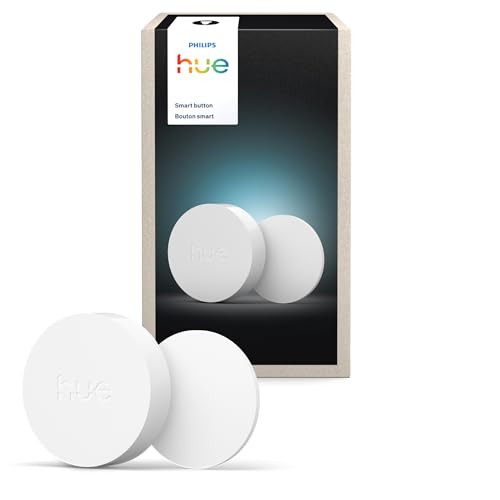
The Hue Smart Button is the best choice if your lights are Philips Hue. It controls Hue scenes and dimming directly, and it also works with Apple Home and Alexa through the Hue Bridge.
Best for: Philips Hue homes, especially if you also use Alexa routines.
What stands out in real use
In the Hue app, a short press can switch to the right scene for the time of day or cycle through several scenes, and pressing and holding dims your lights up or down. You can also set it to start a Hue automation. Through the Hue Bridge, the button also appears in Apple Home and in the Alexa app, where it can trigger a routine. However, both platforms only use a single press. The long press for dimming only works with the Hue app. This 2025 version has a new design, and it sits on a magnetic mount that you can put on the wall or take off as a remote.
Key specs
- Zigbee and Bluetooth
- Hue Bridge required for the full features
- Up to 10 lights without a bridge, 50 with one
- CR2032 battery included
- IP20, indoor use only
Pros
- Easy Hue scenes and dimming
- Triggers Alexa routines through the Hue Bridge
- Works with Apple Home through the bridge
- Battery rated for about 2 years
Cons
- Needs a Hue Bridge
- Only a single press in Apple Home and Alexa
- Best with Hue lights, limited with other brands
Installation and compatibility notes
Add the button in the Hue app, and it appears in Apple Home in the room you chose in the Hue app. To use it in Alexa, the Hue skill needs to be connected, and then the button shows up under Remotes in the Alexa app. Without a bridge, it can only control up to 10 Hue lights directly.
Price: ~$33
Onvis Smart Button HS2 — Best Multi-Button for Apple Home

The Onvis HS2 puts five keys on one button, and each one has a single, double and long press. That’s up to 15 actions in the Home app from one device.
Best for: Apple Home users who want one remote for many scenes, like a bedside or living room controller.
What stands out in real use
It’s a HomeKit button that uses Thread, and you add it by scanning its code in the Home app. One key sits in the center and four sit in the corners, with small glow-in-the-dark dots to find them at night. The magnetic base can be mounted with adhesive or screws, and the button also sticks to metal surfaces. It’s for Apple Home only: it doesn’t work with Matter, Alexa, Google Home or SmartThings. The HomeKit News review found it reliable, but some owners report delays of a few seconds or dropped connections.
Key specs
- HomeKit over Thread (Bluetooth for setup)
- 5 keys, each with single, double and long press
- CR2450 battery, about 1 year
- Magnetic base, adhesive or screw mount
- Requires iOS 17.4 or later
Pros
- Up to 15 actions from one device
- Glow-in-the-dark dots on the keys
- Quick responses over Thread
- Larger CR2450 battery
Cons
- Apple Home only, without Matter
- Some owners report delays or dropouts
- Needs a Thread home hub
Installation and compatibility notes
You need a HomePod mini, a HomePod (2nd gen) or an Apple TV 4K (Wi-Fi + Ethernet) set up as your home hub. If you’re not sure whether you need one, our guide on whether HomeKit needs a hub explains it. Your iPhone needs iOS 17.4 or later.
Price: ~$35
IKEA BILRESA Dual Button — Cheapest Matter Button
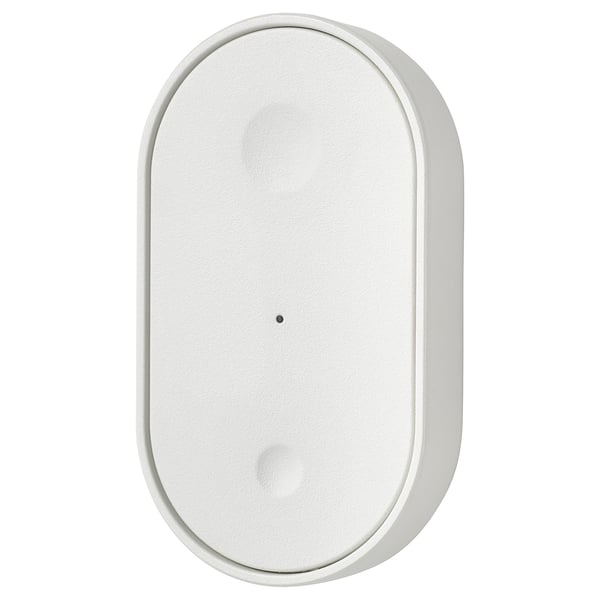
The BILRESA is IKEA’s Matter over Thread remote with two buttons, and at about $7 it costs a fraction of any other Matter button.
Best for: Apple Home and SmartThings users who want to try a Matter button, or put one in every room, for very little money.
What stands out in real use
It’s a Matter device, so it works without IKEA’s app or hub if you already have a Thread border router (IKEA suggests its DIRIGERA hub, and a HomePod, a Nest Hub or a Google TV Streamer also work). IKEA buyers report that Apple Home gives each button a single press, a double press and a hold, so you get six actions from one remote, while Alexa only uses a single press per button. It also works in SmartThings with all three presses. However, it has mixed reviews on IKEA’s site (3.1 out of 5): buyers mention difficult pairing, dropped connections, firmware that needed updating and a small magnetic base. Batteries aren’t included.
Key specs
- Matter over Thread
- 2 buttons, single, double and hold
- Controls up to 10 products
- 2 AAA batteries, not included
- Magnetic base
Pros
- Very low price
- Matter, so it works with several platforms
- Six actions in Apple Home
- Uses AAA batteries that are easy to replace
Cons
- Mixed reviews for pairing and reliability
- Only a single press in Alexa
- Batteries sold separately
- No IKEA app to help with setup unless you have a DIRIGERA hub
Installation and compatibility notes
IKEA recommends rechargeable AAA batteries (its LADDA HR03). Update the firmware after setup if your platform offers it, since several buyers said it helped. In Google Home, you need app version 4.8 or later to use the button as an automation starter.
Price: ~$7
How to Choose a Smart Button
Start with what you already have. The button is the cheap part. The arre, the Onvis and the IKEA need a Thread border router, the Aqara needs an Aqara hub and the Hue needs a Hue Bridge for most features. If you have a HomePod mini or an Apple TV 4K, the Thread buttons are ready to go. If you don’t have a border router yet, see our guide to the best Matter hubs, and our Matter vs Thread explainer for the difference between the two.
Check the presses your platform supports. A HomeKit button with three presses gives you three actions in Apple Home, but the same Matter button may give you only one in Alexa. If you use Alexa, a button with more keys (or more buttons) is the only way to get more actions. If you use Google Home, choose a Matter button, because buttons that come through another hub don’t show up as starters.
Count the actions you need. One button with three presses is enough for a bedroom light or a “good night” scene. For a living room with several scenes, the Onvis HS2 or two IKEA buttons save you from remembering long presses.
Think about where it goes. All five buttons are for indoor use. Magnetic mounts let you use them on the wall or as a remote, and the batteries are coin cells, except the IKEA, which uses AAA batteries.
Conclusion
The arre Smart Button is the best smart button for most homes: it’s a certified Matter device with three presses in Apple Home and SmartThings, and it doesn’t need a hub from arre. Choose the Aqara Wireless Mini Switch if you already have an Aqara hub, and the Philips Hue Smart Button if your lights are Hue or you want to trigger Alexa routines. For Apple Home, the Onvis HS2 is the best HomeKit button with several keys, and the IKEA BILRESA is the cheapest way to try a Matter button.
What is a smart button?
A smart button is a small wireless remote that runs a scene or an automation when you press it. Most buttons support a single press, a double press and a long press, and each one can do something different, depending on your smart home platform.
What is the best HomeKit button?
The arre Smart Button is the best HomeKit button for most people because it’s a Matter device with single, double and long press in Apple Home. If you want more actions, the Onvis Smart Button HS2 has five keys with three presses each, for up to 15 actions.
Do smart buttons need a hub?
Yes, almost always. Matter over Thread buttons need a Thread border router, such as a HomePod mini or an Apple TV 4K with Wi-Fi + Ethernet. Zigbee buttons need their brand’s hub, like an Aqara hub or a Philips Hue Bridge.
Do smart buttons work with Alexa?
Some do. Philips Hue buttons can trigger Alexa routines through the Hue Bridge, and Matter buttons like the IKEA BILRESA work in Alexa too. However, Alexa only uses a single press from these buttons.
Does Google Home support smart buttons?
Yes, since February 2026. The Google Home app (version 4.8 or later) can use a single press, a double press and a long press of a Matter button as an automation starter, in the automation editor.

Written by Evan Mercer
Founder & Lead Researcher, Smart Home Matrix
Evan digs through spec sheets, firmware changelogs, and thousands of owner reviews so you don’t have to. Every guide starts with a compatibility check and ends with picks he would install in his own home. Read more about Evan and this site, or see exactly how we choose products.