
A doorbell camera for apartments has to solve problems a house doesn’t have: there’s usually no doorbell wiring, your lease probably doesn’t let you drill into the door or the frame, and your door opens onto a shared hallway. The best option for most renters is the Ring Peephole Cam 2K, because it replaces the peephole you already have, installs in minutes without any tools, and comes out cleanly when you move.
Every option in this guide runs on batteries, and most of them go up without drilling: through the peephole, with an adhesive mount, or hanging over the door. For more battery-powered models, see our guide to the best wireless doorbell cameras. If you own a house and can wire a doorbell, see our guide to the best doorbell cameras instead.
Quick Recommendations
- Ring Peephole Cam 2K — Best overall. Replaces your door’s peephole with a 2K camera, without drilling or wiring.
- eufy Video Doorbell E340 — Best without a subscription. Records to 8 GB of storage inside the doorbell and has a second camera for packages.
- Tapo D210 — Best budget. A 2K battery doorbell with an indoor chime and microSD recording for under $60.
- Aqara G410 — Best for Apple Home. HomeKit Secure Video, an adhesive mount in the box and six AA batteries.
- Ring Battery Doorbell 2K — Best for a no-drill mount. Ring’s own adhesive mount holds it on a smooth door frame.
Top Choices at a Glance
| Product | Ecosystem | Key Feature | Approx. Price | Best For |
|---|---|---|---|---|
| Ring Peephole Cam 2K | Alexa | Fits through your existing peephole | ~$100 | Best overall |
| eufy Video Doorbell E340 | Alexa, Google Home | 8 GB built-in storage, two cameras | ~$150 | No subscription |
| Tapo D210 | Alexa, Google Home | Chime included, microSD up to 512 GB | ~$58 | Budget |
| Aqara G410 | Apple Home, Alexa, Google Home | HomeKit Secure Video | ~$145 | Apple Home |
| Ring Battery Doorbell 2K | Alexa | Works with Ring’s adhesive No-Drill Mount | ~$100 | No-drill mount |
Compatibility Matrix
| Product | HomeKit | Alexa | Google Home | Matter | Hub Required | Wiring/Power |
|---|---|---|---|---|---|---|
| Ring Peephole Cam 2K | No | Yes | No | No | No | Rechargeable battery pack |
| eufy Video Doorbell E340 | No | Yes | Yes | No | No | Rechargeable battery, or 8-24V doorbell wiring |
| Tapo D210 | No | Yes | Yes | No | No | Built-in rechargeable battery only |
| Aqara G410 | Yes (HomeKit Secure Video) | Yes | Yes | Controller only | No | 6 AA batteries, or 12-24V wiring |
| Ring Battery Doorbell 2K | No | Yes | No | No | No | Built-in rechargeable battery, optional 8-24V AC wiring |
The Aqara G410 is the only option that works with Apple Home, and the two Ring cameras only work with Alexa. None of these cameras needs a separate hub, and all of them work on battery power, which is what makes them good choices for an apartment.
The Best Doorbell Cameras for Apartments in 2026
Ring Peephole Cam 2K — Best Overall

The Peephole Cam 2K is the best doorbell camera for apartments because it’s designed for an apartment door. It goes through the hole your peephole already uses, so you don’t drill, glue or wire anything.
Best for: Renters with a standard door peephole who want a camera that comes off cleanly when they move.
What stands out in real use
You unscrew your old peephole viewer with the included tool, push the camera through the hole and tighten it from inside. The outdoor half shows 2K video with a square 140° by 140° view, so you see visitors from head to toe and packages on the floor. You get motion alerts, live view and Two-Way Talk in the Ring app, and you can set Privacy Zones to hide part of the hallway, like a neighbor’s door. The battery pack comes out for charging, and a second pack costs about $35 if you don’t want any downtime. However, you lose the optical peephole: to see who’s there without your phone, Ring suggests pairing it with an Echo Show.
Key specs
- 2K video, 140° horizontal and vertical view, up to 6x zoom
- Fits peepholes 0.47 to 0.55 in wide and doors 1.28 to 2.36 in thick
- Quick-Release rechargeable battery pack, USB-C cable included
- 2.4 GHz Wi-Fi only
- Works from -4°F to 122°F
- Alexa (Echo Show for live view)
Pros
- Installs without drilling, glue or wiring
- Made specifically for apartment and condo doors
- Head-to-toe view from inside the door
- Removable battery pack
Cons
- You can’t look through the peephole anymore
- Saved video needs a Ring subscription
- Doesn’t work with Apple Home or Google Home
- 2.4 GHz Wi-Fi only
Installation and compatibility notes
Measure your peephole and your door before you buy, because the camera only fits the sizes above. Without a subscription you still get live view, motion alerts and Two-Way Talk, but you can’t watch recorded clips: our guide to whether you need a subscription for Ring explains the plans. To hear a chime inside your apartment, add a Ring Chime (Ring also sells the camera and the Chime together).
Price: ~$100
eufy Video Doorbell E340 — Best Without a Subscription
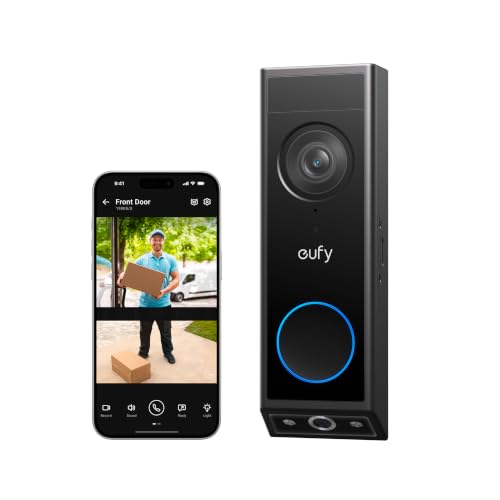
The E340 records everything to storage inside the doorbell, so you don’t pay a monthly fee to watch your clips. It’s also the only option in this guide with a second camera that looks down at your doormat.
Best for: Renters who get a lot of deliveries and don’t want to pay for a subscription.
What stands out in real use
The main camera records 2K video of visitors, and the second camera points down at the floor in front of your door, so a package left against the door is still in view. Clips save to 8 GB of storage on the doorbell itself, which eufy estimates is about 90 days of video at 30 short clips a day. Person, face and package detection are free. The battery pack comes out for charging, and it has color night vision for a dark hallway.
Key specs
- Two cameras: 2K main camera plus a downward package camera
- 8 GB of built-in storage
- Free person, face and package detection
- Removable rechargeable battery, or 8-24V doorbell wiring
- 2.4 GHz Wi-Fi, IP65
- Alexa and Google Assistant
Pros
- You don’t need a subscription to save video
- The package camera covers the floor at your door
- Free face and package detection
- Can also run on doorbell wiring if your apartment has it
Cons
- Doesn’t work with Apple Home
- One of the more expensive options in this guide
- eufy’s own mount uses screws
Installation and compatibility notes
eufy’s mounting plate screws into the wall, so for a no-drill install you’ll need a clamp-style door mount made for the E340. These clamp onto the door itself and only fit doors that open inward. For more doorbells that save video for free, see our guide to the best doorbell cameras without a subscription.
Price: ~$150
Tapo D210 — Best Budget

The D210 costs less than the other options in this guide and still records 2K video to a microSD card without a subscription. The chime is in the box too.
Best for: Renters on a budget who want local recording and a chime they can plug in anywhere.
What stands out in real use
The D210 runs only on its built-in 6,400 mAh battery, and Tapo rates it for up to 180 days with five minutes of use a day. You add a microSD card (up to 512 GB) and it records clips for free, with free person detection and activity zones. The indoor chime plugs into any outlet, which is useful in an apartment where there’s no doorbell wiring. Ring Call sends visitors to your phone as a call, and Quick Responses let you answer with a recorded message.
Key specs
- 2K (3MP) video, 160° diagonal view
- 6,400 mAh built-in battery, up to 180 days per charge
- microSD card up to 512 GB (sold separately)
- Free person detection
- Plug-in chime included
- 2.4 GHz Wi-Fi, IP65
- Alexa and Google Assistant
Pros
- The lowest price in this guide
- Free local recording to microSD
- Chime included in the box
- Long battery life
Cons
- Can’t be wired, so you charge the whole doorbell
- Tapo’s mounting kit uses screws
- Only person detection is free
Installation and compatibility notes
Tapo’s instructions mount the D210 with two screws, so ask your landlord before you install it. Because the battery is built in, you take the whole doorbell inside to charge it. The chime only works with Tapo doorbells.
Price: ~$58
Aqara G410 — Best for Apple Home

The G410 is the best choice if your apartment runs on Apple Home. It supports HomeKit Secure Video, comes with an adhesive mount, and runs on AA batteries.
Best for: iPhone users who want their doorbell in the Apple Home app, with recordings in iCloud.
What stands out in real use
The G410 records to iCloud through HomeKit Secure Video, which uses your iCloud+ plan instead of a separate camera subscription. In the Aqara app it records 2K video with a 175° lens, and you can also save clips to a microSD card in the included chime. It also works with Alexa and Google Home, and it acts as a hub for Aqara and Matter devices, so you may not need a separate smart home hub. Reviewers used the adhesive strip in the box to mount it without drilling.
Key specs
- HomeKit Secure Video, plus Alexa, Google Home and SmartThings
- 2K video in the Aqara app, 175° lens
- 6 AA batteries (included), or 12-24V wiring
- microSD card up to 512 GB in the chime
- Matter controller, Thread border router and Zigbee hub
- Dual-band Wi-Fi
Pros
- The only option in this guide that works with Apple Home
- Adhesive mount and batteries in the box
- AA batteries, so you don’t have to take it inside to charge
- Also works as a smart home hub
Cons
- HomeKit Secure Video records at a lower resolution than the Aqara app
- Only splash resistant, so it’s not for an uncovered entry
- You have to replace the AA batteries
Installation and compatibility notes
The G410 isn’t built for heavy rain, which doesn’t matter in an indoor hallway. HomeKit Secure Video needs an Apple home hub (an Apple TV or HomePod) and an iCloud+ plan. For more Apple Home doorbells, see our guide to the best HomeKit doorbell cameras.
Price: ~$145
Ring Battery Doorbell 2K — Best for a No-Drill Mount

The Battery Doorbell 2K is Ring’s most affordable battery doorbell, and it’s the best choice if your door doesn’t have a peephole that fits the Peephole Cam. Ring’s own No-Drill Mount (about $20) holds it in place with adhesive.
Best for: Ring users whose door frame or wall next to the door has a smooth surface.
What stands out in real use
It has the same 2K video and 140° by 140° head-to-toe view as the Peephole Cam, with up to 6x zoom. Because it’s a regular doorbell, visitors press a button, and you get the alert on your phone, a Ring Chime or an Echo device. You also keep your peephole. The battery is built in, so you remove the doorbell from its mount to charge it.
Key specs
- 2K video, 140° horizontal and vertical view, up to 6x zoom
- Built-in rechargeable battery
- Optional 8-24V AC doorbell wiring
- 2.4 GHz Wi-Fi only
- Alexa
Pros
- Keeps your peephole working
- Ring’s own adhesive mount fits it
- Affordable for a Ring doorbell
- Same app and subscription as other Ring devices
Cons
- The No-Drill Mount costs extra
- The whole doorbell comes off to charge
- Saved video needs a Ring subscription
- Doesn’t work with Apple Home or Google Home
Installation and compatibility notes
Ring says the No-Drill Mount works on smooth, even surfaces, not on brick, rough stucco or glass. Clean the surface and give the adhesive a few hours before you attach the doorbell.
Price: ~$100
How to Choose a Doorbell Camera for Your Apartment
Ask your landlord first. Your apartment door and the hallway outside usually belong to the building, and some leases and buildings don’t allow door hardware changes or doorbell cameras. Ask your landlord or property manager in writing and keep the reply, even for a no-drill install.
Choose how it will mount. A peephole doorbell camera like the Ring Peephole Cam 2K needs a standard peephole and the right door thickness, so check Ring’s Peephole Cam 2K installation guide before you buy. It also says the camera is approved for fire-rated doors only if they’re made of wood, so ask your building first if your door is metal. Adhesive mounts need a smooth surface next to the door, clamp mounts need a door that opens inward, and an over-the-door camera needs room above the door.
Check the Wi-Fi at your door. Your router may be on the other side of the apartment, and most of these cameras only use 2.4 GHz Wi-Fi. That’s actually helpful, because 2.4 GHz goes through walls better than 5 GHz. Check your phone’s Wi-Fi signal at the front door: if it’s weak there, add a mesh node or extender near the entrance.
Think about your neighbors and audio. Laws about recording conversations are different in every state, and some states require everyone’s consent before you record audio. In a shared hallway, aim the camera at your own door, use privacy or activity zones to block your neighbors’ doors, and turn off audio recording if you’re not sure. In the Ring app, the Audio Streaming and Recording switch needs a Ring subscription.
Decide where your video goes. The eufy E340 and Tapo D210 save clips locally without a subscription. The Aqara G410 uses HomeKit Secure Video and your iCloud+ plan. The two Ring cameras need a Ring subscription to save video.
Keep the original hardware. Put your old peephole viewer and any screws in a bag so you can put everything back when you move out. For the same kind of renter-friendly upgrade on the lock, see our guide to the best smart locks for renters.
Conclusion
For most apartments, the Ring Peephole Cam 2K is the best doorbell camera: it uses the peephole you already have and comes out without a trace. If you don’t want a subscription, the eufy Video Doorbell E340 records to built-in storage, and the Tapo D210 does the same with a microSD card for less. Apple Home users should choose the Aqara G410. If your door has no compatible peephole, the Ring Battery Doorbell 2K on Ring’s No-Drill Mount is a good alternative.
Can you put a doorbell camera on an apartment door?
Yes, as long as your lease and building allow it. Battery doorbell cameras don’t need wiring, and you can install them through the peephole, with an adhesive or clamp mount, or over the top of the door. Ask your landlord in writing before you install one.
What is the best peephole camera for an apartment?
The Ring Peephole Cam 2K is the best peephole camera for most apartments. It replaces your existing peephole viewer without drilling, records 2K video with a 140° by 140° view, and runs on a removable battery pack. It fits peepholes 0.47 to 0.55 in wide and doors 1.28 to 2.36 in thick.
How do you install a doorbell camera without drilling?
Use a peephole camera like the Ring Peephole Cam 2K, an adhesive mount like Ring’s No-Drill Mount or a clamp-style mount that grips the door. Adhesive mounts need a smooth, even surface, and clamp mounts only fit doors that open inward.
Do apartment doorbell cameras need a subscription?
Not all of them. The eufy Video Doorbell E340 saves video to 8 GB of built-in storage and the Tapo D210 records to a microSD card without a subscription. Ring cameras give you live view and alerts for free, but you need a Ring subscription to save recordings.
Is it legal to have a doorbell camera in an apartment hallway?
It depends on your lease, your building’s rules and your state. Ask your landlord in writing first, and be careful with audio: some states require everyone’s consent to record a conversation. Aim the camera at your own door, block neighbors’ doors with privacy zones, and turn off audio recording if you’re unsure.

Written by Evan Mercer
Founder & Lead Researcher, Smart Home Matrix
Evan digs through spec sheets, firmware changelogs, and thousands of owner reviews so you don’t have to. Every guide starts with a compatibility check and ends with picks he would install in his own home. Read more about Evan and this site, or see exactly how we choose products.