
A Ring doorbell transformer is the small box that turns your home’s 120 V power into the low voltage a wired doorbell runs on. Wired Ring doorbells need 16 to 24 V AC and 10 to 40 VA, and battery models accept anything from 8 V. If yours is too weak or broken, Ring recommends a replacement with at least 16 V and 30 VA, which covers every Ring doorbell that runs on a transformer.
This guide explains what size you need for each model, where the transformer usually is, how to check it and how to replace it step by step.
The Short Answer
- What size: 16 V AC and 30 VA is the safe choice for any Ring doorbell that uses a transformer. Wired models need at least 16 V, battery models at least 8 V, and none of them can take more than 24 V or 40 VA.
- Signs it’s too small: the doorbell flashes red or won’t turn on, it loses power at night or after a press, or the chime buzzes.
- Where it is: there’s no standard spot. Look near the electrical panel, in the garage, basement, attic or a closet, or behind the chime.
- Replacing it: turn off the breaker, swap the transformer in the same electrical box and reconnect the two thin doorbell wires. It’s 120 V work, so hire an electrician if you’re not comfortable with it.
- No transformer: the Ring Plug-In Adapter (2nd Gen) powers the doorbell from an indoor outlet instead.
What a Doorbell Transformer Does
A doorbell transformer steps 120 V household power down to low-voltage AC for the doorbell button and the chime. The line-voltage side sits inside an electrical box, and the low-voltage side has two screw terminals where the thin doorbell wires connect.
Every transformer has two numbers on its label, and both matter:
- Voltage (V): how much electrical pressure it supplies. A 16V doorbell transformer is the standard size in US homes, and 16 V is within the range of every Ring doorbell.
- Volt-amps (VA): how much power it can deliver at once. A traditional chime only needs power for a second when someone presses the button. A video doorbell runs a camera and Wi-Fi all day, so it needs more.
That’s why an old transformer can work fine with a chime and still fall short with a Ring doorbell. Older transformers are often rated 10 VA, which was enough for a chime but is the bare minimum for a wired video doorbell.
Some transformers have three terminals instead of two. In that case, the label lists the voltage and VA for each pair of terminals (for example 8 V, 16 V or 24 V), and you use the pair that matches what your doorbell needs.
What Size Transformer Your Ring Doorbell Needs
Ring publishes a power range for each doorbell in its hardwiring guidelines. Here’s what they say today:
| Ring doorbell | Voltage | VA |
|---|---|---|
| Battery doorbells (Battery Doorbell 2K, 2K Plus, 4K Pro and older Video Doorbell models) | 8-24 V AC | 5-40 VA |
| Video Doorbell Wired | 10-24 V AC | 8-40 VA |
| Wired Doorbell 2K, 2K Plus, 4K Pro, Wired Doorbell Plus and Pro | 16-24 V AC | 10-40 VA |
| Two or more doorbells on one transformer | 16 V AC | 30 VA |

A few things to keep in mind:
- 30 VA gives you headroom. Ring recommends at least 16 V and 30 VA when you replace a transformer, and its own Hardwired Transformer is exactly that. The 10 VA minimum works on paper, but features like Package Detection and Bird’s Eye View may not turn on if the doorbell doesn’t get enough power.
- Battery doorbells only trickle-charge. Wired to a transformer, a battery doorbell keeps its battery topped up and rings your existing chime, but the battery still does the work.
- Use a doorbell transformer, nothing else. Ring says not to use lighting transformers (like the ones for halogen or landscape lights) or power supplies that aren’t Ring’s own, because they can damage the doorbell.
- The Wired Doorbell 4K Elite is different. It runs on Power over Ethernet (PoE), not a doorbell transformer.
If you’re still choosing a model, our guide to the best Ring doorbells compares all of them, including which ones work with your existing chime.
Signs Your Transformer Is Too Small
According to Ring, these are the signs your doorbell isn’t getting enough power:
- It won’t turn on, or the light flashes red.
- It loses power at night or after someone presses the button.
- The chime doesn’t ring, rings by itself, or buzzes and hums.
- Package Detection or Bird’s Eye View can’t be turned on in the Ring app.
- The app shows a poor power rating in Device Health.
If you see one of these, check the transformer before you replace the doorbell.
Where Is the Doorbell Transformer?
There’s no standard doorbell transformer location: it depends on who wired the house. These are the usual places to look, roughly in this order:
- Near the main electrical panel, mounted on a small electrical box next to it.
- In the garage, on a wall or the ceiling.
- In the basement or crawlspace, near other electrical equipment.
- In the attic or a closet.
- Behind the chime, in a junction box inside the wall. Take the chime cover off to check.

It’s a small metal box attached to an electrical box, with two thin wires coming out of the screw terminals on its side. If you can’t find it, follow those thin doorbell wires: one runs from the doorbell to the chime, and the chime connects to the transformer. Ring says the transformer is often far from the chime, so this can take some time.
How to Check Your Transformer
Start with the label. Once you’ve found your Ring doorbell transformer, read the voltage and VA printed on it and compare them with the table above. If it says 16 V and 10 VA, it’s within Ring’s range for most models but has no headroom, and a 30 VA replacement is a good idea when you see the signs above.
To check that it still works, use a multimeter. This is low-voltage, so you can test it with the power on:
- Set the multimeter to AC volts, on a range above 24 V.
- Touch one probe to each low-voltage screw terminal.
- Read the number. A working transformer reads close to its rating (a few volts higher with nothing connected is normal). A reading well below the rating, or zero, means it’s failing or isn’t getting power.
A multimeter can’t tell you the VA rating, so the label is the only way to know that. If the label is worn off, replacing the transformer is usually easier than guessing.
How to Replace a Doorbell Transformer
For a doorbell transformer replacement, the new transformer goes in the same place as the old one, and the doorbell wiring stays the same. These are Ring’s steps:
- Turn off the breaker that powers the transformer. If your breakers aren’t labeled, turn off the main breaker.
- Take a photo of the old transformer’s wires before you touch anything.
- Disconnect the household wires. Inside the electrical box, three wires connect the transformer to your home’s power. Remove the wire nuts and separate them.
- Disconnect the two doorbell wires from the screw terminals, then remove the old transformer.
- Mount the new transformer where the old one was, through the opening in the electrical box.
- Connect the household wires to the matching leads on the new transformer with wire nuts, the same way they were connected to the old one (your photo helps here).
- Connect the two doorbell wires to the screw terminals. Ring says it doesn’t matter which wire goes on which terminal.
- Turn the breaker back on and check the doorbell in the Ring app.
Before you test the doorbell, open its In-home Chime Settings in the Ring app and make sure the chime type (Mechanical, Digital or None) matches what you have. Ring says to check this first to prevent damage. If you keep your old chime, its voltage matters too: Ring says to compare the transformer with what both the doorbell and the chime need, and a 16 V transformer suits chimes rated for 16 V. Our Ring Chime vs Chime Pro guide explains the plug-in options if your chime stops working.
The transformer connects to 120 V household wiring, so this is the step where you can get hurt. Ring says installation by a qualified electrician may be required in your area, and some places need a permit. If you’ve never worked inside an electrical box, hire an electrician for this part and do the doorbell yourself. Our guide on how to install a Ring doorbell covers that side, from the app setup to the chime connection.
What to Buy
Any 16 V, 30 VA doorbell transformer works with Ring doorbells. If you don’t want to touch the house wiring at all, the Plug-In Adapter is the alternative.
Ring Hardwired Transformer — Best Overall
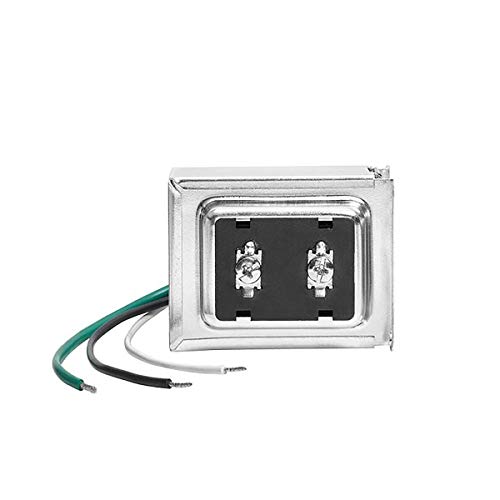
Ring’s own transformer takes 120 V AC and supplies 16 V AC at 30 VA, the rating Ring recommends for its wired doorbells. It mounts to an electrical box with screws or a threaded clamp.
Best for: replacing a weak transformer with the part Ring designed for its doorbells.
Price: ~$25
Newhouse Hardware 16V 30VA Transformer — Best Budget Option

This Newhouse Hardware transformer has the same 16 V, 30 VA rating as Ring’s, and it costs a little less. It mounts the same way, to an electrical box.
Best for: a cheaper transformer with the rating Ring recommends.
Price: ~$21
Ring Plug-In Adapter (2nd Gen) — Best Without Doorbell Wiring

The Plug-In Adapter plugs into an indoor outlet near the door and runs a thin cable to the doorbell, along the molding with the included clips or through a wall, door or window. Either wire goes on either terminal, and you choose “no chime” during setup, so your old chime won’t ring. It doesn’t work with the Peephole Cam or the Video Doorbell Elite.
Best for: homes with no doorbell wiring, or a broken transformer you can’t reach.
Price: ~$25
If you’d rather skip wiring altogether, a battery doorbell is the other option: our guide to the Ring doorbell battery explains how long it lasts and how to charge it. And if the doorbell goes offline after you change the transformer, see how to reset a Ring doorbell.
The Bottom Line
If your Ring doorbell has power problems, the Ring doorbell transformer is the first thing to check, because older ones were often sized for a chime, not a camera. Read the label: if it’s below what your model needs, or only 10 VA, replace it with a 16 V, 30 VA model in the same electrical box. It’s a short job, but it’s 120 V work, so turn off the breaker first or hire an electrician. If there’s no wiring at the door, the Plug-In Adapter does the same job from an outlet.
What size transformer do I need for a Ring doorbell?
Wired Ring doorbells like the Wired Doorbell 2K Plus and 4K Pro need 16 to 24 V AC and 10 to 40 VA, and battery models accept 8 to 24 V AC. When you replace a transformer, Ring recommends at least 16 V AC and 30 VA.
Where is my doorbell transformer located?
There’s no standard spot. Check near the main electrical panel, in the garage, basement, attic or a closet, or in a junction box behind the chime, and follow the thin doorbell wires from the chime if you can’t find it.
Can I use a 24V transformer with a Ring doorbell?
Yes, every Ring doorbell that runs on a transformer accepts up to 24 V AC. If you keep your old chime, check that it’s rated for that voltage too, because Ring says the transformer has to suit both the doorbell and the chime.
How do I know if my Ring doorbell transformer is too weak?
Ring lists these signs: the doorbell won’t turn on or flashes red, it loses power at night or after a press, the chime buzzes or doesn’t ring, Package Detection or Bird’s Eye View can’t be turned on, or the app shows a poor power rating.
Do I need an electrician to replace a doorbell transformer?
The transformer connects to 120 V household wiring, so always turn off the breaker first. Ring says a qualified electrician and a permit may be required in your area, so hire one if you’re not comfortable working inside an electrical box.
Can I power a Ring doorbell without a transformer?
Yes. The Ring Plug-In Adapter (2nd Gen) powers a Ring doorbell from an indoor outlet, but it doesn’t work with the Peephole Cam or the Video Doorbell Elite. A battery doorbell doesn’t need any wiring.

Written by Evan Mercer
Founder & Lead Researcher, Smart Home Matrix
Evan digs through spec sheets, firmware changelogs, and thousands of owner reviews so you don’t have to. Every guide starts with a compatibility check and ends with picks he would install in his own home. Read more about Evan and this site, or see exactly how we choose products.