
A baby monitor lets you see and hear your baby from another room, and the newer ones also send alerts to your phone, track the room’s temperature and record the night. For most families, the best baby monitor is the Nanit Pro: its 1080p camera looks down on the crib from above, it works over Wi-Fi from anywhere and its free features already cover live video, alerts and the nursery’s temperature and humidity, for about $290.
Not everyone wants a monitor on Wi-Fi, though. The options below also cover a dedicated parent unit, monitors that never connect to the internet, an FDA-cleared sock that reads your baby’s pulse and oxygen level, and two budget choices.
Quick Recommendations
- Nanit Pro — Best overall. An overhead 1080p camera with sleep tracking, alerts and Alexa support.
- eufy Baby Monitor E21 — Best with a parent unit. A 4K pan-tilt camera and a 5-inch screen that work with or without Wi-Fi, without a subscription.
- Owlet Dream Duo 3 — Best for health readings. The FDA-cleared Dream Sock plus a 2K camera in one app.
- Infant Optics DXR-8 PRO — Best without Wi-Fi. A private link to a 5-inch parent unit, with noise reduction and interchangeable lenses.
- Owlet Dream Sight — Best budget Wi-Fi camera. 2K video, cry alerts and room readings on your phone for about $100.
- VTech VM819 — Best budget. A simple monitor without Wi-Fi and with up to 19 hours of video on a charge.
Top Choices at a Glance
| Product | Ecosystem | Key Feature | Approx. Price | Best For |
|---|---|---|---|---|
| Nanit Pro | Nanit app, Alexa | Overhead 1080p camera, sleep tracking | ~$290 | Best overall |
| eufy Baby Monitor E21 | Parent unit + eufy Baby app | 4K pan-tilt camera, no subscription | ~$260 | Parent unit and app |
| Owlet Dream Duo 3 | Owlet Dream app | Pulse and oxygen sock + 2K camera | ~$380 | Health readings |
| Infant Optics DXR-8 PRO | Parent unit only | No Wi-Fi, active noise reduction | ~$200 | No Wi-Fi |
| Owlet Dream Sight | Owlet Dream app | 2K Wi-Fi camera | ~$100 | Budget Wi-Fi |
| VTech VM819 | Parent unit only | 19-hour video battery | ~$48 | Tight budget |
Compatibility Matrix
| Product | HomeKit | Alexa | Google Home | Matter | Connection | Subscription |
|---|---|---|---|---|---|---|
| Nanit Pro | No | Yes | With Insights plan | No | Wi-Fi, 2.4 and 5 GHz | Optional |
| eufy Baby Monitor E21 | No | No | No | No | Local link + Wi-Fi app | None |
| Owlet Dream Duo 3 | Not stated | Not stated | Not stated | No | Wi-Fi (sock needs 2.4 GHz) | Optional |
| Infant Optics DXR-8 PRO | No | No | No | No | No Wi-Fi | None |
| Owlet Dream Sight | Not stated | Not stated | Not stated | No | Wi-Fi, 2.4 and 5 GHz | Optional |
| VTech VM819 | No | No | No | No | No Wi-Fi | None |
Smart home support is limited for baby monitors: none of these work with HomeKit or Matter. The Nanit Pro is the only one that works with Alexa, and Nanit lists Google Home as part of its paid Insights plan.
Wi-Fi, No Wi-Fi or Both
The first choice is how the camera talks to you, because it decides where you can watch, what happens during an outage and whether you’ll pay for a subscription.
Wi-Fi monitors stream the camera to an app on your phone, so you can check in from work or a date night. They usually add sleep data, video history and alerts. However, they depend on your router, and a weak signal in the nursery means a frozen picture. If a Wi-Fi camera keeps dropping, our guide to a smart camera that keeps going offline covers the usual fixes.
Monitors without Wi-Fi send the picture straight from the camera to a handheld parent unit over a private radio link. Nothing goes through the internet, you don’t need an online account and they keep working when the internet is down. However, you can only watch at home, within range of the camera.
Hybrid monitors like the eufy E21 do both: a parent unit for the night and an app for when you’re out.
The Best Baby Monitors in 2026
Nanit Pro — Best Overall

The Nanit Pro is the best choice for most families: its overhead view shows the whole crib, and the features you get without paying are already enough for daily use.
Best for: Parents who want to check on the baby from their phone, track sleep and use an Echo Show as a second screen.
What stands out in real use
Mounted above the crib on its floor stand or wall mount, the camera looks straight down, so you can see your baby’s face and position instead of the crib bars. Without a plan, you get live 1080p video, sound and motion alerts, background audio while you use other apps, two-way audio, white noise, a nightlight and room temperature and humidity. Breathing Motion Monitoring is also free if your baby wears Nanit’s patterned Breathing Band, swaddle or sleeping bag (sold separately). The Insights plans add sleep analysis and video history: the Sleep plan costs under $10 a month billed annually, and Memories ($120 a year) and Milestones ($300 a year) add 2 or 7 days of continuous video. Each camera comes with three months of the Sleep plan. With Alexa, you can watch the live video on an Echo Show or another smart display and turn on the nightlight by voice.
Key specs
- 1080p camera with infrared night vision
- Overhead view from the floor stand or wall mount
- Temperature and humidity sensors
- Wi-Fi, 2.4 and 5 GHz
- Plug-in power
Pros
- Overhead view of the whole crib
- Strong free features, including breathing motion with Breathing Wear
- Works with Alexa
- Nanit says it keeps streaming on your home network if the internet goes down
Cons
- Sleep analysis and video history need a paid plan
- Your phone is the screen unless you buy Nanit’s display
- No pan or tilt
- Google Home access is part of the paid plan
Installation and compatibility notes
Use the floor stand or wall mount if you want sleep tracking, since the Flex Stand doesn’t support it. Nanit recommends a 5 GHz network for the best video, so check the Wi-Fi signal in the nursery before you mount it. If you’d rather have a screen than use your phone, Nanit also sells the camera with an 8-inch display for about $399.
Price: ~$290
eufy Baby Monitor E21 — Best With a Parent Unit
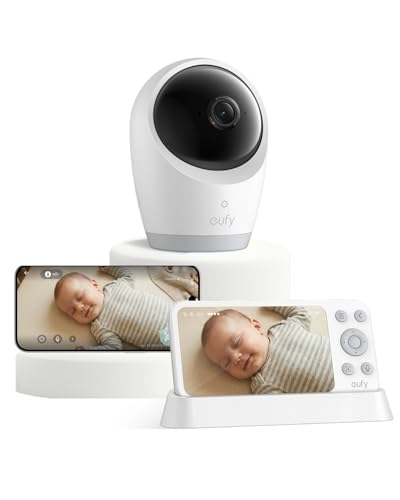
The E21 gives you a dedicated screen for the night and an app for when you’re out, with 4K video and without any subscription.
Best for: Parents who want a parent unit on the nightstand but still want to check in from work, and anyone who wants to avoid monthly fees.
What stands out in real use
The camera pans 330 degrees, tilts 60 degrees and zooms 8x, so you can follow a baby who moves around the crib or check the rest of the room. The 5-inch parent unit connects directly to the camera without Wi-Fi, and the eufy Baby app adds remote viewing for you and up to five family members. A switch turns the Wi-Fi off completely if you only want the local connection. You get alerts for crying, loud noises and room temperature changes, and active noise reduction cuts background noise by 20 dB. With a microSD card, the camera records 24/7, and you watch it back in the app without paying for cloud storage. The camera has its own 5,000 mAh battery, so you can take it to a grandparent’s house or a hotel.
Key specs
- 4K camera, 330° pan, 60° tilt, 8x zoom, night vision
- 5-inch 720p parent unit
- Local connection plus the eufy Baby app
- 24/7 recording to microSD (up to 128 GB, not included)
- Camera battery: about 9 hours, about 5.5 hours with night vision
Pros
- Parent unit and app in one system
- No subscription
- Sharp video with pan, tilt and zoom
- Portable camera for travel
Cons
- No motion alerts
- The parent unit isn’t a touchscreen
- microSD card costs extra
- Doesn’t work with Alexa, Google or HomeKit
Installation and compatibility notes
Leave the camera on its charging base in the nursery and use the battery for trips. Add a microSD card before the first night if you want continuous recording. eufy says its baby monitors don’t support Alexa, Google Assistant or HomeKit, so everything runs through the parent unit and the eufy Baby app. You can add a second camera and watch both on a split screen.
Price: ~$260
Owlet Dream Duo 3 — Best for Health Readings

The Dream Duo 3 is the choice if you want more than video: the Dream Sock reads your baby’s pulse rate and oxygen level, and the 2K camera shows you the crib.
Best for: Parents who want health readings while the baby sleeps, from a sock that the FDA has cleared.
What stands out in real use
The FDA cleared the Dream Sock in 2023 as an over-the-counter device that shows pulse rate and oxygen level and alerts you when readings leave preset ranges, for healthy babies from 1 to 18 months old and 6 to 30 pounds. The base station is the main alert: it lights up and sounds even if your phone, the app or the Wi-Fi isn’t working. The Dream Sight camera streams 2K video with night vision and 4x zoom, and sends cry, sound and motion notifications plus temperature and humidity readings. Live readings and notifications are free. The optional Owlet360 plan ($99.99 a year) adds 14 days of video history and sleep trends. However, no monitor replaces safe sleep: the American Academy of Pediatrics says there’s no evidence that consumer wearable monitors lower the risk of SIDS, and Owlet itself says the sock isn’t a substitute for safe sleep practices.
Key specs
- Dream Sock: pulse rate and oxygen level, ages 1 to 18 months
- Base station with light and sound alerts
- 2K camera, 130° lens, 4x zoom, night vision, two-way talk
- Temperature and humidity tracking
- Camera Wi-Fi 2.4 and 5 GHz; the sock needs 2.4 GHz
Pros
- FDA-cleared pulse and oxygen readings
- Alerts from the base station even if the app is down
- Sharp 2K video
- Core readings and alerts are free
Cons
- The most expensive option here
- The sock only covers babies up to 18 months
- Video history needs Owlet360
- No dedicated video parent unit
Installation and compatibility notes
Keep a 2.4 GHz Wi-Fi network available, because the Dream Sock needs it even if your phone and camera use 5 GHz. Put the base station where you’ll hear it at night, and charge the sock during the day. Owlet says the health notifications aren’t for babies under one month or under 6 pounds.
Price: ~$380
Infant Optics DXR-8 PRO — Best Without Wi-Fi

The DXR-8 PRO is the monitor to buy if you don’t want your nursery camera on the internet at all.
Best for: Privacy-minded parents, homes with weak Wi-Fi and anyone who wants a monitor that works the moment it’s plugged in.
What stands out in real use
The camera talks directly to the 5-inch parent unit over a private radio link, so there’s no app, no account and no cloud. Its active noise reduction filters out fans, air purifiers and air conditioners, which helps if you run white noise in the nursery. You pan, tilt and zoom from the parent unit, and you can swap the standard lens for the included zoom lens for a closer view. The battery is user-replaceable, so a worn battery doesn’t mean a new monitor. However, the video looks dated next to the 2K and 4K cameras here, and the battery lasts about 6 hours with the screen on, so most parents keep it on the charger at night.
Key specs
- 5-inch 720p parent unit
- No Wi-Fi: direct FHSS radio link
- Pan, tilt and zoom from the parent unit
- Standard and zoom lenses included
- Up to 4 cameras
- Replaceable battery, about 6 hours with the screen on
Pros
- Nothing goes through the internet
- Good background noise reduction
- Interchangeable lenses
- Easy to set up
Cons
- Video quality is behind newer monitors
- Short screen-on battery life
- You can only watch at home
- No sleep tracking or phone alerts
Installation and compatibility notes
Infant Optics claims up to 1,000 feet of range in open space, but walls cut that a lot, so test the signal from your bedroom and kitchen before you rely on it. Use the standby or sound-activated mode at night to save battery.
Price: ~$200
Owlet Dream Sight — Best Budget Wi-Fi Camera
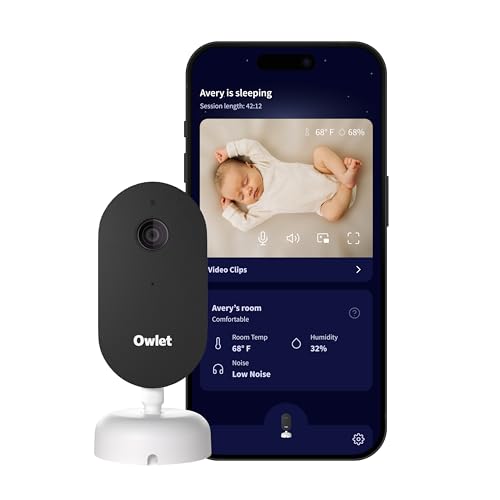
The Dream Sight is Owlet’s camera on its own: a 2K baby monitor camera for your phone, for about a third of the Nanit’s price.
Best for: Parents who want app alerts and sharp video without spending much, and anyone who might add a Dream Sock later.
What stands out in real use
You get 2K video with night vision and 4x zoom, two-way talk and notifications for crying and motion, with a filter for background noise. The camera also tracks the nursery’s temperature and humidity and alerts you when the room is too warm, too cold or too dry. It saves video clips in the Owlet Dream app, and Owlet360 ($99.99 a year) adds 14 days of video history. Since it’s the same camera as in the Dream Duo 3, you can pair a Dream Sock with it later. Some recent reviews mention disconnects after software updates, so keep it close enough to your router for a strong signal.
Key specs
- 2K camera, 4x zoom, night vision
- Cry, sound and motion notifications
- Temperature and humidity tracking
- Two-way talk
- Wi-Fi, 2.4 and 5 GHz
Pros
- Sharp video for the price
- Room temperature and humidity alerts
- Works with the Dream Sock later
- Live video doesn’t need a subscription
Cons
- Phone only, no parent unit
- Video history needs Owlet360
- No overhead sleep tracking like Nanit’s
- Mixed reports on connection reliability
Installation and compatibility notes
Setup uses Bluetooth and Wi-Fi in the Owlet Dream app. Mount it on the wall or a shelf so it sees the whole crib, and keep the cord out of reach (see the safety notes below).
Price: ~$100
VTech VM819 — Best Budget

The VM819 does the basics without an app or Wi-Fi, for less than $50.
Best for: A tight budget, a second monitor for grandparents, or parents who only want to see and hear the baby.
What stands out in real use
The camera sends video directly to a small 2.8-inch parent unit over an encrypted radio link, with nothing to set up beyond plugging it in. The battery is the highlight: up to 19 hours of video or 29 hours of audio only on one charge, so it lasts the whole night. A sound-activated mode keeps the screen dark until your baby makes noise. You also get infrared night vision, 2x digital zoom, two-way talk, a nursery temperature display and a few lullabies and ambient sounds. However, the small screen and basic video quality are where it saves money, and the camera doesn’t pan or tilt.
Key specs
- 2.8-inch parent unit
- No Wi-Fi: encrypted FHSS radio link
- Up to 19 hours video, 29 hours audio only
- Night vision, 2x digital zoom, two-way talk
- Temperature sensor
- Up to 2 cameras
Pros
- Very affordable
- Long battery life
- Nothing goes through the internet
- Simple to use
Cons
- Small screen
- Basic video quality
- No pan or tilt
- You can only watch at home
Installation and compatibility notes
VTech claims up to 1,000 feet of range in open space, and indoors it’s a lot shorter, so check the picture from the rooms you use most. Place the camera on a dresser or shelf at least 3 feet from the crib.
Price: ~$48
How to Choose a Baby Monitor
Parent unit or phone. A parent unit is always on and doesn’t drain your phone, which many parents prefer at night. A phone app lets you check in from anywhere and share the view with a partner or grandparent. If you want both, choose a hybrid like the eufy E21, or add Nanit’s display to the Nanit Pro.
Know what the subscription adds. The Nanit and Owlet monitors work without a plan for live video and alerts, and charge for sleep analysis and video history. The eufy E21 records to a microSD card for free, and the monitors without Wi-Fi have nothing to subscribe to.
Health sensors don’t replace safe sleep. The Dream Sock and Nanit’s breathing motion feature can give you more information, but the AAP’s advice is the same for every family: put your baby to sleep on their back, on a firm, flat surface, without pillows, blankets or toys in the crib.
Keep cords away from the crib. The CPSC says to keep monitor cords at least 3 feet from any part of a crib, bassinet or play yard, and never to put a monitor inside or on the edge of the crib. Wall mounts like Nanit’s route the cord down the wall, which helps.
Watch the nursery’s temperature and humidity. Most monitors here show the room temperature, and the Nanit and Owlet cameras show humidity too. Our guide to indoor humidity levels explains the range to aim for in winter and summer.
Protect your account. For a Wi-Fi monitor, use a strong, unique password, turn on two-factor authentication if the app offers it and install firmware updates.
Think about later. Once your child is older, a regular indoor security camera can watch the playroom for less money, but a dedicated baby monitor camera is still better in the nursery for its alerts and quick parent view.
Conclusion
The Nanit Pro is the best baby monitor for most families: its overhead camera shows the whole crib, it works with Alexa and its free features cover live video, alerts and room readings. The eufy Baby Monitor E21 combines a parent unit and an app without any subscription, and the Owlet Dream Duo 3 adds FDA-cleared pulse and oxygen readings. If you don’t want Wi-Fi, choose the Infant Optics DXR-8 PRO, or the VTech VM819 on a budget. The Owlet Dream Sight is the budget choice if you want the video on your phone. If you’re deciding between the two smart brands, our Nanit vs Owlet comparison explains how they differ.
What is the best baby monitor?
The Nanit Pro is the best baby monitor for most families. Its 1080p camera looks down on the crib from above, and without a subscription you get live video, sound and motion alerts, two-way audio and room temperature and humidity. It also works with Alexa.
What is the best baby monitor without Wi-Fi?
The Infant Optics DXR-8 PRO is the best option without Wi-Fi. It sends video straight to a 5-inch parent unit over a private radio link, filters out fan and white noise, and has interchangeable lenses. The VTech VM819 is a cheaper option without Wi-Fi.
Do baby monitor cameras need a subscription?
Not for the basics. The Nanit Pro and Owlet cameras show live video and send alerts without a plan, and charge for sleep analysis and video history. The eufy E21 records to a microSD card without any subscription, and monitors without Wi-Fi have no plan at all.
Is the Owlet Dream Sock FDA-cleared?
Yes. The FDA cleared the Dream Sock in 2023 as an over-the-counter device that shows a baby’s pulse rate and oxygen level and alerts you when readings leave preset ranges. It’s for healthy babies from 1 to 18 months old and 6 to 30 pounds.
Do any baby monitors work with Alexa or Google Home?
The Nanit Pro works with Alexa, so you can watch the live video on an Echo Show, and Nanit lists Google Home as part of its paid Insights plan. eufy says its baby monitors don’t work with Alexa, Google Assistant or HomeKit.
How far from the crib should a baby monitor be?
The CPSC says to keep the monitor’s cord at least 3 feet from any part of the crib, bassinet or play yard. Never put a monitor inside the crib or on its edge.

Written by Evan Mercer
Founder & Lead Researcher, Smart Home Matrix
Evan digs through spec sheets, firmware changelogs, and thousands of owner reviews so you don’t have to. Every guide starts with a compatibility check and ends with picks he would install in his own home. Read more about Evan and this site, or see exactly how we choose products.