
A home weather station measures the weather where you live, instead of at an airport a few miles away: the temperature in your yard, the rain that actually fell on your garden and the wind at your house. For most homes, the best weather station for home use is the Ambient Weather WS-2902. It measures everything most people need, it shows it on a color console and it sends the data to your phone over Wi-Fi for about $200.
If you want a station with no moving parts, local data for Home Assistant, lightning alerts or a lower price, the options below cover each of those cases. If you use Apple Home, it’s worth knowing early that none of the full weather stations in this guide work with HomeKit: the Eve Weather is the HomeKit weather station here, and it measures temperature, humidity and air pressure, not wind or rain.
Quick Recommendations
- Ambient Weather WS-2902 — Best overall. Wind, rain, UV, solar radiation and pressure on a color console, with free remote monitoring.
- Tempest Weather System — Best for smart homes. One sensor with no moving parts, lightning detection and Alexa and IFTTT support.
- Ecowitt WS3901 — Best for Home Assistant. An ultrasonic 7-in-1 sensor and a large console that shares data locally.
- AcuRite Atlas — Best for lightning alerts. A complete station with a lightning detector and an HD display that connects to Wi-Fi.
- AcuRite Iris (5-in-1) — Best budget. Temperature, humidity, wind and rain with a Wi-Fi display for about $139.
- Eve Weather — Best for HomeKit. A Matter over Thread sensor for outdoor temperature, humidity and pressure in Apple Home.
Top Choices at a Glance
| Product | Ecosystem | Key Feature | Approx. Price | Best For |
|---|---|---|---|---|
| Ambient Weather WS-2902 | Ambient app, Alexa, IFTTT | 7 outdoor readings + color console | ~$200 | Best overall |
| Tempest Weather System | Tempest app, Alexa, IFTTT | No moving parts, lightning | ~$349 | Smart homes |
| Ecowitt WS3901 | Ecowitt app, Home Assistant | Ultrasonic wind, local data | ~$240 | Home Assistant |
| AcuRite Atlas | AcuRite app, Weather Underground | Lightning detection 1-25 miles | ~$240 | Lightning alerts |
| AcuRite Iris (5-in-1) | Weather Underground | 5 readings, HD display | ~$139 | Budget |
| Eve Weather | Apple Home, Matter | Thread, works in Apple Home | ~$88 | HomeKit |
Compatibility Matrix
| Product | HomeKit | Alexa | Google Home | Matter | Thread | Hub Required | Wiring/Power |
|---|---|---|---|---|---|---|---|
| Ambient Weather WS-2902 | No | Yes | No | No | No | No (console on Wi-Fi) | Solar sensor with battery backup, plug-in console |
| Tempest Weather System | No | Yes | No | No | No | Included Tempest hub | Solar-charged battery, plug-in hub |
| Ecowitt WS3901 | No | No | No | No | No | No (console on Wi-Fi) | Solar sensor with AA backup, plug-in console |
| AcuRite Atlas | No | Not stated | No | No | No | No (display on Wi-Fi) | 4 AA in the sensor, plug-in display |
| AcuRite Iris (5-in-1) | No | No | No | No | No | No (display on Wi-Fi) | 4 AA in the sensor, plug-in display |
| Eve Weather | Yes | Via Matter | Via Matter | Yes | Yes | Thread border router | CR2450 battery |
The Eve Weather is the only option here that works in Apple Home or over Matter, and it needs a Thread border router such as a HomePod mini or Apple TV 4K. For Home Assistant, the Ecowitt and Tempest stations share their data on your home network, while the Ambient integration reads it from Ambient’s cloud.
The Best Home Weather Stations in 2026
Ambient Weather WS-2902 — Best Overall
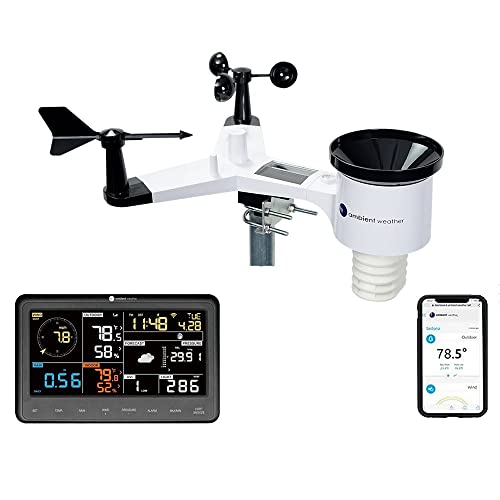
The WS-2902 is the best home weather station for most people: it measures every common reading, it has a clear color console and its free online dashboard works well.
Best for: Homeowners who want a complete wifi weather station with a console inside and remote monitoring on their phone.
What stands out in real use
The outdoor sensor array measures wind speed and direction, rainfall, outdoor temperature and humidity, UV and solar radiation, and the console adds indoor temperature, humidity and barometric pressure. It also calculates dew point, heat index and wind chill. The console connects to your Wi-Fi and uploads to AmbientWeather.net, where you can see your current readings and history for free, and share them with Weather Underground. Ambient’s site lists Alexa, IFTTT, SmartThings and Home Assistant support, so you can ask Alexa for your backyard weather or use IFTTT to trigger something when the wind picks up. However, the cups, wind vane and rain bucket are moving parts that need cleaning now and then.
Key specs
- Wind, rain, outdoor temperature and humidity, UV, solar radiation
- Indoor temperature, humidity and pressure on the console
- Color LCD console, 2.4 GHz Wi-Fi
- Solar sensor array with battery backup
- Range about 100 ft through walls (330 ft in open air)
Pros
- Measures every common reading for about $200
- Free AmbientWeather.net dashboard and history
- Works with Alexa, IFTTT and SmartThings
- Shares data with Weather Underground
Cons
- Moving parts that need cleaning
- Home Assistant reads the data from Ambient’s cloud, not locally
- Doesn’t work with Apple Home or Google Home
- Text alerts and three years of history need the paid AWN+ plan
Installation and compatibility notes
You mount the sensor array on a pole (not included), line it up the way the manual shows and plug the console in indoors. You can set it up in Ambient’s app or on the console’s own web page. The console connects only to 2.4 GHz Wi-Fi.
Price: ~$200
Tempest Weather System — Best for Smart Homes
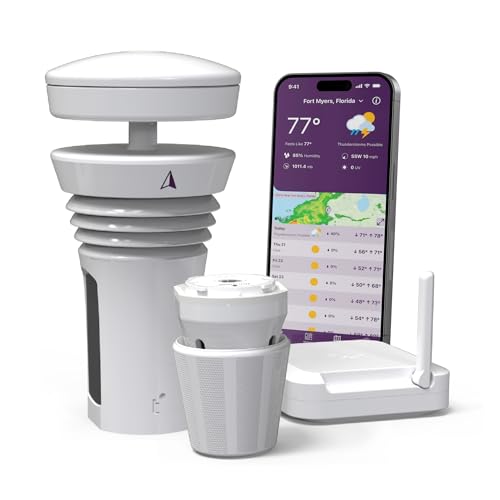
The Tempest is a single sensor with no moving parts that measures wind, rain and lightning, and it has the best smart home options of the full weather stations in this guide.
Best for: Smart homes that want weather-based automations, and anyone who doesn’t want to clean cups and a rain bucket.
What stands out in real use
Instead of spinning cups, the Tempest measures wind with sound waves, and it counts raindrops with a haptic sensor that feels each drop hit the top. It also measures temperature, humidity, pressure, UV, solar radiation and light, and it detects lightning up to about 25 miles away. The sensor charges its own battery in the sun, and a small hub plugs in indoors. The free Tempest app combines your station’s readings with forecast models to give a forecast for your exact location. Tempest works with an Alexa skill, IFTTT, Rachio sprinkler controllers and the Amazon Smart Thermostat, and Home Assistant reads its data locally. However, the haptic sensor doesn’t measure snow, and there’s no display in the box: you check everything in the app.
Key specs
- Sonic wind, haptic rain, temperature, humidity, pressure, UV, solar radiation
- Lightning detection up to about 25 miles
- Solar-charged battery, indoor hub on 2.4 GHz Wi-Fi
- Range up to about 300 ft in a typical home
- 2-year warranty
Pros
- No moving parts to clean or replace
- Lightning alerts and a forecast for your location
- Works with Alexa, IFTTT and Rachio
- Local data for Home Assistant
Cons
- Most expensive option in this guide
- Doesn’t measure snow
- Doesn’t include a display
- Doesn’t work with Apple Home, and Tempest no longer lists Google Home
Installation and compatibility notes
The sensor needs direct sun to keep its battery charged, so mount it in an open spot away from walls and trees. It fits a standard pole, or you can buy Tempest’s universal mount. If you use a smart sprinkler controller, our guide to smart sprinkler controllers vs hose timers explains how a rain skip saves water, and the Yardian Pro in our guide to the best smart sprinkler controllers can use a Tempest’s readings for its weather skips.
Price: ~$349
Ecowitt WS3901 — Best for Home Assistant

The WS3901 pairs Ecowitt’s ultrasonic WS90 sensor with a 7.5-inch console, and it’s the best choice if you want your weather data inside Home Assistant without a cloud service.
Best for: Home Assistant users and weather fans who want ultrasonic wind and rain sensors for less than the Tempest.
What stands out in real use
The WS90 sensor measures wind with ultrasound and rain with a piezoelectric sensor, so like the Tempest it has no spinning parts, and it also measures temperature, humidity, light and UV. It sends a reading every 8.8 seconds. The WS3900 console adds indoor temperature, humidity and pressure, and it uploads to ecowitt.net, Weather Underground, Weathercloud or your own server over Wi-Fi. That last option is what makes it popular with Home Assistant users: the built-in Ecowitt integration receives the data on your home network, and Ecowitt also has its own Home Assistant integration that reads it locally. However, Ecowitt doesn’t offer an Alexa skill or Apple Home support, and its setup has more settings to work through than Ambient’s.
Key specs
- WS90 7-in-1: ultrasonic wind, piezo rain, temperature, humidity, light, UV
- 7.5-inch color console with indoor temperature, humidity and pressure
- Solar panel with 2 AA backup batteries, IPX5
- Range up to 500 ft in open air
- Optional 12 V heater kit for snow and ice
Pros
- No moving parts, for about $110 less than the Tempest
- Local data for Home Assistant
- Large console included
- Uploads to several weather networks or your own server
Cons
- Doesn’t work with Alexa, Google Home or Apple Home
- More technical to set up
- Rain readings are less accurate in very light or very heavy rain, according to Ecowitt’s specs
Installation and compatibility notes
The WS90 mounts on a 1-inch pole, which isn’t included. Connect the console to 2.4 GHz Wi-Fi in the Ecowitt app, then set up the custom upload for Home Assistant. If you’re still choosing a platform, our Home Assistant vs HomeKit comparison explains the trade-offs.
Price: ~$240
AcuRite Atlas — Best for Lightning Alerts

The Atlas is a complete weather station with a lightning detector in the box and a large display that’s easy to read across a room.
Best for: Homes in storm country that want lightning alerts and a large display that shows everything at a glance.
What stands out in real use
The Atlas sensor measures temperature, humidity, wind speed and direction, rainfall, UV and light. Solar panels on the sensor power a small fan that pulls air past the temperature sensor, which helps keep readings accurate in direct sun. This bundle includes the lightning sensor, which detects strikes 1 to 25 miles away, counts them and estimates the distance of the last one. The HD display shows indoor temperature, humidity and pressure as well, and it connects straight to Wi-Fi to send the readings to the AcuRite app and Weather Underground. However, the sensor runs on four AA batteries, and AcuRite doesn’t list any smart home integrations for it.
Key specs
- Temperature, humidity, wind, rain, UV, light
- Lightning detection 1 to 25 miles
- HD display with indoor readings and pressure
- 4 AA batteries, solar-powered fan
- Range up to 330 ft
Pros
- Lightning detection included
- Fan-aspirated temperature sensor
- Large, easy-to-read display
- Shares data with Weather Underground
Cons
- Sensor runs on AA batteries
- AcuRite doesn’t list any smart home integrations
- Moving wind and rain parts
Installation and compatibility notes
Use lithium AA batteries if your winters drop below -4°F, as AcuRite recommends. The display needs 2.4 GHz Wi-Fi and plugs in with the included adapter.
Price: ~$240
AcuRite Iris (5-in-1) — Best Budget
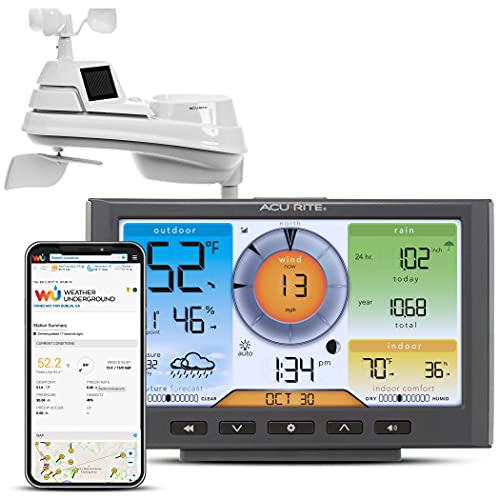
The Iris covers the five readings most people check (temperature, humidity, wind speed, wind direction and rain) with a Wi-Fi display, for much less than the other full stations.
Best for: Gardeners and first-time owners who want rain and wind readings without spending $200 or more.
What stands out in real use
The 5-in-1 sensor measures outdoor temperature, humidity, wind speed and direction, and rainfall, and the color display shows those readings with a forecast. The display connects to Wi-Fi and sends your data to Weather Underground, where you can check it from your phone. The sensor runs on four AA batteries, which AcuRite says last about two years. However, this display sends its data to Weather Underground rather than to the AcuRite app, so that’s where you check it away from home, and it doesn’t measure UV or solar radiation.
Key specs
- Temperature, humidity, wind speed and direction, rain
- Color display with forecast
- Wi-Fi upload to Weather Underground
- 4 AA batteries in the sensor
- Range up to 330 ft
Pros
- Lowest price for a full 5-in-1 station
- Easy-to-read display
- Sensor batteries last about two years, according to AcuRite
Cons
- Remote data only through Weather Underground
- Doesn’t measure UV, solar radiation or lightning
- Doesn’t work with smart home platforms
Installation and compatibility notes
Mount the sensor on a pole in an open spot and add the display to 2.4 GHz Wi-Fi during setup. Create a Weather Underground account first, since the display uploads to your station’s page there.
Price: ~$139
Eve Weather — Best for HomeKit

The Eve Weather is the best HomeKit weather station because it works natively in Apple Home over Matter, but it measures only temperature, humidity and air pressure.
Best for: Apple Home users who want outdoor temperature and humidity for automations, without wind or rain readings.
What stands out in real use
The Eve Weather is a small outdoor sensor with a display that shows the temperature, humidity and a 12-hour weather trend based on changes in air pressure. It connects over Thread and works with Matter, so it works with Apple Home, Alexa, Google Home and other Matter platforms. In Apple Home you get the temperature and humidity for automations (turn on a fan or close the blinds when it gets hot outside, for example), while the air pressure and the full history are in the Eve app. However, it doesn’t measure wind or rain, so it doesn’t replace a full weather station.
Key specs
- Temperature, humidity and air pressure
- Display with 12-hour weather trend
- Matter over Thread
- IPX4, CR2450 battery
Pros
- Works in Apple Home and over Matter
- Small and easy to mount
- Lowest price in this guide
Cons
- Doesn’t measure wind or rain
- Needs a Thread border router
- Air pressure isn’t shown in Apple Home
Installation and compatibility notes
You need a Thread border router: in Apple Home that’s a HomePod mini, HomePod (2nd generation) or Apple TV 4K, and our best Matter hubs guide covers the options for other platforms. Eve recommends a plugged-in Thread device, such as an Eve Energy, near the outside wall if the signal is weak. For indoor rooms, see our guide to HomeKit temperature sensors.
Price: ~$88
How to Choose a Home Weather Station
The best weather station for home use depends on what you want to measure, which smart home platform you use and where you can mount it.
Decide which readings you need. A 5-in-1 station measures temperature, humidity, wind speed, wind direction and rain. A 7-in-1 station adds UV and solar radiation, and some stations add lightning detection. If you only want outdoor temperature or freeze alerts, a full station isn’t necessary: see our guide to WiFi temperature sensors.
Choose between moving parts and none. Cups, a wind vane and a tipping rain bucket are proven and cheaper, but they need cleaning and can wear out. Ultrasonic wind and haptic or piezo rain sensors (Tempest and Ecowitt’s WS90) have no moving parts, but they can’t measure snow.
Check your smart home platform. Ambient and Tempest work with Alexa and IFTTT. Ecowitt and Tempest share data locally with Home Assistant, while Ambient’s integration goes through its cloud. For Apple Home, the Eve Weather is the homekit weather station to get, but it measures only temperature, humidity and pressure.
Plan where it goes. Weather Underground’s guide to installing a personal weather station recommends mounting the temperature sensor at least 5 feet above grass, away from pavement, roofs and walls that hold heat. The standard height for wind readings is 33 feet, so most homes mount the sensor as high and as clear of trees and buildings as they can. Our guide on how to mount a weather station covers the height, the distance from your house and the pole each station needs.
Check the Wi-Fi. Every console and hub here connects only to 2.4 GHz Wi-Fi, and the sensor needs to be within range of the console indoors, which is about 100 to 300 feet through walls.
Conclusion
The Ambient Weather WS-2902 is the best weather station for home use for most people: it measures every common reading and shows it on a clear console and in a free app. The Tempest is the choice for a smart home with no moving parts, the Ecowitt WS3901 is the best home weather station for Home Assistant, the AcuRite Atlas adds lightning alerts and the AcuRite Iris is the budget option. If you use Apple Home, the Eve Weather is the one to add.
What is the best weather station for home use?
The Ambient Weather WS-2902 is the best home weather station for most people. It measures wind, rain, temperature, humidity, UV, solar radiation and pressure, and it sends the readings to your phone over Wi-Fi for about $200.
Is there a HomeKit weather station?
Yes, the Eve Weather is the best HomeKit weather station. It connects over Thread and Matter and shows outdoor temperature and humidity in Apple Home, but it doesn’t measure wind or rain, and you need a Thread border router such as a HomePod mini or Apple TV 4K.
Which weather station works best with Home Assistant?
Ecowitt stations such as the WS3901 are the most popular choice, because Home Assistant receives their data on your home network. The Tempest also shares its data locally, while the Ambient Weather integration reads it from Ambient’s cloud.
Do weather stations work with Alexa?
Yes, Ambient Weather and Tempest both have Alexa skills, so you can ask for the readings from your own station. Both also work with IFTTT for automations.
Where should I put a home weather station?
Weather Underground recommends mounting the temperature sensor at least 5 feet above grass, away from pavement, roofs and walls. Put the wind sensor as high and as clear of trees and buildings as you can, within range of the console indoors.

Written by Evan Mercer
Founder & Lead Researcher, Smart Home Matrix
Evan digs through spec sheets, firmware changelogs, and thousands of owner reviews so you don’t have to. Every guide starts with a compatibility check and ends with picks he would install in his own home. Read more about Evan and this site, or see exactly how we choose products.