
The best Ring camera for most homes is the Ring Outdoor Cam 2K: it records 2K video, runs on a removable battery, and you can also plug it in or add a solar panel, for about $100. Ring sells nine cameras in 2026, from about $60 to $280, though, and the right one depends on where it goes and how you can power it.
Ring also renamed its cameras in August 2026. The “2nd Gen” and “Pro (2nd Gen)” labels are gone, and each name now ends in the video resolution, 2K or 4K. This guide covers all nine current Ring camera models, indoor and outdoor, with what each one does well and who should buy it. Ring doorbells have their own guide: see our best Ring doorbells.
Quick Recommendations
- Ring Outdoor Cam 2K — Best overall. 2K video, a removable battery and three power options, for about $100.
- Ring Indoor Cam 2K — Best budget. The cheapest Ring camera, with 2K video and a lens cover.
- Ring Pan-Tilt Indoor Cam 2K — Best for covering a whole room. Turns 360° and follows motion.
- Ring Indoor Cam 4K — Best indoor video. Ring’s first 4K indoor camera, with dual-band Wi-Fi.
- Ring Spotlight Cam 2K — Best wire-free spotlight camera. Battery power and motion-activated lights.
- Ring Floodlight Cam 2K — Best value floodlight. 2,000 lumens of light and 2K video for about $200.
- Ring Outdoor Cam 4K Pro — Best 4K outdoor camera. Radar motion detection and 10x zoom.
- Ring Spotlight Cam 4K Pro — Best 4K spotlight camera. 600-lumen lights, radar and wired power.
- Ring Floodlight Cam 4K Pro — Best video quality. 4K, radar and 2,000-lumen floodlights for a driveway.
At-a-Glance Comparison
| Product | Power | Video | Approx. Price | Best For |
|---|---|---|---|---|
| Ring Outdoor Cam 2K | Battery, plug-in or solar | 2K | ~$100 | Best overall |
| Ring Indoor Cam 2K | Plug-in | 2K | ~$60 | Lowest price |
| Ring Pan-Tilt Indoor Cam 2K | Plug-in | 2K, 360° pan | ~$70 | Whole-room coverage |
| Ring Indoor Cam 4K | Plug-in | 4K | ~$100 | Indoor detail |
| Ring Spotlight Cam 2K | Battery, plug-in or solar | 2K | ~$170 | Lights without wiring |
| Ring Floodlight Cam 2K | Hardwired | 2K | ~$200 | Budget floodlight |
| Ring Outdoor Cam 4K Pro | Plug-in, hardwired or PoE | 4K | ~$200 | 4K outdoors |
| Ring Spotlight Cam 4K Pro | Plug-in, hardwired or PoE | 4K | ~$250 | 4K with lights |
| Ring Floodlight Cam 4K Pro | Hardwired | 4K | ~$280 | Driveways |
Every model has two-way talk, a siren you can set off from the app and motion alerts. They also share one limit: none of them saves video unless you pay for a Ring subscription. If you’re also considering Blink, our guide to the best Blink cameras compares every Blink model.
Compatibility Matrix
| Product | HomeKit | Alexa | Google Home | Matter | Thread | Hub Required | Wiring/Power |
|---|---|---|---|---|---|---|---|
| Ring Outdoor Cam 2K | No | Yes | No | No | No | No | Battery; plug-in adapter or solar panel optional |
| Ring Indoor Cam 2K | No | Yes | No | No | No | No | USB-C plug-in |
| Ring Pan-Tilt Indoor Cam 2K | No | Yes | No | No | No | No | USB-C plug-in |
| Ring Indoor Cam 4K | No | Yes | No | No | No | No | USB-C plug-in, PoE adapter optional |
| Ring Spotlight Cam 2K | No | Yes | No | No | No | No | Battery; plug-in or solar optional |
| Ring Floodlight Cam 2K | No | Yes | No | No | No | No | Hardwired, plug-in adapter optional |
| Ring Outdoor Cam 4K Pro | No | Yes | No | No | No | No | Plug-in, hardwired or PoE+ |
| Ring Spotlight Cam 4K Pro | No | Yes | No | No | No | No | Plug-in, hardwired or PoE+ |
| Ring Floodlight Cam 4K Pro | No | Yes | No | No | No | No | Hardwired |
The matrix looks the same for every camera because Ring is an Amazon brand, and Alexa is the only assistant it fully supports. You can watch any of these cameras on an Echo Show, but Ring doesn’t work with Apple Home or Matter, and Google Home isn’t a supported integration. If you use an iPhone, our guide on whether Ring works with HomeKit explains the two bridges that can connect them.
The Best Ring Cameras for 2026
Ring Outdoor Cam 2K — Best Overall
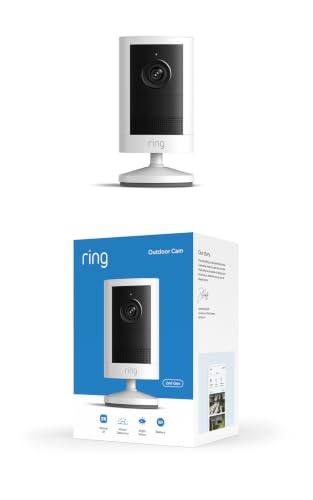
The Outdoor Cam 2K is the best Ring camera for most homes because you can put it almost anywhere. It runs on a removable battery, it also works with a plug-in adapter or a solar panel, and it costs about $100.
Best for: Most homes that want one outdoor camera without running wires.
What stands out in real use
The camera records in 2K (2560 x 1440) with a 140° wide view, enough to cover a backyard or the side of a house. Ring’s Low-Light Sight keeps the picture in color when there’s a little light, such as a porch lamp, and the camera switches to black and white in full darkness. When the battery runs low, you take out the pack and charge it indoors while the mount stays on the wall.
Key specs
- 2K video (2560 x 1440), 140° x 80° view, up to 6x zoom
- Color video in low light, night vision in the dark
- Quick release battery pack included
- Optional plug-in adapter or solar panel
- 2.4 GHz Wi-Fi only, 75 dB siren
- IP65, works from -4°F to 122°F
Pros
- Three ways to power it
- Removable battery, so the camera stays mounted
- Costs half as much as the Outdoor Cam 4K Pro
- Supports 24/7 recording when it’s plugged in
Cons
- 2.4 GHz Wi-Fi only
- Quieter siren than the Pro models
- Ring doesn’t publish a battery life figure
- You need a subscription to save video
Installation and compatibility notes
You set up the camera in the Ring app first, then mount it with two screws. Ring recommends a height of 8 to 10 feet, angled slightly down. If you add the plug-in adapter, the camera can also record around the clock with Ring’s 24/7 add-on, which battery power alone can’t do. A solar panel needs a few hours of direct sun each day to keep up.
Price: ~$100
Ring Indoor Cam 2K — Best Budget
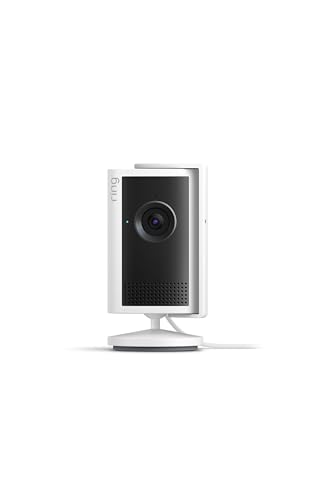
The Indoor Cam 2K is the cheapest Ring camera and a good first camera for keeping an eye on a living room, a nursery or a pet. It used to be called the Indoor Cam Plus.
Best for: Watching one room for the lowest price.
What stands out in real use
The 2K video is sharp for an indoor camera at this price, and reviewers rate its low-light picture well. A lens cover comes in the box, so you can block the camera when you’re home. However, the microphone stays on when the lens is covered. You can turn it off in the Ring app if you want full privacy.
Key specs
- 2K video (2560 x 1440), 115° horizontal view
- Night vision
- USB-C plug-in power, 6.5 ft cable
- 2.4 GHz Wi-Fi only
- 75 dB siren
- Lens cover included
Pros
- Lowest price in the lineup
- Sharp 2K video
- Lens cover in the box
- Small enough for a shelf or a wall
Cons
- The microphone stays on when the lens is covered
- Short power cable
- 2.4 GHz Wi-Fi only
- You need a subscription to save video
Installation and compatibility notes
It needs an outlet nearby: the cable is 6.5 feet long, and Ring sells a 9.8 ft cable separately. You can stand it on a shelf or screw the mounting plate to a wall or ceiling. Privacy Zones let you black out part of the picture, such as a window that faces a neighbor.
Price: ~$60
Ring Pan-Tilt Indoor Cam 2K — Best for Covering a Whole Room

The Pan-Tilt Indoor Cam 2K turns all the way around and follows motion, so one camera can watch a whole open-plan room. It’s new in October 2026 and costs only about $10 more than the Indoor Cam 2K.
Best for: Large rooms and open-plan spaces where a fixed camera would miss part of the room.
What stands out in real use
The camera head pans 360° and tilts 175°, and you can move it from the app during live view. Auto-tracking turns the camera to follow a person moving through the room. When you close its privacy shutter, it turns off both the camera and the microphone, which the cheaper Indoor Cam 2K’s cover doesn’t do.
Key specs
- 2K video (2560 x 1440), 115° horizontal view
- 360° pan and 175° tilt
- Auto-tracking
- Privacy shutter that disables camera and microphone
- USB-C plug-in power
- 2.4 GHz Wi-Fi only
Pros
- Covers a whole room with one camera
- Follows motion on its own
- Shutter turns off the microphone too
- Only about $10 more than the fixed 2K model
Cons
- Larger than the fixed indoor cameras
- 72 dB siren, the quietest in the lineup
- 2.4 GHz Wi-Fi only
- You need a subscription to save video
Installation and compatibility notes
It’s meant to sit on a shelf or table, and a universal mounting plate is in the box for a wall. Place it near the middle of the space you want to watch. Ring still sells the older 1080p Pan-Tilt Indoor Cam, so check for “2K” in the name when you buy.
Price: ~$70
Ring Indoor Cam 4K — Best Indoor Video

The Indoor Cam 4K is Ring’s first 4K indoor camera. It’s the one to buy when you want to read details in a large room, and it’s the only Ring indoor camera with 5 GHz Wi-Fi.
Best for: Large rooms, entryways and small shops where detail matters.
What stands out in real use
The camera records in 4K (3840 x 2160) with HDR, so you can zoom into a recording and still see a face or a label. Dual-band Wi-Fi 6 lets it use the faster 5 GHz band, which helps with 4K video. It also has a 95 dB siren, louder than the other indoor models, and a physical lens cover.
Key specs
- 4K video (3840 x 2160) with HDR
- 115° horizontal view
- Night vision up to 46 ft
- Dual-band Wi-Fi 6 (2.4 and 5 GHz)
- 95 dB siren
- USB-C plug-in power, PoE adapter optional
Pros
- Sharpest indoor video Ring makes
- 5 GHz Wi-Fi
- Louder siren than the other indoor cameras
- Lens cover included
Cons
- Needs at least 15 Mbps of upload speed
- Doesn’t pan or tilt
- Costs $40 more than the Indoor Cam 2K
- You need a subscription to save video
Installation and compatibility notes
Ring asks for at least 15 Mbps of upload speed, and 20 Mbps for the best 4K picture, so test your connection where the camera will sit. A 6 ft cable and a 10 W adapter come in the box. If you have Ethernet in the room, Ring’s indoor PoE adapter powers it and connects it with one cable.
Price: ~$100
Ring Spotlight Cam 2K — Best Wire-Free Spotlight Camera

The Spotlight Cam 2K adds motion-activated lights to a battery camera. The lights help the camera record in color at night, and they show anyone in the yard that they’ve been seen.
Best for: Dark yards, side gates and back doors without an outlet nearby.
What stands out in real use
When the camera detects motion, the 550-lumen spotlights turn on, and the camera records in 2K with a 140° view. It has room for a second battery pack, which means fewer charges. In its review, Tom’s Guide found its low-light video better than the previous model’s and said the battery lasts longer.
Key specs
- 2K video (2560 x 1440), 140° x 80° view, up to 6x zoom
- 550-lumen motion-activated spotlights
- Battery, plug-in or solar power
- Room for a second battery pack
- 2.4 GHz Wi-Fi only, 85 dB siren
- IP65, works from -4°F to 122°F
Pros
- Lights and a camera without wiring
- Space for two batteries
- Louder siren than the Outdoor Cam 2K
- Supports 24/7 recording when it’s plugged in
Cons
- Only one battery in the box
- 2.4 GHz Wi-Fi only
- Lights drain the battery faster
- You need a subscription to save video
Installation and compatibility notes
The installation is the same as the Outdoor Cam 2K: set it up in the app, then mount it with screws. Every time the spotlights turn on, they use battery, so on a busy wall a second pack or a solar panel is worth adding. A plug-in version is also sold in the US.
Price: ~$170
Ring Floodlight Cam 2K — Best Value Floodlight

The Floodlight Cam 2K replaces an outdoor light fixture with two bright floodlights and a 2K camera. It’s the cheapest way to get Ring’s 2,000-lumen floodlights.
Best for: Driveways and backyards that already have an outdoor light fixture.
What stands out in real use
The two floodlights reach 2,000 lumens, and you can dim them as low as 200 lumens in the app. The camera covers 140° x 85°, and Ring’s Low-Light Sight helps it record in color under the lights. Because it’s hardwired, you never charge it, and it supports 24/7 recording with the paid add-on.
Key specs
- 2K video (2560 x 1440), 140° x 85° view, up to 6x zoom
- 2,000-lumen floodlights, adjustable from 200 lumens
- Hardwired, plug-in adapter optional
- 2.4 GHz Wi-Fi only
- Siren
- IP65, works from -4°F to 122°F
Pros
- Bright, adjustable floodlights
- Never needs charging
- Supports 24/7 recording
- About $80 less than the 4K Pro
Cons
- Needs an outdoor light fixture or the plug-in adapter
- 2.4 GHz Wi-Fi only
- No radar motion detection
- You need a subscription to save video
Installation and compatibility notes
It mounts on a weatherproof junction box in place of an existing light, with the breaker off. Depending on where you live, you may need an electrician. If you don’t have a fixture, Ring sells a plug-in adapter for an outdoor outlet. Our guide on how to install a security camera covers placement and height.
Price: ~$200
Ring Outdoor Cam 4K Pro — Best 4K Outdoor Camera

The Outdoor Cam 4K Pro is Ring’s compact 4K camera, with radar motion detection and 10x zoom. It doesn’t run on a battery, so it’s for walls where you can plug it in or run a cable.
Best for: A driveway, a garage or a long yard where you want to zoom in on details.
What stands out in real use
Radar-powered 3D Motion Detection measures how far away movement is, so you can set the camera to alert you when someone comes up the driveway and ignore people on the sidewalk. Bird’s Eye View draws the path a visitor took on an overhead map in the app. The 4K video with 10x zoom makes it easier to read details at a distance.
Key specs
- 4K video (3840 x 2160), 140° x 85° view, up to 10x zoom
- Radar 3D Motion Detection and Bird’s Eye View
- Plug-in, hardwired or PoE+ power
- Dual-band Wi-Fi 6 (2.4 and 5 GHz)
- 85 dB siren
- IP65, works from -5°F to 120°F
Pros
- 4K video with 10x zoom
- Radar cuts alerts from distant movement
- 5 GHz Wi-Fi
- Supports 24/7 recording
Cons
- No battery option
- Needs at least 15 Mbps of upload speed
- No built-in light
- You need a subscription to save video
Installation and compatibility notes
Ring sells it in plug-in, hardwired and PoE versions, and the Amazon listing here is the plug-in model, which uses a USB-C power adapter. The PoE version takes power and data over one Ethernet cable from a PoE+ switch or injector, which avoids weak Wi-Fi outside.
Price: ~$200
Ring Spotlight Cam 4K Pro — Best 4K Spotlight Camera

The Spotlight Cam 4K Pro has the same 4K camera and radar as the Outdoor Cam 4K Pro and adds 600-lumen spotlights. It’s the choice when you want lights and the best detection on a wall without a light fixture.
Best for: Side yards, garages and back doors with an outlet or wiring nearby.
What stands out in real use
The spotlights turn on with motion and help the 4K camera record in color at night. Radar 3D Motion Detection and Bird’s Eye View work the same as on the Outdoor Cam 4K Pro, so you can set the distance at which it alerts you. T3’s review called it a first-class camera and praised its video quality, with the subscription and the price as the main drawbacks.
Key specs
- 4K video (3840 x 2160), 140° x 85° view, up to 10x zoom
- 600-lumen spotlights (3000K)
- Radar 3D Motion Detection and Bird’s Eye View
- Plug-in, hardwired or PoE+ power
- Dual-band Wi-Fi
- IP65, works from -5°F to 120°F
Pros
- 4K video and lights in one camera
- Radar motion detection
- Three wired power options
- Supports 24/7 recording
Cons
- No battery option
- $80 more than the Spotlight Cam 2K
- Needs at least 15 Mbps of upload speed
- You need a subscription to save video
Installation and compatibility notes
The listing here is the plug-in version, which needs an outdoor outlet within reach of its cable. The hardwired version connects to an existing junction box, and the PoE version needs an Ethernet run. If you want spotlights without any wiring, the Spotlight Cam 2K above is the battery option.
Price: ~$250
Ring Floodlight Cam 4K Pro — Best Video Quality

The Floodlight Cam 4K Pro combines Ring’s best camera features with its brightest lights. It’s the best Ring camera for a driveway or a large backyard, if you can wire it in.
Best for: Driveways and large yards where you want both bright light and the most detail.
What stands out in real use
It records in 4K with 10x zoom, and reviewers found a big jump in image quality over Ring’s older floodlight cameras. Radar 3D Motion Detection lets it alert you only when someone crosses a line you set, rather than for swaying branches. The 2,000-lumen floodlights cover 270°, wider than the camera’s own view.
Key specs
- 4K video (3840 x 2160), 140° x 85° view, up to 10x zoom
- 2,000-lumen floodlights (3000K), 270° coverage
- Radar 3D Motion Detection and Bird’s Eye View
- Dual-band Wi-Fi 6 (2.4 and 5 GHz)
- 85 dB siren, two-way talk with Audio+
- Hardwired, IP65
Pros
- Sharpest outdoor video Ring makes
- Bright, wide floodlights
- Radar motion detection
- Supports 24/7 recording
Cons
- The most expensive Ring camera
- Needs an outdoor light fixture and wiring
- Needs at least 15 Mbps of upload speed
- You need a subscription to save video
Installation and compatibility notes
Like the Floodlight Cam 2K, it replaces an outdoor light fixture and may need an electrician. 4K over Wi-Fi needs a strong signal on that wall, so check it with your phone before you buy. For floodlight cameras from other brands, including some that record locally, see our guide to the best floodlight cameras.
Price: ~$280
Ring Camera Comparison: 2K vs 4K, Battery vs Wired
Two choices separate most Ring camera models: the video resolution and how the camera gets power.
2K or 4K. 2K is enough to recognize a face or see a package. 4K helps when you zoom in on something farther away, such as a car in the driveway, but it needs more from your network: Ring asks for at least 15 Mbps of upload speed for its 4K cameras. All the 4K models have dual-band Wi-Fi, while the 2K cameras only connect to 2.4 GHz. The 4K Pro outdoor cameras also add radar motion detection and Bird’s Eye View, which no 2K camera has.
Battery or wired. The Outdoor Cam 2K and Spotlight Cam 2K run on batteries, so they install anywhere, but you have to recharge them. The floodlights need wiring, and the Pro cameras need an outlet, wiring or an Ethernet cable.
24/7 recording needs constant power. Ring only offers 24/7 recording on cameras that are plugged in or hardwired, and it’s a paid add-on on top of a plan. A battery camera can’t record around the clock, even with a solar panel. Ring keeps 24/7 video for up to 14 days.
How to Choose a Ring Camera
Which Ring camera is best for you depends on a few things besides the price.
Count the subscription. Without a plan, every Ring camera gives you live view, motion alerts and two-way talk, but it doesn’t record anything. Ring’s plans cost $4.99 a month for one device, $9.99 for every device at one address and $19.99 for the Pro plan. 24/7 recording costs $3 a month per camera on top of a plan. Our guide on whether you need a subscription for Ring explains what each plan includes.
Indoor or outdoor. The three indoor cameras aren’t weatherproof, so use them only inside. For a porch, a yard or a garage wall, choose one of the six outdoor models. To compare them with outdoor cameras from other brands, see our guide to the best outdoor security cameras.
Light or no light. A spotlight or floodlight helps the camera record in color at night and works as a deterrent. A floodlight needs a fixture to replace, and a spotlight camera can run on a battery or an outlet.
Old names. Many stores still use the earlier names. An “Outdoor Cam (2nd Gen)” is the Outdoor Cam 2K, an “Indoor Cam Plus” is the Indoor Cam 2K, and a “Floodlight Cam Pro (2nd Gen)” is the Floodlight Cam 4K Pro. Ring’s product name changes page lists every rename. Some older 1080p models, such as the Spotlight Cam Plus and Floodlight Cam Wired Plus, are still on sale, but they cost nearly as much as their 2K replacements.
New 4K Plus models. Ring announced three more outdoor cameras in October 2026: the Outdoor Cam 4K Plus ($149.99), Spotlight Cam 4K Plus ($199.99) and Floodlight Cam 4K Plus ($219.99). They’re 4K models priced below the Pro versions, and the Outdoor and Spotlight 4K Plus models can run on a battery. They’re on preorder, with an Amazon release date of October 27, 2026. If you want 4K on a battery, it may be worth waiting for them.
Sale prices. The prices in this guide are Ring’s regular prices. Amazon discounts Ring cameras often, mostly during its big sales.
Conclusion
The Ring Outdoor Cam 2K is the best Ring camera for most homes, because it costs about $100 and runs on a battery, an outlet or a solar panel. For indoors, the Indoor Cam 2K is the lowest-cost option, the Pan-Tilt Indoor Cam 2K covers a whole room, and the Indoor Cam 4K has the sharpest picture. Outside, the Spotlight Cam 2K adds lights without wiring and the Floodlight Cam 2K is the budget floodlight. The 4K Pro cameras add radar and 10x zoom, and the Floodlight Cam 4K Pro has the best video quality in the lineup.
If you’d rather avoid a monthly fee, our guide to the best Ring alternatives covers cameras that save video for free. And if a Ring camera you already own stops working, our Ring camera troubleshooting guide goes through the fixes.
Which Ring camera is best?
The Ring Outdoor Cam 2K is the best Ring camera for most homes. It records 2K video, runs on a removable battery and can also be plugged in or charged by a solar panel. The Indoor Cam 2K is the cheapest, and the Floodlight Cam 4K Pro has the best video.
Do Ring cameras work without a subscription?
Yes, but they don’t record. Without a plan you get live view, motion alerts and two-way talk. Saving video, person and vehicle alerts and video history need a Ring subscription, which starts at $4.99 a month for one device.
Which Ring cameras record 24/7?
Ring offers 24/7 recording only on cameras that are plugged in or hardwired, such as the floodlight cameras, the indoor cameras and the 4K Pro models. It needs a Ring plan plus a paid add-on, and Ring keeps the footage for up to 14 days. Battery cameras can’t record 24/7.
What is the difference between Ring 2K and 4K cameras?
Ring’s 4K cameras record in 3840 x 2160 and zoom up to 10x, while the 2K cameras record in 2560 x 1440. The 4K models also have dual-band Wi-Fi and need at least 15 Mbps of upload speed, and the 4K Pro outdoor cameras add radar motion detection.
What are Ring’s new camera names?
In August 2026 Ring replaced generation labels with the video resolution. The Outdoor Cam (2nd Gen) is now the Outdoor Cam 2K, the Indoor Cam Plus is the Indoor Cam 2K, and the Floodlight Cam Pro (2nd Gen) is the Floodlight Cam 4K Pro.
Do Ring cameras work with Google Home or Apple Home?
Ring cameras work with Alexa, including live video on an Echo Show. They don’t support Apple Home or Matter, and Google Home isn’t a supported integration. Apple users can connect Ring through a bridge such as Homebridge or Scrypted.

Written by Evan Mercer
Founder & Lead Researcher, Smart Home Matrix
Evan digs through spec sheets, firmware changelogs, and thousands of owner reviews so you don’t have to. Every guide starts with a compatibility check and ends with picks he would install in his own home. Read more about Evan and this site, or see exactly how we choose products.