
Do you need a eufy subscription? No. Eufy cameras and doorbells record to storage at your home, on the camera, a microSD card or a HomeBase, and live view, alerts and AI detection are all free. A eufy subscription, called Cloud Backup, only adds a copy of your event videos in the cloud.
This guide explains what works for free, what each eufy plan costs in 2026, which cameras can’t use a plan at all, and when Cloud Backup is worth paying for.
The Short Answer
- Does eufy require a subscription: no. Every eufy camera and doorbell works without one.
- What’s free: live view, two-way audio, motion alerts, AI detection (people, and on many models vehicles and pets), and recording to local storage.
- What you pay for: Cloud Backup, which keeps 30 days of event videos in the cloud, so they’re still there if the camera goes offline.
- What it costs: $3.99 a month or $39.99 a year for one camera, and $13.99 a month or $139.99 a year for all your cameras.
- Not every camera can use it: some eufy cameras, like the SoloCam S220, don’t support Cloud Backup at all.
What Works on eufy Without a Subscription
Eufy built its cameras around local storage, so you get almost every feature without paying anything after you buy the camera:
- Live view: watch any camera in the eufy app at any time.
- Two-way audio: hear and talk to whoever is in front of the camera or doorbell.
- Motion alerts: a notification on your phone when the camera detects something.
- AI detection: the camera, or a HomeBase, tells people apart from other motion. Many models also detect vehicles and pets.
- Local recording: clips are saved on the camera, a microSD card or a HomeBase, and you can watch them in the app from anywhere.
Where your video goes depends on the model. Battery SoloCams like the S220 have 8 GB of storage built in. Indoor cameras and the Video Doorbell C31 use a microSD card (sold separately). The HomeBase 3 ($199.99) stores video for several cameras, holds up to 16 TB with a hard drive, and adds face recognition for familiar people.
What you don’t get without a plan is a copy of your video somewhere else. If someone takes the camera or the HomeBase, the recordings go with it.
The diagram below shows what you get with no plan and with Cloud Backup.

For how eufy’s free features compare with Ring’s, see our eufy vs Ring comparison. Our Eufy vs Wyze comparison does the same for Wyze.
Eufy Cloud Backup Plans and Prices
Eufy’s subscription is called Cloud Backup. In the US, it comes in two plans, and eufy also sells a store membership that includes it:
| Plan | Per month | Per year | Covers |
|---|---|---|---|
| Cloud Backup Basic | $3.99 | $39.99 | One camera |
| Cloud Backup Basic | $7.99 | $79.99 | Two cameras |
| Cloud Backup Plus | $13.99 | $139.99 | All compatible cameras |
| eufy Plus Membership | $15 | $135 | All devices, plus store benefits |
Every plan keeps your event videos for 30 days, then overwrites the oldest ones. It saves motion clips, not 24/7 video, and you watch them in the eufy app even if the camera is offline. Plus doesn’t add longer history or extra AI features: the only difference is how many cameras it covers. An account can only have one Cloud Backup plan at a time, so with three or more cameras, Plus is the simplest choice. Eufy’s Cloud Backup page has the current prices.
The eufy Plus Membership is mainly a store program, with an extra 6-month warranty for yearly members and free shipping vouchers. It also includes 30-day cloud backup for all your devices, and with yearly billing it costs less than Cloud Backup Plus ($135 vs $139.99).
The diagram below compares the yearly cost of each option.

If you’ve seen eufy plans at $2.99 or $9.99 a month, those prices are out of date. Eufy raised them on April 1, 2025, when cloud videos started to match the camera’s own resolution instead of 1080p. People who subscribed before then keep their old price as long as the plan stays active.
Cloud Backup doesn’t work on every eufy camera. The SoloCam S220 and SoloCam S340 can’t use it, and neither can some eufy doorbells, so check the Cloud Backup list in the eufy app before you plan around it.
For one camera, Cloud Backup costs about the same as other brands’ plans. Wyze’s Cam Plus costs $2.99 a month, Blink Basic $3.99, Ring’s cheapest plan $4.99 and Arlo’s $9.99. Our guides to Wyze subscriptions, Ring subscriptions, Blink subscriptions and Arlo subscriptions have those plans. However, those brands keep more features behind the plan, like video recording or smart alerts, and eufy doesn’t.
Other Paid eufy Services
Eufy has two other paid services, and neither is required:
- Protection Plan: professional monitoring for eufy cameras and alarm sensors. Basic costs $4.99 a month, and Plus costs $9.99 a month for 24/7 monitoring and emergency dispatch. Our guide to the best DIY home security systems compares it with other monitored systems.
- Cellular data: eufy’s 4G LTE cameras need a data plan for their SIM card, which you pay to the data provider, not to eufy. Our guide to the best cellular security cameras explains how those plans work.
Is a eufy Subscription Worth It?
For most people, no. Eufy already gives you free recording and AI alerts, so Cloud Backup only adds an off-site copy. It’s worth paying for if:
- Your cameras are somewhere people can reach them, and you want the video to survive if a camera is stolen or broken.
- You want to watch clips even when a camera or the HomeBase is offline.
- You have one or two important cameras, like a doorbell and a driveway camera, where $40 to $80 a year is easy to justify.
You can skip it if your cameras are hard to reach, or if you keep a HomeBase 3 somewhere inside the house. If you want more choices that record locally, our guide to the best security cameras without a subscription compares eufy with Reolink, Tapo and Wyze.
You can cancel Cloud Backup at any time, in the eufy app or through eufy support. Eufy doesn’t refund fees you’ve already paid. If you subscribed through the Apple App Store or Google Play, cancel it there.
Eufy Cameras That Work Without a Plan
These eufy cameras and the doorbell all record locally and detect people for free. They all work with Alexa and Google Assistant. For more models, see our guide to the best eufy cameras.
eufy SoloCam E42 — Best Overall

A 4K battery camera with a solar panel, a strobe light, and a 355-degree pan that follows people and vehicles. It records to 16 GB of built-in storage, or to a microSD card of up to 128 GB. With a HomeBase 3, it adds face recognition and pet detection.
Best for: a driveway or a backyard, where one camera needs to cover a wide area.
Price: ~$180
eufy SoloCam S220 — Best Budget Camera

A 2K battery camera with a solar panel built in, so it doesn’t need an outlet. It records to 8 GB of storage inside the camera and detects people on the camera itself. It can’t use Cloud Backup, so all your video stays at home.
Best for: a first outdoor camera for about $100, with nothing to pay after.
Price: ~$100
eufy Video Doorbell C31 — Best Doorbell

A 2K doorbell with a head-to-toe view that runs on its battery or on doorbell wiring. It records to a microSD card (sold separately), and when it’s wired with the chime bypassed, it records 24/7. It detects people, but not packages.
Best for: a low-cost doorbell that saves every visitor without a monthly fee.
Price: ~$100
eufy Indoor Cam E30 — Best Indoor Camera
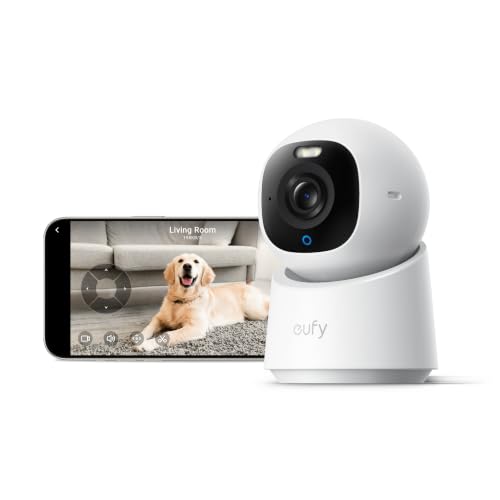
A 4K pan-and-tilt camera that follows people and pets around the room. It records 24/7 or only events to a microSD card of up to 128 GB. It’s also one of the few eufy cameras that works with Apple Home.
Best for: watching a living room, a nursery or a pet while you’re out.
Price: ~$70
For doorbells from other brands, see our guide to the best doorbell cameras without a subscription. If you use an iPhone, our guide on whether eufy works with HomeKit lists every compatible model.
The Bottom Line
So, does eufy require a subscription? No. Recording, live view and AI alerts are free, which makes eufy one of the best brands to use without a plan. A eufy subscription only adds 30 days of cloud backup, at $3.99 a month for one camera or $13.99 for all of them, and it’s worth it mainly for cameras that someone could steal.
Does eufy work without a subscription?
Yes. Live view, two-way audio, motion alerts, AI detection and local recording are all free. Video is saved on the camera, a microSD card or a HomeBase, and you watch it in the eufy app.
How much is a eufy subscription?
In the US, Cloud Backup Basic costs $3.99 a month or $39.99 a year for one camera, and $7.99 a month for two. Cloud Backup Plus costs $13.99 a month or $139.99 a year for all your compatible cameras.
What does eufy Cloud Backup add?
It keeps a copy of your event videos in the cloud for 30 days. You can watch them even if the camera is offline, so the video is still there if someone takes the camera. It doesn’t add AI features or 24/7 cloud recording.
Do all eufy cameras support Cloud Backup?
No. Some models, including the SoloCam S220 and SoloCam S340, can’t use Cloud Backup, and neither can some eufy doorbells. They record to their own storage or a HomeBase instead.
Why did eufy’s subscription price go up?
Eufy raised Cloud Backup prices on April 1, 2025, from $2.99 to $3.99 a month for one camera and from $9.99 to $13.99 for all cameras. At the same time, cloud videos started to match the camera’s resolution instead of 1080p.
Can I cancel eufy Cloud Backup at any time?
Yes. You can cancel at any time in the eufy app or through eufy support, but eufy doesn’t refund fees you’ve already paid. If you subscribed through the Apple App Store or Google Play, cancel it there.

Written by Evan Mercer
Founder & Lead Researcher, Smart Home Matrix
Evan digs through spec sheets, firmware changelogs, and thousands of owner reviews so you don’t have to. Every guide starts with a compatibility check and ends with picks he would install in his own home. Read more about Evan and this site, or see exactly how we choose products.