
The best light bulb camera for most homes is the Wyze Bulb Cam: it records a wide 2K view, gives you a bright 800-lumen light and works with Alexa and Google Assistant, for about $49. A light bulb camera screws into an ordinary light socket and gets its power from it, so you don’t need to run wires, mount a bracket or charge a battery.
The detail worth knowing before you buy is that the camera only works while the light switch is on. If someone turns the switch off, the camera goes offline too. Each option below handles the rest differently: some turn to follow movement, some are only for dry or covered spots, and only one gives you person detection without a subscription. If you’d rather have a regular camera, our best smart security cameras guide covers more types.
Quick Recommendations
- Wyze Bulb Cam — Best overall. A wide 2K view, an 800-lumen light and 24/7 recording to a microSD card.
- Lorex 2K Lightbulb Pan-Tilt Camera (SL301) — Best without a subscription. Pan-tilt with auto-tracking and person and vehicle detection, without monthly fees.
- LaView 4MP Bulb Security Camera — Best value pan-tilt. A 360° view with motion tracking that works with Alexa and Google.
- Energizer Smart 2K Light Bulb Camera — Brightest light. A 1,000-lumen LED with pan-tilt, auto-tracking and dual-band Wi-Fi.
At-a-Glance Comparison
| Product | Ecosystem | Key Feature | Approx. Price | Best For |
|---|---|---|---|---|
| Wyze Bulb Cam | Alexa, Google | 166° view, 800 lumens | ~$49 | Best overall |
| Lorex 2K Lightbulb Pan-Tilt Camera (SL301) | Lorex app only | Free person and vehicle detection | ~$65 | No subscription |
| LaView 4MP Bulb Security Camera | Alexa, Google | 360° view, motion tracking | ~$50 | Value pan-tilt |
| Energizer Smart 2K Light Bulb Camera | Alexa, Google | 1,000 lumens, pan-tilt | ~$63 | Brightest light |
Compatibility Matrix
| Product | HomeKit | Alexa | Google Home | Matter | Hub Required | Wiring/Power |
|---|---|---|---|---|---|---|
| Wyze Bulb Cam | No | Yes | Yes | No | No | E26 socket, 120V, switch left on |
| Lorex 2K Lightbulb Pan-Tilt Camera (SL301) | Not listed | No | No | Not listed | No | E26 socket, dry location, no dimmer |
| LaView 4MP Bulb Security Camera | Not listed | Yes | Yes | Not listed | No | E27 base, 110-240V |
| Energizer Smart 2K Light Bulb Camera | Not listed | Yes | Yes | Not listed | No | Standard light socket |
None of these list support for Apple Home or Matter, so they work through their own apps, plus Alexa and Google for three of them. The Lorex doesn’t work with Alexa or Google at all: you use it only in the Lorex Connect app.
The Best Light Bulb Security Cameras for 2026
Wyze Bulb Cam — Best Overall

The Wyze Bulb Cam is the option that gets the basics right: a wide view, a bright light and a low price. It’s the best choice for a porch, garage or entry light where you want to see the whole area at once. Wyze also sells the Bulb Cam Pan Color, a pan-tilt version with a color bulb, and our guide to the best Wyze cameras compares it with the rest of the lineup.
Best for: A porch or garage light with a clear view of the door, the steps and the driveway.
What stands out in real use
Wyze lists a 166° diagonal view (144° horizontal), which covers a porch and the area in front of it without any moving parts. The camera doesn’t pan or tilt from the app. Instead, you rotate it by hand when you install it, and you can lower the camera about 3 cm for a slightly lower view. The light is a dimmable 800-lumen LED at a fixed 3000K warm white, and you can schedule it or let it react to the ambient light.
Without a subscription you get live view, motion alerts and 24/7 recording to a microSD card (sold separately). In the cloud, Wyze saves only a snapshot of each event. Cam Plus costs $2.99 a month per camera and adds cloud video clips plus person, vehicle and package detection. You can also pair up to five Wyze Accessory Bulbs with one Bulb Cam and control them through it.
Key specs
- 2K video (2304 x 1296), 166° diagonal view
- 800-lumen dimmable LED, 3000K
- Color night vision plus infrared
- 95 dB siren and two-way audio
- microSD up to 256GB, 2.4 GHz Wi-Fi
- Works with Alexa and Google Assistant
Pros
- The widest view of all the options here
- Costs less than the pan-tilt options
- 24/7 local recording without a subscription
- Camera rated IP65 for outdoor use
Cons
- No pan or tilt from the app
- Person detection and cloud video need Cam Plus
- 2.4 GHz Wi-Fi only
- The light color is fixed at warm white
Installation and compatibility notes
The Bulb Cam fits E26 sockets in open fixtures where the camera has a clear view from the bottom. Wyze says it isn’t compatible with fully enclosed fixtures, and it fits sconces with an inner depth of less than 20 cm. The camera is IP65, but the socket connection must be covered and kept away from direct water. Wyze puts a “Do Not Turn OFF” sticker in the box for the wall switch.
Price: ~$49
Lorex 2K Lightbulb Pan-Tilt Camera (SL301) — Best Without a Subscription
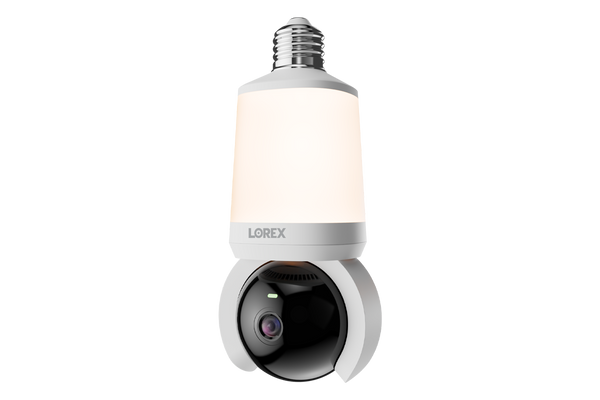
The SL301 is the best choice if you want smart detection without a monthly plan. It turns to follow movement, it recognizes people and vehicles, and it records to a microSD card without monthly fees.
Best for: Garages, entryways and indoor rooms where you want a camera that follows movement.
What stands out in real use
Lorex’s spec sheet lists 355° of pan and 90° of tilt with auto-tracking, so the camera turns toward whatever it detects. Person detection works up to 65 ft and vehicle detection up to 98 ft. Its lens is narrower than the Wyze (78.4° horizontal), so it relies on panning to cover a room or a driveway.
The 800-lumen light can turn on manually, on a schedule, or when the camera detects motion, a person or a vehicle, and you can set the color from 3000K to 6000K. It supports microSD cards up to 512GB and dual-band Wi-Fi 6. However, the SL301 doesn’t work with Alexa or Google Assistant, so everything happens in the Lorex Connect app.
Key specs
- 2K video (2560 x 1440), 355° pan and 90° tilt
- Person detection up to 65 ft, vehicle up to 98 ft
- 800 lumens, 3000K to 6000K
- Wi-Fi 6 on 2.4 GHz and 5 GHz
- microSD up to 512GB
- IP54, -4°F to 122°F
Pros
- Person and vehicle detection without a subscription
- Auto-tracking pan and tilt
- Adjustable light color
- Supports the largest microSD cards here
Cons
- Doesn’t work with Alexa or Google Assistant
- Rated for dry locations only
- The LED can’t be replaced
- Narrower lens than the Wyze
Installation and compatibility notes
Lorex’s installation guide says to use the SL301 in a dry location, not in totally enclosed fixtures and not with dimmers (you set the brightness in the app). Its weather rating is IP54, and Lorex recommends a sheltered spot. That makes it a better fit for a garage, a hallway or a fully covered entry than an exposed porch light.
Price: ~$65
LaView 4MP Bulb Security Camera — Best Value Pan-Tilt
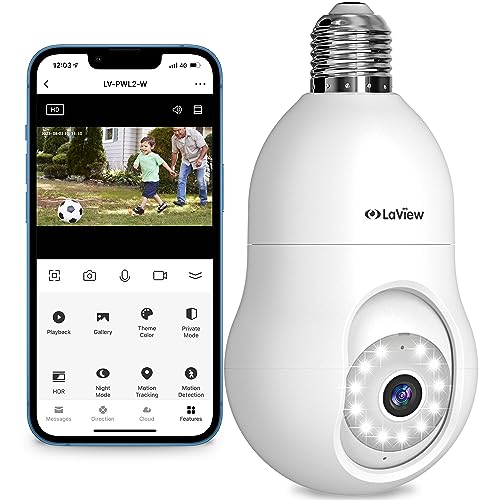
The LaView is the lowest-cost way to get a light bulb security camera that turns to follow movement. It also works with Alexa and Google, which the Lorex doesn’t.
Best for: Indoor rooms, garages and covered entries where camera coverage matters more than the light.
What stands out in real use
LaView lists 4MP video (2560 x 1440), a 360° panoramic view and motion tracking, so one camera can cover a whole garage or living room. A human detection filter, activity zones and sound detection help cut down on alerts, and the 110 dB siren and two-way audio let you respond from your phone. You can also watch the live view in a web browser.
The light is the weak point. LaView rates it at 350 lumens, less than half of the Wyze, so think of it as a camera with a light rather than a porch light with a camera. Storage is a microSD card or LaView’s cloud, with a 30-day trial.
Key specs
- 4MP video (2560 x 1440)
- 360° panoramic view with motion tracking
- 350-lumen LED
- 110 dB siren and two-way audio
- 2.4 GHz Wi-Fi
- Works with Alexa and Google Assistant
Pros
- The lowest list price for a pan-tilt bulb camera here
- Motion tracking and human detection
- Works with Alexa and Google
- Live view in a web browser
Cons
- The dimmest light of all the options
- 2.4 GHz Wi-Fi only
- LaView doesn’t list a weather rating for it
Installation and compatibility notes
LaView lists an E27 screw base for 110-240V sockets. Because there’s no weather rating on LaView’s listing, use it indoors or in a covered fixture, and keep the switch on so the camera stays online.
Price: ~$50
Energizer Smart 2K Light Bulb Camera — Brightest Light

The Energizer has the brightest light of all the options here, with a 1,000-lumen LED. It also pans, tilts and tracks movement, so it’s the best choice when the light matters as much as the camera.
Best for: A dark side door, driveway or backyard light where you need more light than a typical bulb camera gives.
What stands out in real use
Energizer lists 355° of pan and 90° of tilt with auto-tracking, 2K video and a 1,000-lumen dimmable LED that you can set to different shades of white. It connects on 2.4 GHz or 5 GHz Wi-Fi and works with Alexa and Google Home.
You can record to a microSD card up to 128GB or to the cloud, with a free 30-day trial. However, Amazon reviews are mixed on reliability and Wi-Fi connection. Energizer’s troubleshooting guide says the firmware update the app offers after setup improves connection stability, so install it right away.
Key specs
- 2K video with 355° pan and 90° tilt
- Auto-tracking
- 1,000-lumen dimmable LED, adjustable white
- Wi-Fi on 2.4 GHz and 5 GHz
- microSD up to 128GB or cloud storage
- Works with Alexa and Google Home
Pros
- The brightest light of all the options
- Pan, tilt and auto-tracking
- Dual-band Wi-Fi
- Works with Alexa and Google
Cons
- Mixed Amazon reviews on reliability
- Energizer doesn’t publish a weather rating
- Cloud storage needs a plan after the trial
Installation and compatibility notes
The camera screws into a standard light socket. Energizer markets it for outdoor security but doesn’t list a weather rating, so put it in a covered fixture, like a porch light under a roof. If pairing fails, Energizer’s guide suggests moving closer to the router for the first connection.
Price: ~$63
What to Know Before You Buy a Light Bulb Camera
The switch has to stay on. A bulb camera gets its power from the socket, so turning off the wall switch turns off the camera. Leave the switch on and control the light from the app or a schedule. If people in your home turn the light off out of habit, put a cover or a label on the switch (Wyze includes a sticker for this).
Check the fixture. The camera needs to hang below the fixture with a clear view. Wyze and Lorex both say their cameras aren’t for fully enclosed fixtures, and a glass globe or a frosted shade blocks the view anyway. Measure deep sconces too: Wyze fits ones up to 20 cm from the socket to the edge.
Outdoors means covered. The bulb and the socket are the weak point, even when the camera itself is weather-rated. Wyze rates its camera IP65 but says the socket connection must be covered, and Lorex rates the SL301 for dry locations only. A porch light under a roof works. An exposed fixture on a wall that gets rain doesn’t. For spots like that, a camera from our best outdoor security cameras guide is a better choice.
Avoid dimmers. Lorex says not to use the SL301 with a dimmer, and Wyze doesn’t recommend one either. Set the brightness in the app instead.
How to Choose the Best Light Bulb Security Camera
Fixed view or pan-tilt. A fixed wide view like the Wyze sees the whole area all the time. A pan-tilt camera like the Lorex, LaView or Energizer covers more ground and follows movement, but it only looks in one direction at a time.
Light output. If the camera replaces your only porch light, look at the lumens. The Energizer (1,000) and the Wyze and Lorex (800 each) light up an entry like a normal bulb, while the LaView (350) is closer to a night light. If you need much more light, the options in our best floodlight cameras guide are brighter, but they need wiring.
Storage and subscriptions. Every option here records to a microSD card, which you usually buy separately. The Lorex gives you person and vehicle detection without a plan, while Wyze needs Cam Plus for that. Our guide to security cameras without a subscription explains what you lose without a plan.
Wi-Fi at the light. Porch and garage lights are often the farthest point from your router. Check the signal there with your phone before you buy. The Wyze and LaView use 2.4 GHz only, which usually reaches farther, while the Lorex and Energizer can also use 5 GHz. If a camera drops off often, our guide on why a camera keeps going offline covers the fixes.
Conclusion
The Wyze Bulb Cam is the best light bulb camera for most homes: a wide 2K view, an 800-lumen light, Alexa and Google support and 24/7 local recording for about $49. Choose the Lorex SL301 if you want person and vehicle detection without a subscription in a dry or covered spot, the LaView for the lowest-cost pan-tilt camera, and the Energizer if the light itself matters most. Whichever you choose, keep the switch on and use a covered fixture outdoors.
What is the best light bulb security camera?
For most homes, the Wyze Bulb Cam is the best light bulb security camera. It records a wide 2K view, has an 800-lumen dimmable light, works with Alexa and Google Assistant, and can record 24/7 to a microSD card without a subscription.
Does a light bulb camera work when the light is off?
The camera keeps working when you turn the light off in the app, but not when you turn off the wall switch. The switch cuts power to the socket, so the camera goes offline until it’s turned back on.
Can I use a light bulb camera outdoors?
Yes, in a covered fixture. Wyze rates the Bulb Cam’s camera IP65 but says the socket connection must be covered and kept away from direct water. Lorex rates its SL301 for dry locations only, so it’s better for a garage or a fully covered entry.
Do light bulb cameras need a subscription?
No. The Wyze, Lorex, LaView and Energizer can all record to a microSD card without one. Some features need a plan: Wyze’s person detection and cloud video clips come with Cam Plus, which costs $2.99 a month per camera.
Will a light bulb camera work in an enclosed fixture?
Usually not. Wyze and Lorex both say their bulb cameras aren’t for fully enclosed fixtures, and a glass globe or shade would block the camera’s view. Choose an open fixture where the camera hangs below the edge.
Do light bulb cameras work with a dimmer switch?
It’s best to avoid one. Lorex says not to use the SL301 with a dimmer, and Wyze doesn’t recommend dimmer switches for the Bulb Cam. Leave the switch at full power and set the brightness in the app.

Written by Evan Mercer
Founder & Lead Researcher, Smart Home Matrix
Evan digs through spec sheets, firmware changelogs, and thousands of owner reviews so you don’t have to. Every guide starts with a compatibility check and ends with picks he would install in his own home. Read more about Evan and this site, or see exactly how we choose products.