
Google stopped making the Nest Protect in March 2025, so if one of your alarms is about to expire, you need a Nest Protect replacement from another brand. For most homes, that’s the First Alert SC5. Google itself points Protect owners to it, it fits the same mounting bracket, and it’s the only alarm that interconnects with the Protects you still have, so you can replace them one at a time as each one expires.
The SC5 isn’t the only choice, though. If you’re leaving Google Home, or you’d rather have your alarms in the Ring app or Apple Home, the options below cover each of those cases. Before you buy anything, it’s worth knowing that a working Protect doesn’t need replacing yet: it keeps running, with updates, until its own replace-by date.
Quick Recommendations
- First Alert SC5 Hardwire — Best overall. The official replacement for a wired Nest Protect, with the same bracket and an adapter plug for your wiring.
- First Alert SC5 Battery — Best for battery Nest Protects. The same alarm without wiring, and it works with your remaining Protects in Google Home.
- Kidde Smart Smoke + CO Alarm with Ring — Best for Ring and Alexa homes. Alerts in the Ring app without a subscription, for about half the price.
- Heiman S1-TM Matter Smoke Alarm — Best for Apple Home. A Matter over Thread smoke alarm that also reports temperature and humidity.
- Heiman C1-M Matter CO Alarm — Best Matter CO alarm. Adds the carbon monoxide detection the Heiman smoke alarm doesn’t have.
Top Choices at a Glance
| Product | Ecosystem | Key Feature | Approx. Price | Best For |
|---|---|---|---|---|
| First Alert SC5 Hardwire | Google Home, First Alert app | Interconnects with Nest Protects | ~$129 | Best overall |
| First Alert SC5 Battery | Google Home, First Alert app | No wiring, same bracket | ~$130 | Battery Nest Protects |
| Kidde Smart Smoke + CO Alarm with Ring | Ring, Alexa | Ring app alerts, no hub | ~$70 | Ring and Alexa homes |
| Heiman S1-TM Matter Smoke Alarm | Apple Home, Google Home, Alexa | Matter over Thread, temperature + humidity | ~$50 | Apple Home |
| Heiman C1-M Matter CO Alarm | Apple Home, Google Home, Alexa | Matter CO alarm, battery rated up to 10 years | ~$60 | Matter CO coverage |
Compatibility Matrix
| Product | HomeKit | Alexa | Google Home | Matter | Thread | Hub Required | Wiring/Power |
|---|---|---|---|---|---|---|---|
| First Alert SC5 Hardwire | No | Not stated | Yes | No | No | No (Wi-Fi) | 120V hardwired, built-in backup battery |
| First Alert SC5 Battery | No | Not stated | Yes | No | No | No (Wi-Fi) | CR123A batteries |
| Kidde Smart Smoke + CO Alarm with Ring | No | Yes (notifications) | No | No | No | No (Wi-Fi) | 2 AA batteries |
| Heiman S1-TM Matter Smoke Alarm | Yes | Via Matter | Via Matter | Yes | Yes | Thread border router | CR123A battery |
| Heiman C1-M Matter CO Alarm | Yes | Via Matter | Via Matter | Yes | Yes | Thread border router | CR123A battery |
The SC5 is the only alarm here that interconnects with a Nest Protect, so if you want to keep some of your Protects, it’s the one to buy. The Heiman alarms are the only ones that work in Apple Home, and they need a Thread border router such as a HomePod mini or Apple TV 4K.
The Best Nest Protect Replacements
First Alert SC5 Hardwire — Best Overall

The SC5 Hardwire is the best Nest Protect replacement for a wired Protect: First Alert sells it as the direct replacement, it twists onto the bracket you already have and it keeps working with your other Protects.
Best for: Google Home households replacing a wired Nest Protect, especially if the other Protects in the house still have years left.
What stands out in real use
The SC5 was built for this job. Google and First Alert worked together on it, and once both are in the Google Home app, it interconnects with your existing Nest Protects: when one alarm detects smoke or CO, they all sound. That means you don’t have to replace every alarm in the house on the same day. Like the Protect, it gives a spoken Heads-Up warning that names the danger and the room before the full alarm, and you can check, silence or test it from your phone. First Alert’s Precision Detection is designed to cut down on false alarms from cooking, which is the most common reason people take an alarm off the ceiling.
Key specs
- Photoelectric smoke sensor and electrochemical CO sensor
- Voice Heads-Up warnings with the type and location of the danger
- Interconnects with Nest Protects and compatible First Alert alarms
- 120V hardwired with a built-in lithium backup battery
- 85 dB alarm, 10-year limited warranty
Pros
- Uses the Nest Protect’s mounting bracket
- Quick-connect adapter plug, so you don’t need to rewire
- Works alongside your remaining Protects in Google Home
- Spoken warnings, like the Protect
Cons
- About $130 for each alarm
- First Alert doesn’t list a night light like the Protect’s Pathlight
- No support for Apple Home, Alexa or Matter
- Some owner reviews report nuisance alarms
Installation and compatibility notes
Turn off the breaker, twist the Protect off its backplate and unplug its connector, then plug in the SC5 with the included adapter and twist it onto the same bracket. You set it up in First Alert’s app first (its product pages now call it Resideo Connect), then add it to the Google Home app, which is where it links with your Protects. Interconnecting with a Protect needs the Google Home app and a Google Account. The backup battery isn’t replaceable. Amazon itself isn’t selling the SC5 at the moment: the listing below is new and sold by a third-party seller at about First Alert’s list price, while First Alert’s own store shows it as backordered.
Price: ~$129
First Alert SC5 Battery — Best for Battery Nest Protects

The SC5 Battery is the same alarm without the wiring, and it’s the simplest swap for a battery-powered Protect.
Best for: Battery Nest Protect owners who want to stay in Google Home and keep their other Protects interconnected.
What stands out in real use
First Alert labels this version as the replacement for the battery Nest Protect. It mounts on the same bracket, so the swap takes a few minutes: twist the Protect off, twist the SC5 on and set it up in the app. Bob Vila’s reviewer had it showing in the app about three minutes after opening the box, with the batteries already installed. You get the same sensors, spoken warnings and interconnect with Nest Protects as the hardwired model, and you can mount it anywhere, since it doesn’t need a wire in the ceiling.
Key specs
- Photoelectric smoke sensor and electrochemical CO sensor
- Voice Heads-Up warnings with the type and location of the danger
- Wireless interconnect with Nest Protects and First Alert alarms
- Replaceable CR123A lithium batteries, preinstalled
- Meets UL 217 10th Edition
Pros
- No wiring, mounts on the Protect’s bracket
- Works alongside your remaining Protects in Google Home
- Quick setup with the batteries already in
- Replaceable batteries
Cons
- About $130 for each alarm
- First Alert doesn’t list a night light like the Protect’s Pathlight
- No support for Apple Home, Alexa or Matter
Installation and compatibility notes
Twist the Protect counterclockwise off its backplate, then put the SC5 on the same backplate. Set it up in First Alert’s app, then add it to the Google Home app to link it with your Protects. Remove the old Protect from your Google account when you’re done. As with the hardwired model, Amazon itself isn’t selling the SC5 Battery right now: the listing below is new, sold by a third-party seller at about the list price.
Price: ~$130
Kidde Smart Smoke + CO Alarm with Ring — Best for Ring and Alexa Homes
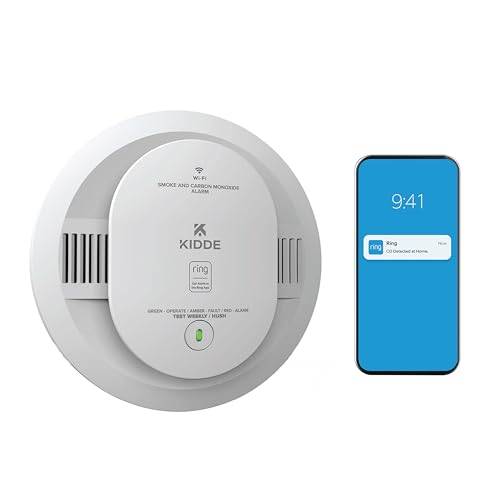
If your cameras and doorbell are already in the Ring app, this Kidde combination alarm is the best Nest Protect alternative for you, and it costs about half as much as the SC5.
Best for: Ring and Alexa households that are replacing all their Protects and don’t need Google Home.
What stands out in real use
The Kidde connects to your Wi-Fi and sends smoke, CO and low-battery alerts to the Ring app, so a fire alert shows up in the same place as your camera notifications. You don’t need a Ring Alarm base station or any other Ring device, and the phone alerts don’t need a subscription. If you want a monitoring center to call for help, Ring offers 24/7 smoke and CO monitoring for $5 a month. It gives spoken alerts that say why it’s sounding, interconnects without wires with other compatible Kidde alarms and sends notifications to Echo devices.
Key specs
- Smoke and carbon monoxide detection
- Ring app alerts for smoke, CO and low battery
- Wire-free interconnect with compatible Kidde alarms
- 2 AA alkaline batteries
- Meets UL 217, 10-year limited warranty
Pros
- About half the price of the SC5
- Alerts in the Ring app without a subscription
- Optional professional monitoring
- Works without a Ring base station
Cons
- Doesn’t interconnect with Nest Protects
- Doesn’t work with Google Home or Apple Home
- Kidde says to replace the AA batteries about once a year
Installation and compatibility notes
This is the battery version, so it mounts anywhere with its own bracket (the Protect’s bracket comes off). Kidde also makes a hardwired version (RGCUAR-RW) with AA backup, but it uses Kidde’s own wiring harness, not the Nest connector, so you’d connect it to your ceiling wires yourself or have an electrician do it. Because the Kidde can’t talk to a Nest Protect, replace all the alarms in the house at the same time so they still sound together. If you’re new to Ring’s plans, our guide to whether you need a Ring subscription explains what each one adds.
Price: ~$70
Heiman S1-TM Matter Smoke Alarm — Best for Apple Home

The Nest Protect never worked in Apple Home, and the Heiman S1-TM is the simplest way to get smoke alerts there now: it’s a Matter over Thread alarm that appears in the Home app.
Best for: Apple Home users, or anyone who wants a smoke alarm that works on several platforms through Matter.
What stands out in real use
Apple Home has supported Matter smoke and CO alarms since iOS 18.4, so the S1-TM shows up as an alarm sensor you can get notifications from and use in automations, such as turning on the lights when it detects smoke. Because it’s Matter, you can add the same alarm to Google Home, Alexa or SmartThings too. It uses a dual-beam photoelectric sensor and also reports room temperature and humidity. However, it’s a smoke alarm only, so pair it with a CO alarm such as the Heiman C1-M to match what a Protect did.
Key specs
- Dual-beam photoelectric smoke sensor
- Temperature and humidity sensor
- Matter over Thread
- CR123A battery, 85 dB alarm
- UL 217 10th Edition, CSFM listed
Pros
- Works in Apple Home
- Also works with Google Home and Alexa through Matter
- Reports temperature and humidity
- About $50
Cons
- Smoke only, no CO sensor
- No built-in interconnect, only automations
- Needs a Thread border router
Installation and compatibility notes
You need a Thread border router, such as a HomePod mini, an Apple TV 4K, a Nest Hub (2nd gen) or an Echo (4th gen). Our guide to the best Matter hubs lists which devices are one. The S1-TM mounts with a screw or a magnet. Matter alarms don’t sound each other, so if you want the whole house to go off together, a Matter alarm can’t do that on its own. To see what else from Google reaches Apple Home, read does Nest work with HomeKit.
Price: ~$50
Heiman C1-M Matter CO Alarm — Best Matter CO Alarm

The C1-M is the carbon monoxide half of a Matter setup: put it next to the S1-TM and you have the smoke and CO coverage a Nest Protect gave you, in Apple Home.
Best for: Anyone replacing a Protect with a Matter smoke alarm who still needs CO detection.
What stands out in real use
The C1-M uses an electrochemical CO sensor made by Figaro and is certified to UL 2034 5th Edition. It runs on one CR123A lithium battery that Heiman rates for up to 10 years, with a low-battery chirp and an end-of-life signal. Like the smoke alarm, it connects over Matter over Thread, so it works in Apple Home, Google Home, Alexa and SmartThings, and you can link it to the S1-TM through automations.
Key specs
- Electrochemical CO sensor (Figaro TGS5141)
- UL 2034 5th Edition
- Matter over Thread
- CR123A battery rated up to 10 years
- Wall or ceiling mount, 2.75 inches across
Pros
- Adds CO detection to a Matter smoke alarm
- Works in Apple Home
- Battery rated up to 10 years
- Small enough for tight spots
Cons
- CO only, so it’s a second device next to the smoke alarm
- No built-in interconnect
- Needs a Thread border router
Installation and compatibility notes
It mounts with a screw or a magnetic adhesive pad on a wall or ceiling. The National Fire Protection Association’s CO standard calls for a CO alarm outside each sleeping area, so most homes need more than one. Set it up in the same app as the S1-TM so both use the same Thread network.
Price: ~$60
Nest Protect Discontinued: What It Means for Your Alarms
Google ended production of the Nest Protect in March 2025, together with the Nest x Yale lock. The good news is that nothing changes for the alarms already on your ceiling. Google says existing Protects keep working as they always have until their expiration date and keep getting software and security updates. The Protect also moved into the Google Home app in 2025, so you don’t need the old Nest app for alerts.
What sets the deadline is each alarm’s age. Google says the 2nd gen Nest Protect has to be replaced 10 years after its manufacture date, and the 1st gen had a 7-year life. To find your date, open the Google Home app, select the Protect, then go to Settings, Device information and look next to “Replace by” (Google’s guide to when to replace your Nest Protect shows where it’s printed on the back too).
As the date gets close, the Protect’s light ring turns yellow and says “Expiring soon”, and you get notifications about three months, one month and seven days before. After it expires, it chirps continuously until you take it down. If you see a leftover Protect for sale, check its manufacture date first: the 10 years count from that date, not from the day you install it.
How to Choose a Nest Protect Alternative
Decide whether you’re staying in Google Home. If you are, the SC5 is the easy answer, because it’s the only alarm that interconnects with a Protect. You can replace each Protect as it expires and keep the rest. If you’re switching to Ring or Apple Home, Google says the Protect can’t interconnect with alarms from other brands, so plan to replace every alarm at the same time.
Match the power type. A battery Protect can be replaced by any battery alarm. A wired Protect’s connector uses only the black and white wires in the ceiling, and the SC5 Hardwire’s adapter plugs straight into it. Other brands come with their own wiring harness, so you’d turn off the breaker and connect it with wire nuts, or ask an electrician.
Know what the SC5 doesn’t list. First Alert doesn’t list a night light like the Protect’s Pathlight, the Emergency Shutoff that turned off a Nest thermostat’s furnace during a CO alarm or the video clips Nest cameras recorded when a Protect went off. If you used those, you won’t get them back with any alarm here.
Keep the alarms interconnected. The NFPA recommends interconnected smoke alarms, so when one sounds, they all do. The SC5 and the Kidde do that on their own, while Matter alarms can only notify you and run automations. If you’re still deciding whether a smart alarm is worth the extra cost, our guide to whether smart smoke detectors are worth it compares them with regular interconnected alarms, and our best smart smoke detectors guide covers more options.
Conclusion
The First Alert SC5 is the best Nest Protect replacement for most homes: it fits the same bracket, it works in Google Home and it interconnects with the Protects you still have, so you can replace them one at a time. Choose the Hardwire or Battery version to match the Protect you’re taking down. If you use Ring and Alexa, the Kidde with Ring costs about half as much, and for Apple Home, the Heiman S1-TM and C1-M are the best Nest Protect alternative.
What is the official Nest Protect replacement?
Google points Nest Protect owners to the First Alert SC5 Smart Smoke & Carbon Monoxide Alarm. It uses the same mounting bracket and interconnects with your existing Nest Protects when both are in the Google Home app.
Is the Nest Protect discontinued?
Yes. Google ended production of the Nest Protect in March 2025. Existing Protects keep working and getting software and security updates until their replace-by date, which is 10 years after the manufacture date for the 2nd gen.
Do I need to replace my Nest Protect now?
No, a working Protect doesn’t need replacing until its replace-by date. You can find it in the Google Home app under the Protect’s Settings and Device information, and the Protect warns you before it expires.
Will the First Alert SC5 work with my other Nest Protects?
Yes. Once you add the SC5 to the Google Home app, it interconnects with your Nest Protects, so when one detects smoke or CO, they all sound. It needs the Google Home app and a Google Account to do that.
Is there a Nest Protect alternative that works with Apple Home?
Yes, Matter smoke and CO alarms such as the Heiman S1-TM and C1-M work in Apple Home on iOS 18.4 or later. They need a Thread border router such as a HomePod mini or Apple TV 4K, and they don’t interconnect with each other on their own.

Written by Evan Mercer
Founder & Lead Researcher, Smart Home Matrix
Evan digs through spec sheets, firmware changelogs, and thousands of owner reviews so you don’t have to. Every guide starts with a compatibility check and ends with picks he would install in his own home. Read more about Evan and this site, or see exactly how we choose products.