
A Philips Hue sunrise alarm is the Hue app’s Wake up automation set to the Sunrise style: your lights start very dim and warm before your alarm and reach full brightness at the time you choose. It takes a couple of minutes to set up in the Hue app. Apple Home and Alexa can do something similar with other dimmable smart lights, and this guide covers all three.
If you’d rather have a dedicated bedside device, our guide to the best smart alarm clocks compares sunrise clocks like the Hatch Restore 3.
The quick answer
- Philips Hue: in the Hue app, go to Automations, tap +, choose Wake up with light, pick the Sunrise style, set your time and tap Save. A Hue Bridge gives you all the options.
- Apple Home: the Home app can’t fade lights in. Set up the Hue app’s Wake up automation instead, or create a few Time of Day automations that raise the brightness step by step.
- Alexa: say “Alexa, wake me up at 7 a.m. with the bedside lamp”, or create a routine with Ramp to Brightness.
- Google Home: say “Hey Google, turn on gentle wake up” and set your alarms on a Nest speaker or display. Hue’s Wake up automation then starts 30 minutes before each alarm.
What you need first
A Hue Bridge, ideally. Hue lights also work over Bluetooth without a Bridge, but Hue lists Bluetooth automations as limited (and Bluetooth controls up to 10 lights, with your phone in range). Reviews of the Bluetooth version report wake-up fades of up to 30 minutes, without a repeating schedule or a maximum brightness setting. With a Bridge, the fade can last up to an hour, the alarm repeats on the days you choose, and you can control your lights from anywhere. The Bridge is also how Hue connects to Apple Home, so you need it for Siri and the Home app.
The right lights. Any dimmable Hue light can fade in, but the Sunrise style needs lights that change color temperature. Hue says it works on all White ambiance and White and color ambiance lights, and that it was made for gradient lights, which show several colors at once:
- White ambiance bulbs only show shades of white, so their sunrise goes from a dim, warm glow to a brighter, cooler white.
- Color bulbs and gradient lights add the orange tones of a real sunrise.
- Basic Hue White bulbs only dim, so they get the plain fade instead.
Our guide to the best smart bulbs compares Hue with other brands if you’re still choosing.
How to set up a Philips Hue sunrise alarm
These steps follow Hue’s own instructions in its automation FAQ:
- Open the Hue app and go to the Automations tab.
- Tap the plus (+) icon and choose Wake up with light.
- When the app asks for a style, choose Sunrise. The other style is a plain fade to bright light.
- Set the time you want to be awake. The lights reach full brightness at that time, so the fade starts before it.
- Choose how long the fade lasts, the days it repeats and the room or lights it uses.
- Set how bright the lights should be at the end, and whether they turn off after a while. Then tap Save.
To switch an existing Wake up automation to the new style, tap it in the Automations tab and choose Sunrise under Style.
A few things are worth knowing:
- Start with 20 to 30 minutes. Hue suggests that range for most people. A 7:00 wake-up time with a 30-minute fade starts at 6:30.
- Non-gradient lights start a bit later. Hue says gradient lights play an extra effect at the start of the Sunrise style, so other lights begin changing slightly after the start of the fade you set.
- Add a Go to sleep automation too. It’s in the same list, and it dims your lights slowly at bedtime.

How to set up a sunrise alarm in Apple Home
Apple’s Home app doesn’t offer a fade or transition time for scenes or automations, so it can’t create a real sunrise by itself. You have three options.
Option 1: use the Hue app. This is the easiest one. If your Hue lights are in Apple Home through the Hue Bridge, set up the Philips Hue sunrise alarm in the Hue app as described above. It works alongside Apple Home, so you can keep using the Home app and Siri for everything else.
Option 2: raise the brightness step by step. This works with any dimmable light in Apple Home, Hue or not. In the Home app, tap the plus (+) button, choose Add Automation and then A Time of Day Occurs. Create three or four automations a few minutes apart, each one setting the bedroom lights a little brighter. For a 7:00 wake-up, that could be 10% at 6:30, 30% at 6:40, 60% at 6:50 and 100% at 7:00. If your bulbs support it, choose a warm white for the first steps. It isn’t a smooth fade, but it’s a gentler start than lights coming on at full brightness.
Home app automations need a home hub (a HomePod, HomePod mini or Apple TV). Our guide to HomeKit automations explains the triggers, and our article on whether HomeKit needs a hub covers the hub options.
Option 3: turn the lights on when you stop your alarm. In the Shortcuts app on your iPhone, a personal automation can run when you stop or snooze an alarm, or when the Wake Up alarm from your Sleep schedule goes off. Add a Home action that sets a scene, and your lights come on as soon as you stop the alarm. It isn’t a sunrise, but it works well together with one of the options above.
How to set up a sunrise alarm with Alexa or Google
Alexa: an alarm with lights
Alexa can brighten a dimmable smart light before an alarm goes off. Hue lights connect to Alexa through the Hue skill (with a Bridge) or directly to a compatible Echo over Bluetooth. Ask your Echo:
- “Alexa, wake me up at 6:30 with the bedside lamp.”
- “Alexa, set a light alarm for 6:30 with my bedroom lights every day.”
- “Alexa, set an alarm for 6:30 with lights.” This uses the lights in the same Alexa group as the Echo.
In the Alexa app, the alarm should show Wake-Up Light Enabled. Amazon also says the alarm needs to be at least 2 minutes away when you set it, and a smart plug or dimmer switch needs its device type set to Light.
Alexa: a routine with Ramp to Brightness
If you want to choose how long the fade lasts, or wake up to light without a sound alarm, use a routine. In the Alexa app, open More, then Routines, and create a routine with a schedule at the time the fade should start. Add an action: Control Device, choose your dimmable light, select Brightness and set the brightness you want at the end. Then choose Ramp to Brightness and enter how long the fade should last. Our guide to the best Alexa smart bulbs covers bulbs that work well with routines.
Google Home: gentle wake up with Hue
With Hue lights and a Google Nest speaker or display, say “Hey Google, turn on gentle wake up.” After that, whenever you set a morning alarm on the Nest device, Hue’s Wake up automation starts 30 minutes before it. Hue notes that it doesn’t work with alarms you set on your phone.
Which Hue lights to use
Philips Hue Essential Starter Kit — Best Way to Start

A Hue Bridge plus two Hue Essential A19 color bulbs (2200K to 6500K). The Bridge gives you all the Wake up options (longer fades, repeating days, end brightness), works with Apple Home and controls up to 50 lights.
Best for: anyone starting with Hue who wants a sunrise alarm in the bedroom.
Price: ~$100 (for a kit with a Bridge and 2 bulbs)
Philips Hue White Ambiance A19 2-Pack — Best for Bedside Lamps

Two 1,100-lumen bulbs that go from very warm to cool white (1000K to 20000K). They work with the Sunrise style, and the very warm low end suits the start of a sunrise. Add them to a Bridge you already have, or use them over Bluetooth.
Best for: a warm white sunrise in the lamps you already have, if you don’t need color.
Price: ~$55 (for a 2-pack)
Philips Hue Twilight — Best Bedside Wake-Up Light
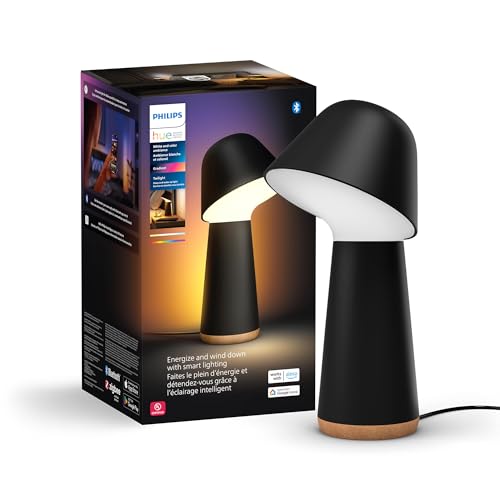
Hue’s bedside lamp for sleep and waking up: a front light that swivels for reading, plus a gradient light on the back that casts several colors onto the wall (1,380 lumens in total). The Sunrise style was designed for gradient lights like this one, and Hue says Twilight’s sunrise starts very dim and warm and ends with a fresh, cool light. It works over Bluetooth or with a Bridge.
Best for: a dedicated bedside lamp with Hue’s best sunrise effect.
Price: ~$320
If your lights don’t brighten
- The lamp is switched off. A smart bulb needs power to receive commands, so leave the lamp or wall switch on.
- The automation is off or set for other days. Check its toggle in the Hue app’s Automations tab, and the days it repeats.
- Alexa’s lights stay off. Check that the alarm shows Wake-Up Light Enabled in the Alexa app, and that plugs and switches are set to the Light type.
- The Apple Home steps don’t run. Check that your HomePod or Apple TV is set up as your home hub.
- Two automations control the same lights. If the Hue app, Apple Home and Alexa all change the bedroom lights in the morning, the lights follow the last command. Keep one wake-up automation per room.
The bottom line
For a Philips Hue sunrise alarm, the Hue app is the best option: a Wake up automation with the Sunrise style, 20 to 30 minutes long, on a Hue Bridge. If you use Apple Home, you can keep the Home app and Siri for everything else and let Hue handle the mornings, or raise the brightness step by step for other lights. With Alexa, an alarm “with lights” takes one sentence, and a Ramp to Brightness routine lets you choose the timing.
Does Philips Hue have a sunrise alarm?
Yes. The Hue app’s Wake up with light automation has a Sunrise style that starts dim and warm and reaches full brightness at the time you choose. Go to Automations, tap +, choose Wake up with light, pick Sunrise and tap Save.
Do I need a Hue Bridge for a Hue sunrise alarm?
Not strictly, but it helps. Hue lists Bluetooth automations as limited, and reviews report shorter fades without a repeating schedule. With a Bridge, the fade can last up to an hour, it repeats on the days you choose, and your lights also work with Apple Home.
Can Apple Home fade lights in for a wake-up alarm?
Not by itself, because the Home app doesn’t have a fade setting. Use the Hue app’s Wake up automation for Hue lights, or create a few Time of Day automations that raise the brightness step by step. Home app automations need a home hub.
How do I make Alexa wake me up with lights?
Say “Alexa, wake me up at [time] with [light name].” The alarm should show Wake-Up Light Enabled in the Alexa app. For more control over the timing, create a routine with the Ramp to Brightness action.
Which Hue bulbs work with the Sunrise wake-up style?
Hue says the Sunrise style works on all White ambiance and White and color ambiance lights, and it was made for gradient lights like the Hue Twilight. Basic Hue White bulbs only dim, so they use the plain fade.
How long should a sunrise alarm be?
Hue suggests 20 to 30 minutes for most people. In the Hue app, the lights reach full brightness at the wake-up time you set, so a 30-minute fade for 7:00 starts at 6:30.

Written by Evan Mercer
Founder & Lead Researcher, Smart Home Matrix
Evan digs through spec sheets, firmware changelogs, and thousands of owner reviews so you don’t have to. Every guide starts with a compatibility check and ends with picks he would install in his own home. Read more about Evan and this site, or see exactly how we choose products.