
The best smart alarm clock for most people is the Amazon Echo Spot: a small Alexa speaker with a clock face you can read from bed, no camera, and voice control for your lights and thermostat, for about $110. It isn’t the only kind, though. Some wake you with light instead of sound, some replace your phone at night with sleep sounds, and one tracks your sleep without anything to wear.
This guide covers seven of them, from Alexa and Google Home clocks to sunrise lights and a clock for kids, and explains which features actually change how you wake up. If you want a sunrise without buying a new clock, your smart bulbs can do it too (see the buying guide at the end).
Quick Recommendations
- Amazon Echo Spot — Best overall. An Alexa clock with good sound, a readable display and no camera.
- Hatch Restore 3 — Best sunrise alarm clock. Wakes you with a gradual sunrise and puts you to sleep with sounds.
- Loftie Clock — Best without a subscription. A two-phase alarm and 100+ sounds included, with no screen.
- Google Nest Hub (2nd Gen) — Best for Google Home. A sunrise alarm on the screen and free sleep tracking.
- Echo Show 5 (3rd Gen) — Best Alexa display. A bigger 5.5-inch screen, a sunrise alarm and video calls.
- Philips SmartSleep Wake-up Light HF3520 — Best without Wi-Fi. A colored sunrise, FM radio and buttons, with no app to set up.
- Hatch Baby — Best for kids. A night light, sound machine and time-to-rise light you control from your phone.
At-a-Glance Comparison
| Product | Type | Wake-Up | Approx. Price | Best For |
|---|---|---|---|---|
| Amazon Echo Spot | Alexa clock | Alarm, music, your smart lights | ~$110 | Most bedrooms |
| Hatch Restore 3 | Sunrise clock | Sunrise light and sound | ~$170 | Waking with light |
| Loftie Clock | Sound clock | Two-phase sound alarm | ~$200 | No fees, no screen |
| Google Nest Hub (2nd Gen) | Google display | Screen sunrise, your smart lights | ~$100 | Google Home |
| Echo Show 5 (3rd Gen) | Alexa display | Screen sunrise, alarm | ~$100 | A bigger screen |
| Philips SmartSleep Wake-up Light HF3520 | Sunrise light | Colored sunrise, sounds, radio | ~$125 | No Wi-Fi |
| Hatch Baby | Kids’ clock | Time-to-rise light | ~$80 | Toddlers and kids |
None of these needs a subscription to wake you up. Hatch sells an optional Hatch+ plan for extra content, and the Echo devices work without Alexa+.
Compatibility Matrix
| Product | HomeKit | Alexa | Google Home | Matter | Thread | Hub Required | Wiring/Power |
|---|---|---|---|---|---|---|---|
| Amazon Echo Spot | No | Yes (built in) | No | Yes (controller, Wi-Fi) | No | No | Plug-in |
| Hatch Restore 3 | Not stated | Yes (skill) | Not stated | Not stated | No | No | Plug-in |
| Loftie Clock | Not stated | Not stated | Not stated | Not stated | No | No | Plug-in |
| Google Nest Hub (2nd Gen) | No | No | Yes (built in) | Yes (controller) | Yes (border router) | No | Plug-in |
| Echo Show 5 (3rd Gen) | No | Yes (built in) | No | Yes (controller, Wi-Fi) | No | No | Plug-in |
| Philips SmartSleep Wake-up Light HF3520 | No | No | No | No | No | No | Plug-in |
| Hatch Baby | Not stated | Not stated | Not stated | Not stated | No | No | Plug-in |
No clock here works with Apple Home. On an iPhone you use each clock’s own app, or the Alexa or Google Home app. Hatch and Loftie use their own apps and don’t list Apple Home, Google Home or Matter support. The Nest Hub is the only one that’s also a Thread border router, so it can run Matter-over-Thread devices for Google Home.
The Best Smart Alarm Clocks for 2026
Amazon Echo Spot — Best Overall
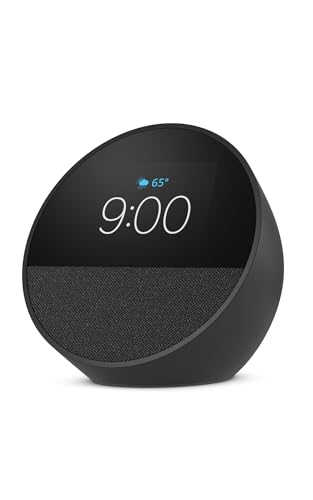
The Echo Spot is the best smart alarm clock for most bedrooms. It shows the time clearly, sounds better than its size suggests, and puts Alexa next to your bed without a camera pointed at it.
Best for: Anyone who already uses Alexa, or wants a bedside clock that can also turn off the lights.
What stands out in real use
If you want an alarm clock with Alexa, this is the one to start with. The 2.83-inch screen sits behind a half-round glass front and shows the time, weather and what’s playing, with clock faces and colors you can change. A tap on the device silences the alarm. The motion sensor lets you build routines, like turning the lights down when you get into bed, and Amazon’s own example is a wake-up routine “that gently wakes you with music and gradual light” from your smart bulbs. It also works as an eero mesh extender if you already have eero Wi-Fi.
Key specs
- 2.83-inch touchscreen (320 x 240)
- 1.73-inch front-firing speaker
- No camera, mic-off button
- Motion sensor for routines
- eero Built-in (adds up to 1,000 sq ft to an eero network)
- Dual-band Wi-Fi, Bluetooth
Pros
- Easy-to-read clock with custom faces
- Good sound for music and podcasts in bed
- No camera in the bedroom
- Controls Alexa lights, plugs and thermostats by voice or tap
Cons
- No built-in sunrise light (it needs your smart bulbs for that)
- The small screen is for glancing, not watching
- Amazon raised the list price from $79.99 to about $110
Installation and compatibility notes
It plugs into the wall and sets up in the Alexa app. It controls Alexa-compatible devices and works as a Matter controller over Wi-Fi, but it isn’t a Thread border router or a Zigbee hub. It’s “Designed for Alexa+”, but the clock, alarms and smart home control work without it. For more Alexa ideas, see our guide to the best Alexa devices.
Price: ~$110
Hatch Restore 3 — Best Sunrise Alarm Clock

The Restore 3 is the best sunrise alarm clock if you want to wake up to light instead of noise. It also runs a bedtime routine with light and sound, so your phone can stay out of reach at night.
Best for: Light sleepers, dark winter mornings, and anyone trying to keep the phone out of bed.
What stands out in real use
The sunrise starts before your alarm and brightens the room gradually, and you can pair it with a wake-up sound. At night you press one big button to start a routine of light and sound, and the same button snoozes in the morning, so you don’t need the app day to day. Hatch lists 80+ sleep sounds, and the clock dims so it doesn’t light up the room. You set routines and alarms in the Hatch Sleep app.
Key specs
- Sunrise alarm with sound
- 80+ sleep sounds, wind-down light routines
- Dimmable clock display
- One-button controls for routines, volume and snooze
- Wi-Fi with the Hatch Sleep app
- 30 days of Hatch+ included
Pros
- A gentle sunrise wake-up that works well in a dark room
- Bedtime routines without your phone
- Clean design that fits a nightstand
- Alexa skill for basic voice control
Cons
- Expensive for a clock
- Hatch+ costs $5.99 a month or $59.99 a year for the premium content
- No Google Home or Apple Home support listed
Installation and compatibility notes
You set it up with the Hatch Sleep app on Wi-Fi, then use the buttons on the clock. Hatch says a subscription isn’t required to use its devices; Hatch+ adds premium content like meditations and stories. Hatch has an Alexa skill for basic commands such as turning it on or off and changing the volume. On Amazon it’s sold by Hatch’s own store.
Price: ~$170
Loftie Clock — Best Without a Subscription

The Loftie Clock is the choice if you want a phone-free alarm clock and no monthly fees. Everything it does, including 100+ sleep sounds, is included in the price.
Best for: People who want a simple, screen-free nightstand and no subscription.
What stands out in real use
Its two-phase alarm is the best part. A soft sound plays first and fades after 30 seconds, then a calm melody wakes you fully 3, 6 or 9 minutes later. That gives you a gentle start without a separate snooze habit. It also plays sleep sounds and guided content, works as a Bluetooth speaker, and has a night light. Blackout Mode turns the screen and light off while the alarm stays on.
Key specs
- Two-phase alarm (wake up, then get up)
- 100+ sleep sounds included, no subscription
- Night light, Blackout Mode
- Bluetooth speaker
- Offline Mode after setup
- 2.4 GHz Wi-Fi for setup and updates
Pros
- All content included, no fees
- Two-phase alarm is easy to wake up to
- Works without Wi-Fi once it’s set up
- Simple, distinctive design
Cons
- Not a sunrise alarm (Loftie sells the sunrise light as a separate lamp)
- Expensive for what it does
- No Alexa, Google Home or Apple Home support listed
Installation and compatibility notes
You need the Loftie app, Bluetooth and a 2.4 GHz Wi-Fi network for the first setup. Once the clock shows the right time, you can switch on Offline Mode and use it without Wi-Fi. On Amazon it’s sold by Loftie’s own store.
Price: ~$200
Google Nest Hub (2nd Gen) — Best for Google Home

The Nest Hub (2nd Gen) is the best alarm clock for a Google Home bedroom. Its screen does a sunrise before your alarm, and it can track your sleep with radar instead of a wearable.
Best for: Google Home users who want sleep tracking and a bigger screen by the bed.
What stands out in real use
The Sunrise Alarm brightens the screen for up to 30 minutes before the alarm goes off, and it can turn on the smart lights in the room too. Sleep Sensing uses a small radar sensor to track your sleep from the nightstand, with nothing to wear. Google still calls it a free preview, as its Sleep Sensing help page explains. There’s no camera, which suits a bedroom.
Key specs
- 7-inch touchscreen
- Sunrise Alarm, can bring up your room lights
- Sleep Sensing (radar, free preview)
- No camera
- Thread border router and Matter controller
- Google Assistant built in
Pros
- Sleep tracking without a wearable
- Sunrise Alarm that can also use your smart lights
- No camera in the bedroom
- Also a Thread border router for Google Home
Cons
- Google’s Sleep Sensing is still a preview, so it could change
- Doesn’t work with Alexa
- On Amazon it’s only sold by resellers, above Google’s price
Installation and compatibility notes
It sets up in the Google Home app. Place it on the nightstand facing you for Sleep Sensing, which works only on this 2nd Gen model. On Amazon, the Nest Hub is only available from resellers at about $300, so the button below goes to the Google Store, where it’s about $100. If you’re building out a Google Home, see our guide to the best Google Home devices.
Price: ~$100
Echo Show 5 (3rd Gen) — Best Alexa Display

The Echo Show 5 is the choice if you want a bigger Alexa screen by the bed. It costs about the same as the Echo Spot and adds a 5.5-inch display, a camera and a screen sunrise.
Best for: Alexa users who also want video calls, a doorbell view or photos on the nightstand.
What stands out in real use
The sunrise alarm brightens the screen gradually before the alarm; Amazon says it starts 15 minutes before. The bigger screen shows the time, weather and photos, and you can watch a compatible video doorbell or camera from bed. The camera has a built-in shutter you can close at night.
Key specs
- 5.5-inch touchscreen
- Sunrise alarm (screen)
- 2 MP camera with built-in shutter
- Video calls and camera views
- Controls Alexa smart home devices
- Matter over Wi-Fi
Pros
- Bigger screen for the price
- Screen sunrise built in
- Physical camera shutter
- Shows Ring and other compatible cameras
Cons
- A camera in the bedroom isn’t for everyone
- Not a Thread border router or Zigbee hub
- A screen sunrise gives much less light than a wake-up light
Installation and compatibility notes
It plugs in and sets up in the Alexa app. Turn on Sunrise Alarms in the device settings, and turn the screen brightness down for the night. Compare it with the larger Echo Show models in our guide to the best smart displays.
Price: ~$100
Philips SmartSleep Wake-up Light HF3520 — Best Without Wi-Fi

The HF3520 is the sunrise alarm clock to get if you don’t want another app. It wakes you with a colored sunrise and natural sounds, and you set everything with the buttons on the light.
Best for: People who want a sunrise wake-up with no Wi-Fi, account or app.
What stands out in real use
The light brightens through sunrise colors before your alarm, and it runs a sunset at night to help you fall asleep. You can wake to one of five natural sounds or the FM radio, and tap it to snooze. It’s also a bedside reading lamp with 20 brightness settings. Because there’s no app, it keeps working the same way whatever happens to your Wi-Fi.
Key specs
- Colored sunrise and sunset simulation
- 5 natural wake-up sounds, FM radio
- 20 brightness settings
- Tap snooze, auto-dimming display
- Bedside reading lamp
- No app or Wi-Fi
Pros
- A real sunrise light, not just a bright screen
- No app, account or Wi-Fi needed
- Radio and sound options
- Sold by Amazon
Cons
- No voice or smart home control
- Every setting is on the unit’s buttons
- No sleep-sound library or bedtime routines
Installation and compatibility notes
It plugs into the wall and you set the time and alarms on the unit. It doesn’t connect to anything, so it won’t work with Alexa, Google Home or Apple Home.
Price: ~$125
Hatch Baby — Best for Kids

Hatch Baby is the best choice for a toddler or young child. It’s a night light, a sound machine and a time-to-rise light in one, and you control it from your phone.
Best for: Toddlers and young kids who need to learn when it’s OK to get up.
What stands out in real use
You set a schedule in the Hatch Sleep app: soft sounds and a dim light at bedtime, then a time-to-rise color in the morning that tells your child it’s OK to get up. You can change it from another room without walking in. A big button on top starts, pauses or stops the favorite routine, and it comes with 3 months of Hatch+ that doesn’t renew on its own.
Key specs
- Night light with custom colors
- Sound machine with white noise and more
- Time-to-rise light
- App schedules and remote control
- Big button on the device
- 3 months of Hatch+ included
Pros
- Adjust light and sound without going into the room
- Time-to-rise light helps with early wake-ups
- Lower price than the adult Hatch
- Hatch+ trial doesn’t auto-renew
Cons
- Not a clock for adults
- Needs the Hatch app and Wi-Fi for schedules
- No Alexa, Google Home or Apple Home support listed
Installation and compatibility notes
Place it near the crib or bed, plug it in and set it up in the Hatch Sleep app. If you also want to watch the room, pair it with one of the best baby monitors. On Amazon it’s sold by Hatch’s own store.
Price: ~$80
How to Choose a Smart Alarm Clock
Light or sound. A sunrise alarm clock with a real light, like the Hatch Restore 3 or the Philips HF3520, brightens the whole room. A display like the Nest Hub or Echo Show 5 does a “sunrise” with its screen, which is gentler than a beep but much less light. If waking with light is the main reason you’re buying, get a real wake-up light.
Smart home control. An Alexa or Google clock is the only kind that controls the rest of your home. The Echo Spot and Echo Show 5 run Alexa routines, and the Nest Hub runs Google Home ones. That also means you can make a sunrise with your own lights: set a wake-up routine that slowly brings up a smart bulb in your bedside lamp. Our guide on how to set up a sunrise alarm with smart lights covers Hue, Apple Home and Alexa step by step. Any color bulb from our guide to the best smart bulbs can do it.
Subscriptions. None of these clocks needs a plan to wake you up. Hatch+ adds premium content, and Loftie includes everything. Alexa+ is free with Prime and isn’t needed for alarms.
Screens and cameras. A bright screen can keep some people awake, so check how far a clock dims. The Loftie’s Blackout Mode turns its screen and light off while the alarm stays on. The Echo Show 5 is the only one here with a camera, and it has a shutter.
Wi-Fi and power. Every clock here plugs in. The Loftie can run offline after setup and the Philips never needs Wi-Fi, which matters if your router drops out at night. If you rely on an Alexa or Google clock, keep a backup alarm on your phone for important mornings.
Conclusion
The Amazon Echo Spot is the best smart alarm clock for most people: a clear clock, good sound and Alexa control, with no camera, for about $110. The Hatch Restore 3 is the best sunrise alarm clock, the Loftie Clock is the choice with no fees, and the Nest Hub (2nd Gen) is the one for Google Home and sleep tracking. The Echo Show 5 gives Alexa users a bigger screen, the Philips HF3520 is a sunrise light with no app, and Hatch Baby is the one for kids.
What is the best smart alarm clock?
The Amazon Echo Spot is the best smart alarm clock for most people. It has a clear clock face, good sound, Alexa control for your smart home and no camera, for about $110. If you’d rather wake up to light, the Hatch Restore 3 is the best sunrise alarm clock.
What is the best sunrise alarm clock?
The Hatch Restore 3 is the best sunrise alarm clock for most bedrooms: it brightens the room before your alarm and runs bedtime routines with light and sound. The Philips SmartSleep Wake-up Light HF3520 is the choice if you want a sunrise light with no app or Wi-Fi.
Is there an alarm clock with Alexa built in?
Yes. The Amazon Echo Spot is Amazon’s own alarm clock with Alexa, and the Echo Show 5 (3rd Gen) is an Alexa display with a screen sunrise alarm. The Hatch Restore 3 also has an Alexa skill for basic voice commands, but Alexa isn’t built in.
Do smart alarm clocks need a subscription?
Not to wake you up. Hatch sells an optional Hatch+ plan ($5.99 a month or $59.99 a year) for premium content, the Loftie Clock includes all of its sounds, and the Echo Spot and Echo Show 5 work without Alexa+.
Can smart lights work as a sunrise alarm?
Yes. An Alexa wake-up routine can slowly turn up a smart bulb before your alarm, and the Nest Hub’s Sunrise Alarm can bring up the smart lights in the room. It’s the cheapest way to try a sunrise wake-up if you already have smart bulbs.
Does the Nest Hub track sleep for free?
Yes, for now. Sleep Sensing on the Nest Hub (2nd Gen) is a free preview, and Google says it may become part of its paid health plans in the future. It only works on the 2nd Gen model.

Written by Evan Mercer
Founder & Lead Researcher, Smart Home Matrix
Evan digs through spec sheets, firmware changelogs, and thousands of owner reviews so you don’t have to. Every guide starts with a compatibility check and ends with picks he would install in his own home. Read more about Evan and this site, or see exactly how we choose products.