
A smart thermostat rebate almost always comes from your electric or gas utility, not from the government or the thermostat brand. In 2026 these rebates typically run from about $30 to $100 for an ENERGY STAR certified model, and some utilities pay more if you also sign up for a peak-demand program. There’s no federal tax credit for a smart thermostat bought this year, so your utility is where the money is.
This guide shows where to look, how to check that the thermostat you want qualifies, and how the Nest and ecobee reward programs add to the rebate. It takes about five minutes, and it’s worth doing before you buy: some programs only pay instantly at checkout, and others give you 60 days to apply.
Smart Thermostat Rebates at a Glance
| At a glance | |
|---|---|
| Who pays | Your electric or gas utility, or your state’s efficiency program |
| Typical amount | About $30 to $100 per thermostat in 2026 programs |
| What qualifies | Usually a new ENERGY STAR certified smart thermostat on the utility’s model list |
| How you get it | An instant discount (utility store or a store code) or a claim after purchase with your receipt |
| Extra rewards | Nest Rush Hour Rewards, ecobee Community Energy Savings, Amazon’s Energy Saving Incentives |
| Federal tax credit | None in 2026: the 25C credit covered improvements made through December 31, 2025 |
Where Thermostat Rebates Come From
There are two kinds of money for a smart thermostat, and many homes can get both.
A purchase rebate. This is a one-time payment for buying and installing a qualifying thermostat. Utilities and state efficiency programs run them, and each one sets its own amount, model list and deadline. Here’s what four 2026 programs offer:
| Program | Rebate | Main rules |
|---|---|---|
| Mass Save (Massachusetts) | Up to $100 per thermostat | ENERGY STAR certified, up to 3 per account, installed in 2026, paperwork by February 28, 2027 |
| PNM (New Mexico) | $50 | ENERGY STAR certified, bought in 2026, up to 2 per account, never more than the price paid |
| Tucson Electric Power (Arizona) | $35 | On TEP’s model list, connected by Wi-Fi to your cooling system, up to 2 per account |
| CenterPoint Energy (Indiana) | Up to $30 | New, Wi-Fi connected, existing home, apply within 60 days of purchase |
A demand-response reward. Many utilities also pay you to let them adjust your thermostat a few degrees during peak hours, the hot afternoons and cold mornings when everyone’s heating or cooling at once. The thermostat pre-cools or pre-heats your home first, and you can cancel any single event. These rewards usually come as an enrollment bonus plus a smaller yearly payment, and they’re how the Nest and ecobee programs below work.
What you can’t count on in 2026 is a federal tax credit. The IRS says the Energy Efficient Home Improvement Credit (25C) covers improvements made through December 31, 2025, and a standalone smart thermostat was never clearly on its list of qualifying items anyway. Some states run income-qualified Home Energy Rebate programs funded by the Inflation Reduction Act, for households under 150% of the area median income. Those are built around heat pumps, insulation and wiring, and ENERGY STAR’s list of eligible products for them doesn’t include smart thermostats as a category of their own.
A rebate also shortens the payback on the thermostat itself. Our guide to whether smart thermostats save money shows what a typical home saves each year.
How to Find Your Smart Thermostat Rebate
These four steps work for any brand and any utility.
1. Search your ZIP code. Three free tools list offers by ZIP code:
- The ENERGY STAR Rebate Finder covers rebates and special offers on certified products, including smart thermostats. It’s the best place to start an ENERGY STAR smart thermostat rebate search because it isn’t tied to one brand.
- The Google Store rebates page shows rebates, rewards and offers from your energy provider for Nest thermostats.
- ecobee’s Rebate Finder lists rebates, incentives and special offers for ecobee thermostats in your area.
If none of them shows anything, check your utility’s own website for an “energy efficiency” or “rebates” page, or search the DSIRE database, which tracks state and utility incentives.
2. Open your utility’s rebate page. The finders point you to a program, but the utility’s page has the rules that decide whether you get paid. Look for the amount, the purchase and install dates, the limit per account, and the deadline to apply. CenterPoint Energy in Indiana, for example, wants the application within 60 days of purchase.
3. Match the exact model number. Most programs require an ENERGY STAR certified thermostat, but the utility’s own list is what counts, and it can lag behind. Tucson Electric Power’s 2024-2026 list includes the Nest Thermostat, the Nest Learning Thermostat (3rd gen) and the ecobee Premium and Enhanced, but not the Nest Learning Thermostat (4th gen) or the Amazon Smart Thermostat, even though both are on ENERGY STAR’s list. Compare the model number on the box or product page with the utility’s list before you buy.
4. Decide how you want the money. Rebates come in two forms:
- Instant: a discount in the utility’s online store, or a code you show at a participating retailer. Mass Save offers both.
- After purchase: you buy the thermostat anywhere, install it, and submit an online or mail-in form with your receipt and model number. Tucson Electric Power accepts online retailers as long as they ship to your service address, while sites like eBay don’t count.
An instant discount is easier, but the utility store may only carry a few models. A rebate after purchase lets you buy the thermostat you actually want. Some utilities don’t let you combine the two on the same thermostat, so read the fine print.

Some energy providers even offer Nest installation at no extra cost, according to Renew Home. If you’re thinking about hiring someone, our guide to smart thermostat installation cost covers what it usually costs.
Nest Thermostat Rebates and Rush Hour Rewards
A Nest thermostat rebate works like any other: your utility pays it, and the Google Store’s ZIP code search is the quickest way to see what’s available. Depending on your provider, the offers can include a purchase rebate, a discounted Nest thermostat in the utility’s online store, and Rush Hour Rewards.
Rush Hour Rewards is Google’s demand-response program, run by Renew Home together with Google Nest and your energy provider. According to Renew Home, most energy providers pay you for enrolling and then a yearly amount for each year you take part, as a bill credit or a prepaid card. Summer programs need central air conditioning controlled by a Nest thermostat, and winter programs need a Nest-controlled heating system.
To sign up in the Google Home app:
- Open the Google Home app and tap Settings.
- Under Nest services and support, tap Subscriptions.
- Tap Rebates & rewards and follow the prompts for the programs in your area.
You’ll usually also get an email inviting you to sign up a few days after you install the thermostat. Your energy provider then reviews the application, which can take several weeks.
Here’s a real example of the amounts. Renew Home’s page for NV Energy lists a one-time $50 bill credit for enrolling, plus $5 a month (up to $20 a year) if you take part in at least half of the events. During an event, the thermostat changes the temperature by up to 4°F.
To skip an event, change the temperature on the thermostat. However, skipping events often can cost you part of the reward, and leaving the program early can mean giving back the enrollment bonus or a thermostat discount in some programs. If you’re choosing between Google’s two models, our Nest Thermostat vs Nest Learning Thermostat comparison explains the differences.
ecobee Rebates and Community Energy Savings
An ecobee rebate comes from your utility too. ecobee’s Rebate Finder searches by ZIP code, and the utility’s page has the rules and the model list. TEP’s list, for example, includes the Premium and Enhanced but not the Essential.
ecobee’s version of Rush Hour Rewards is Community Energy Savings, part of the free eco+ features. ecobee says you can earn up to $125 in rewards from your energy provider. The thermostat pre-cools or pre-heats your home before a peak, then makes small adjustments while demand is high, and you can opt out of any event.
To enroll in the ecobee app:
- On the home screen, tap your home’s name at the top, then Manage Homes. Select your home, tap Edit, and check the address.
- Tap Utility, select your provider, and tap Confirm provider.
- If your provider has an offer, it shows on the screen. Follow the prompts to apply.
ecobee lists dozens of participating utilities, including Con Edison, Eversource, Georgia Power, Duke Energy and the Tennessee Valley Authority. If yours isn’t listed, the utility may still run its own program, so check its website. For how ecobee and Google compare beyond rewards, see our Nest vs ecobee guide.
Smart Thermostats That Qualify for Most Rebates
ENERGY STAR’s list of certified smart thermostats includes the Google Nest Thermostat and Nest Learning Thermostat (3rd and 4th gen), the ecobee Premium and Enhanced, the Amazon Smart Thermostat, and many Honeywell Home and Sensi models. Every model on the list can also respond to utility demand-response events.
These three are the most practical choices if a rebate is part of your plan. They cover the two brand programs above and the cheapest certified option. All three are sold new by Amazon.com or the brand, which matters because most programs exclude used and refurbished units. For more options, see our guide to the best smart thermostats.
Google Nest Thermostat — Best Overall

The Nest Thermostat is the safest choice for a rebate: it’s ENERGY STAR certified, it’s been on utility model lists like TEP’s for years, and it works with Rush Hour Rewards.
Best for: Most homes that want a rebate plus peak-demand rewards, at a low price.
What stands out in real use
The Nest Thermostat sets a schedule you build in the Google Home app and switches to Eco temperatures when everyone’s away, which is where most of the savings come from. Because Google runs Rush Hour Rewards with so many energy providers, it’s the model most likely to qualify for both a purchase rebate and an enrollment bonus. It also works with Apple Home and Alexa through Matter, so you’re not tied to Google’s app for everyday control.
Key specs
- ENERGY STAR certified
- Google Home app, Matter (works with Apple Home and Alexa)
- Rush Hour Rewards and Nest energy programs
- Works with most heating and cooling systems, including single-stage heat pumps
- Two AAA backup batteries
Pros
- On utility model lists like TEP’s
- Cheapest way into Google’s reward programs
- Simple schedule and Eco temperatures
- Matter support for Apple Home and Alexa
Cons
- Doesn’t learn your schedule like the Nest Learning Thermostat
- Some systems need a C wire or the Nest Power Connector
- Not compatible with Nest Temperature Sensors
Installation and compatibility notes
Many homes can install it themselves. Some systems need a C wire or the Nest Power Connector, so run Google’s compatibility check before you buy. Our C-wire adapter guide explains the options if you don’t have one.
Price: ~$130
ecobee Smart Thermostat Enhanced — Best for ecobee Rewards
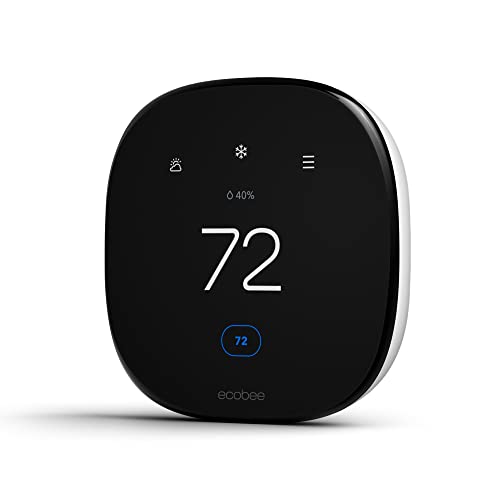
The Enhanced is the ecobee to choose for a rebate: it’s ENERGY STAR certified, on utility lists like TEP’s, and it gets ecobee’s Community Energy Savings rewards.
Best for: Apple Home and Alexa homes, and anyone who wants room sensors later.
What stands out in real use
The Enhanced uses radar to tell when someone’s near it and when the house is empty, and it adjusts the temperature when you’re away. It works with Apple Home, Alexa, Google Home and SmartThings, and it supports ecobee’s SmartSensors if you want to balance the temperature between rooms later. Community Energy Savings and the rest of eco+ are free, so the rewards don’t depend on a subscription.
Key specs
- ENERGY STAR certified
- Apple Home, Alexa, Google Home, SmartThings
- Radar occupancy sensing, SmartSensor compatible (sold separately)
- Power Extender Kit in the box for homes without a C wire
- Heat pumps up to 2 heat and 2 cool stages plus 1 stage of aux heat
Pros
- On utility model lists like TEP’s
- Community Energy Savings rewards up to $125, depending on the utility
- Works with every major smart home platform
- Includes an adapter for homes without a C wire
Cons
- Costs more than the Nest Thermostat
- No Matter support
- Sold on Amazon only by resellers right now, so we link to ecobee’s store
Installation and compatibility notes
ecobee includes the Power Extender Kit, so most homes can install the Enhanced without running a new wire. Check that your utility’s list names the Enhanced (model EB-STATE6L-01) before you buy, since some lists don’t include ecobee’s newest models.
Price: ~$200
Amazon Smart Thermostat — Best Budget Option

The Amazon Smart Thermostat is the cheapest ENERGY STAR certified smart thermostat here, so a $50 rebate covers a large part of its price.
Best for: Alexa homes on a tight budget, where the utility’s list includes it.
What stands out in real use
It’s a simple thermostat you control with Alexa and the Alexa app, with schedules and temperature changes when you’re away. Because it costs so little, even a small rebate makes a big difference. Some utilities sell it pre-enrolled in their programs, and in that case you have to finish enrolling in the Alexa app within 180 days of purchase. Our Amazon Smart Thermostat review covers it in more detail.
Key specs
- ENERGY STAR certified
- Alexa only (Alexa app or an Echo device)
- Energy Saving Incentives in the Alexa app
- Works with most heating and cooling systems, including heat pumps
- C wire required
Pros
- Lowest price of any ENERGY STAR model here
- Simple setup in the Alexa app
- Supports utility demand-response programs
Cons
- Needs a C wire (Amazon sells a bundle with an adapter)
- Alexa only, with no Apple Home or Google Home support
- Missing from some utility lists, such as TEP’s
Installation and compatibility notes
You need a C wire, or the C-wire adapter Amazon sells in a bundle. Check your utility’s list for the Amazon Smart Thermostat before you buy: it’s certified, but not every program includes it yet.
Price: ~$80
Common Rebate Mistakes
These are the mistakes that most often cost people their rebate:
- Buying used or refurbished. Most programs pay only for a new thermostat. Tucson Electric Power, for example, excludes used and refurbished units and resale sites.
- Assuming the ENERGY STAR label is enough. The utility’s model list decides. Check the model number, not just the brand.
- Missing the deadline. Some programs give you 60 days from purchase, and others close the year’s paperwork on a set date. Apply as soon as the thermostat is installed and connected.
- Combining offers that don’t combine. CenterPoint Energy in Indiana won’t pay a rebate on a thermostat that already got its instant discount. Use one or the other.
- Leaving a reward program early. Unenrolling from a demand-response program before the season ends can cost you the enrollment bonus, and some programs that gave you a discounted thermostat expect you to stay enrolled.
Conclusion
The smart thermostat rebate you can get depends on your utility, so start with a ZIP code search on ENERGY STAR, the Google Store or ecobee, then read your utility’s rules and check that your exact model is on its list. Expect about $30 to $100 for the purchase, plus a separate reward if you sign up for Rush Hour Rewards or Community Energy Savings. The Nest Thermostat is the safest all-round choice, the ecobee Enhanced suits Apple Home and Alexa homes, and if your budget is tight, our guide to the best smart thermostats under $100 has more options.
How much is a smart thermostat rebate?
It depends on your utility. In 2026 programs, purchase rebates typically run from about $30 to $100 per ENERGY STAR certified thermostat: Mass Save pays up to $100, PNM $50 and Tucson Electric Power $35. Many utilities pay a separate reward if you also enroll in a peak-demand program.
Is there a federal tax credit for a smart thermostat in 2026?
No. The IRS says the Energy Efficient Home Improvement Credit (25C) covers improvements made through December 31, 2025, and a standalone smart thermostat was never clearly on its list of qualifying items. In 2026, utility rebates are the main incentive.
How do I get a Nest thermostat rebate?
Enter your ZIP code on the Google Store’s rebates page to see your energy provider’s offers, then follow your utility’s rules. After you install the thermostat, you can also join Rush Hour Rewards in the Google Home app under Settings, Subscriptions, Rebates & rewards, where most providers pay an enrollment bonus.
Does ecobee have a rebate?
ecobee’s rebates come from utilities, and ecobee’s Rebate Finder lists them by ZIP code. ecobee also offers Community Energy Savings in the free eco+ features, which ecobee says can earn up to $125 in rewards from your energy provider.
Can I buy my thermostat on Amazon and still get a rebate?
Often, yes. Many utilities accept a rebate claim for a new thermostat from any retailer, including online stores, as long as you send your receipt and the model is on their list. Tucson Electric Power, for example, accepts online retailers that ship to your service address. Instant discounts usually only apply in the utility’s own store or at participating retailers.
Do I need an ENERGY STAR smart thermostat to get a rebate?
In most programs, yes. Mass Save and PNM both require an ENERGY STAR certified smart thermostat, and other utilities keep their own list of eligible models. Check that list for your exact model number before you buy.

Written by Evan Mercer
Founder & Lead Researcher, Smart Home Matrix
Evan digs through spec sheets, firmware changelogs, and thousands of owner reviews so you don’t have to. Every guide starts with a compatibility check and ends with picks he would install in his own home. Read more about Evan and this site, or see exactly how we choose products.