
Does ecobee work with HomeKit? Yes. ecobee HomeKit support is native: every current ecobee smart thermostat, and most older ones, pairs directly with the Apple Home app, without a bridge, Homebridge or an extra hub. ecobee was actually the first thermostat maker to support HomeKit, with the ecobee3 in 2015. The one thing ecobee doesn’t support is Matter, and that matters for a few newer Apple Home features.
This guide covers which ecobee devices work with Apple Home, how to add ecobee to HomeKit, what you can control from the Home app, and the limits worth knowing before you buy.
Quick answer: Yes, ecobee works with HomeKit natively. The Smart Thermostat Premium, Enhanced, Essential and the installer-only Smart Thermostat Lite all pair with the Apple Home app, as do the older ecobee3, ecobee3 lite and ecobee4. You scan a HomeKit code shown on the thermostat’s screen. ecobee doesn’t support Matter, so Apple’s Adaptive Temperature feature isn’t available, and you still use the ecobee app for schedules and Comfort Settings.
Which ecobee Devices Work With HomeKit
Here’s how each ecobee product works with Apple Home:
| ecobee device | Works with Apple Home? | What to know |
|---|---|---|
| Smart Thermostat Premium | Yes, native HomeKit | Siri built in (needs a HomePod), radar occupancy sensor, SmartSensor in the box |
| Smart Thermostat Enhanced | Yes, native HomeKit | Radar occupancy sensor, works with SmartSensors |
| Smart Thermostat Essential | Yes, native HomeKit | No built-in occupancy sensor, 2.4GHz Wi-Fi only |
| Smart Thermostat Lite | Yes, native HomeKit | Sold only through HVAC installers |
| ecobee3, ecobee3 lite, ecobee4, SmartThermostat with voice control | Yes, native HomeKit | Older models, still supported |
| SmartSensors | Yes, through the thermostat | Show up as temperature and occupancy sensors |
| Smart Doorbell Camera (wired) | Yes | Live view in the Home app, but no HomeKit Secure Video |
| Smart Security | Yes, with a Premium or Enhanced as the hub | Arm and disarm from the Home app and Siri |
All four current thermostats work the same way in Apple Home, so the choice between them comes down to features like occupancy sensing and built-in voice. Our ecobee Essential vs Enhanced vs Premium comparison explains the differences.
How ecobee Connects to Apple Home
An ecobee HomeKit thermostat is a regular HomeKit accessory. It talks to the Home app over your Wi-Fi network, so you pair it the same way you’d pair a HomeKit light or lock. There’s no cloud account linking like you need for Google Home or Alexa.
ecobee hasn’t added Matter to any thermostat. That’s why you’ll find ecobee under HomeKit, not Matter, when you add it, and it’s the reason a few newer Apple features skip it (more on that below). If Matter is important to you, our guide to the best Matter thermostats lists the options.

Two things are still needed alongside the Home app:
- The ecobee app and account. You register the thermostat with ecobee during setup, and the ecobee app is where you edit the schedule, Comfort Settings and sensors.
- A home hub for remote control. A HomePod, HomePod mini or Apple TV lets you change the temperature when you’re away and runs your automations. At home, you can control the thermostat from your iPhone without one. Our guide on whether HomeKit needs a hub explains what a hub adds.
How to Add ecobee to HomeKit
You can add ecobee to HomeKit from the ecobee app or from the thermostat itself. Install and register the thermostat first (our ecobee installation guide covers that part), and make sure your iPhone is on the same Wi-Fi network.
From the ecobee app:
- Open the ecobee app and select your thermostat.
- Open its settings, go to Integrations, and select HomeKit.
- Tap Add to HomeKit, choose the Home you want to add it to, and follow the prompts.
From the thermostat:
- On the thermostat, open the Main Menu, then Settings, then HomeKit.
- Select Enable HomeKit pairing. The thermostat shows a HomeKit QR code.
- In the Home app, tap +, then Add Accessory, and scan the code on the screen.
- Choose a room and name the thermostat.
The menu names can differ slightly between models, and ecobee’s own Apple Home setup article has the current steps. If the camera won’t read the code, tap More options in the Home app and select the ecobee from the list of nearby accessories. Our guide to finding a HomeKit setup code explains what to do if the code won’t scan.
Once it’s paired, open the HomeKit section of the ecobee app’s settings to create ecobee scenes. A scene can resume your schedule, switch to a Comfort Setting such as Away or Sleep, or set a custom temperature, and it then appears in the Home app, where you can use it with Siri or in HomeKit automations.
If you have a Premium, you can also turn on Siri on the thermostat itself during setup, instead of Alexa. ecobee says Siri on the Premium needs a HomePod or HomePod mini as your home hub (an Apple TV isn’t enough), and only one assistant can be active at a time.
What Works in Apple Home, and What Stays in the ecobee App
Once your ecobee Apple Home setup is done, the Home app handles everyday control:
- The current temperature, target temperature and mode (Heat, Cool, Auto or Off)
- Occupancy from the thermostat’s built-in sensor (Premium and Enhanced)
- Temperature and occupancy from each SmartSensor, as separate sensors you can assign to rooms
- Siri on your iPhone, iPad, Apple Watch or HomePod
- Automations, for example turning on the lights when a SmartSensor detects someone in the room
- ecobee scenes you created in the ecobee app
Other things stay in the ecobee app:
- Building or editing the schedule and Comfort Settings
- Smart Home and Away, Follow Me and other eco+ features
- Which sensors count for each Comfort Setting
- Humidifier, dehumidifier and ventilator settings, alerts and energy reports
SmartSensors pair with the thermostat in the ecobee app, not in the Home app, and they show up in Apple Home after that. Our ecobee SmartSensor guide covers how many you need and where to put them.
Limitations and What to Watch For
ecobee is one of the best-integrated thermostat brands in Apple Home, but there are a few limitations:
- Changes from Apple Home are holds. When you set a temperature from the Home app or Siri, the ecobee treats it like a manual change and puts the schedule on hold. How long it lasts depends on the hold setting in the ecobee app, and you can end it with a Resume Schedule scene created in the ecobee app. Our guide to what Hold means on a thermostat explains the options.
- No Adaptive Temperature or Clean Energy Guidance. Apple says these iOS 26 features need a compatible Matter thermostat, and no ecobee thermostat supports Matter. Thermostats like the Aqara W200 support them, and Honeywell says its X7S and X8S will add them in early 2027.
- One HomeKit controller at a time. HomeKit pairing is exclusive. If you want to add your ecobee to Home Assistant through its HomeKit integration, you have to remove it from Apple Home first. Our Home Assistant vs HomeKit comparison explains how the two can work together.
- “No Response” in the Home app. Check whether your other HomeKit accessories respond. If they don’t, the problem is your network or home hub. If only the ecobee is affected, restart it, and if that doesn’t help, remove it from the Home app (or select Disconnect from HomeKit under Settings, then Reset, on the thermostat) and add it again. Don’t use Reset All for this: it erases your schedule and equipment settings. Our guide to fixing HomeKit not responding covers the Apple side.
Which ecobee to Buy for Apple Home
Every current ecobee works with HomeKit, so choose by features. On Amazon, the standalone Premium, Enhanced and Essential are only available from outside sellers right now, so the options below link to the Premium bundle sold by Amazon and to the Enhanced on ecobee.com. For other brands, see our list of the best HomeKit thermostats.
ecobee Smart Thermostat Premium — Best for Siri and Sensors

The Premium is the ecobee that brings the most into Apple Home: Siri built in, a radar occupancy sensor and a SmartSensor in the box. On Amazon, the listing sold by Amazon is the Comfort and Security Bundle, which also includes two door and window sensors.
Best for: Apple Home users who want Siri on the thermostat and room sensors in the Home app.
What stands out in real use
The Premium shows the thermostat, its occupancy sensor and the included SmartSensor in the Home app, so you can use room temperature and occupancy in automations right away. With a HomePod as your home hub, you can turn on Siri on the thermostat, and it also acts as the hub for ecobee Smart Security if you add a plan.
Key specs
- 4-inch touchscreen with a zinc alloy frame
- Radar occupancy sensor and air quality monitor
- Siri or Alexa built in (one at a time)
- Dual-band Wi-Fi (2.4GHz and 5GHz)
- Works with Apple Home, Alexa, Google Home and SmartThings
Pros
- Native HomeKit with Siri built in
- SmartSensor included, plus two door and window sensors in this bundle
- Power Extender Kit in the box if you don’t have a C wire
- Acts as the Smart Security hub in Apple Home
Cons
- The most expensive ecobee
- Siri on the thermostat needs a HomePod or HomePod mini
- No Matter, so no Adaptive Temperature in Apple Home
Installation and compatibility notes
It needs a C wire or the included Power Extender Kit, and it supports most 24V systems, including heat pumps with two stages of auxiliary heat. The door and window sensors are part of ecobee Smart Security, and some features need a paid plan.
Price: ~$280 (for a kit with a SmartSensor and two door and window sensors)
ecobee Smart Thermostat Enhanced — Best Value for Apple Home
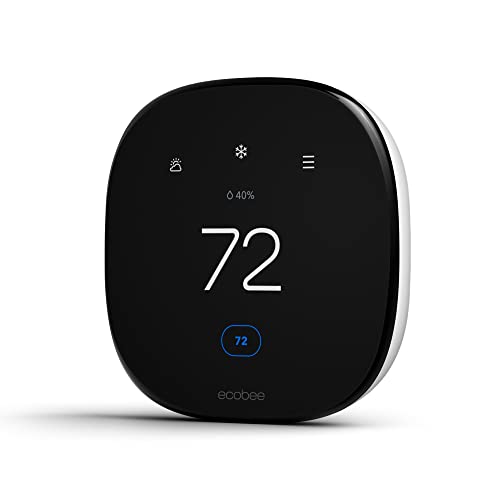
The Enhanced has the same screen and radar occupancy sensor as the Premium for less, without built-in voice and without a SmartSensor in the box.
Best for: Apple Home users who control the thermostat with Siri on an iPhone or HomePod and don’t need a speaker on the wall.
What stands out in real use
In the Home app, the Enhanced works the same way as the Premium: temperature, mode, occupancy and ecobee scenes, plus any SmartSensors you add later. You still control it with Siri, from your iPhone, Apple Watch or HomePod, rather than from the thermostat.
Key specs
- 4-inch touchscreen
- Radar occupancy sensor
- Dual-band Wi-Fi (2.4GHz and 5GHz)
- Works with SmartSensors (sold separately)
- Works with Apple Home, Alexa, Google Home and SmartThings
Pros
- Native HomeKit at a lower price than the Premium
- Built-in occupancy sensor shows up in Apple Home
- Power Extender Kit in the box
- Can act as the Smart Security hub
Cons
- No built-in voice assistant or air quality monitor
- SmartSensors cost extra
- No Matter, so no Adaptive Temperature
Installation and compatibility notes
It needs a C wire or the included Power Extender Kit, and it doesn’t support dual-transformer systems. Amazon’s listing is only available from outside sellers right now, so this button goes to ecobee.com.
Price: ~$200
The Bottom Line
ecobee HomeKit support is about as good as it gets for a thermostat brand. Every current model pairs natively with the Apple Home app, the room sensors show up as their own accessories, and the Premium even has Siri built in. You’ll still use the ecobee app for schedules and Comfort Settings, and the lack of Matter means Apple’s Adaptive Temperature isn’t available. If you want an ecobee for an Apple home, the Enhanced is the best value, and the Premium is the choice for Siri on the wall and a sensor in the box.
Does ecobee work with HomeKit?
Yes. Every current ecobee smart thermostat (Premium, Enhanced, Essential and the installer-only Lite) works with HomeKit natively, as do the older ecobee3, ecobee3 lite and ecobee4. You add it to the Apple Home app by scanning the HomeKit code shown on the thermostat’s screen, without a bridge.
How do I add my ecobee to Apple Home?
In the ecobee app, open the thermostat’s settings, go to Integrations, select HomeKit and tap Add to HomeKit. Or, on the thermostat, open Main Menu, Settings, HomeKit and select Enable HomeKit pairing, then scan the QR code with the Home app.
Does ecobee support Matter?
No. No ecobee thermostat supports Matter, so it joins Apple Home as a HomeKit accessory instead. That works for everyday control, but Apple’s Adaptive Temperature and Clean Energy Guidance need a compatible Matter thermostat.
Do ecobee SmartSensors work with HomeKit?
Yes, through the thermostat. After you pair SmartSensors with your ecobee in the ecobee app, they appear in the Home app as temperature and occupancy sensors you can assign to rooms and use in automations.
Do I need a HomePod to use ecobee with HomeKit?
Not for control at home. You need a home hub (a HomePod, HomePod mini or Apple TV) to control the thermostat away from home and run automations. Siri built into the ecobee Premium needs a HomePod or HomePod mini specifically.

Written by Evan Mercer
Founder & Lead Researcher, Smart Home Matrix
Evan digs through spec sheets, firmware changelogs, and thousands of owner reviews so you don’t have to. Every guide starts with a compatibility check and ends with picks he would install in his own home. Read more about Evan and this site, or see exactly how we choose products.