
Smart vents work, but only for one kind of problem. They’re motorized registers that replace the vents in your floors, walls or ceilings and open or close to send more or less air to each room. If one room in your house is always too hot or too cold while the rest feels fine, smart vents can move air from the rooms that get too much to the ones that get too little. They don’t add heating or cooling power, and the evidence that they cut energy bills is thin.
Flair is the main smart vent brand still selling today. A setup for one problem room costs about $350, and a whole house can run $1,000 to $2,000. This guide explains how smart vents work, where they help, the pressure problem HVAC pros warn about, and what a Flair system costs.
Smart Vents at a Glance
| Smart vents (Flair) | |
|---|---|
| What they replace | The supply registers (vent covers) in your floors, walls or ceilings |
| What you also need | A temperature sensor in each room with a smart vent, plus a Flair Bridge |
| Works with | Central forced-air heating and cooling with ducts, and any thermostat |
| Smart home support | Alexa and Google Assistant; Apple Home and Matter aren’t listed |
| Cost | $129 to $169 per vent, $124 per Flair Puck 2, $99 for the Bridge |
| Best for | One or two rooms that are always too hot or too cold |
| Not for | Homes without ducts, or leaky ducts that need fixing first |
How Smart Vents Work
A smart vent sits in the duct opening where your current register is. Inside, a small motor opens and closes the louvers. On its own, a vent doesn’t know when to move, so every system has three parts:
- The vents, one for each register you want to control.
- A temperature sensor in each room with a smart vent. With Flair, that’s a Flair Puck, your smart thermostat (for the room it’s in) or a compatible room sensor from ecobee, Honeywell or Sensi.
- A hub that connects everything to your Wi-Fi. Flair calls it the Bridge, and it’s required for smart vents.
Each room gets its own set point in the app. By default, Flair opens or closes a room’s vents when its temperature drifts more than 1°F from that set point, and a vent moves no more than once every 15 minutes.
What this does is redistribute air. Your furnace or AC still pushes the same amount of air into the ducts. When the vent in a room that’s already comfortable closes, more of that air goes to the rooms that still need it. That’s why smart vents fix a room that gets too little air, but can’t make a small AC cool a house that’s too big for it.

Flair works with any thermostat. If you have a smart thermostat from ecobee, Google Nest, Honeywell Home, Sensi, Carrier, Bryant, Daikin, Goodman or Amana, Flair can also connect to it and change its set point and mode, so the system runs when a room needs it. ecobee owners can use their existing ecobee SmartSensors as room sensors instead of buying a Puck for every room. Nest owners can’t: Google doesn’t let Flair read the Nest Temperature Sensor, so rooms other than the thermostat’s need a Puck.
Do Smart Vents Actually Work?
For comfort, often yes. Customer reviews on Flair’s site describe rooms over a garage or upstairs that used to be 6 to 10 degrees off and are now within a couple of degrees. That’s the problem smart vents are good at: a single-zone system where the air doesn’t go where it’s needed.
For energy savings, the picture is less clear. Flair says its vents save “up to 30%” on energy use, but we couldn’t find an independent field study that measured whole-home savings from a current smart vent system. Savings come from not heating or cooling rooms you’re not using, and how much you save depends on your house and your ducts.
The Pressure Problem
HVAC pros are wary of smart vents for a good reason: closing vents raises the pressure inside your ducts. A study from Lawrence Berkeley National Laboratory found that closing registers increased energy use in a typical California house with ducts outside the living space, because the higher pressure pushed more air out through duct leaks. It also warned against closing more than 60% of registers, which can make a furnace overheat and shut off or an AC coil freeze.
Flair builds a limit into its software for this reason. It never closes more than one third of the supply vents in a zone, counting all your vents, not just the smart ones. In a house with 12 supply vents, that means four at most. If a fifth vent needs to close, Flair opens one somewhere else first. An HVAC professional can also install Flair’s Static Pressure Kit, which measures the pressure in the ducts so Flair can adjust that limit.
That limit is good for your equipment, but it also means smart vents can’t turn off half the house. They’re a tool for balancing airflow, not a replacement for a real zoning system.
Leaky Ducts Come First
ENERGY STAR estimates that 20 to 30% of the air moving through the ducts in a typical house is lost to leaks, holes and poor connections. It also lists rooms that are hard to heat and cool as a common sign of duct problems. If your problem room sits at the end of a leaky duct in the attic, smart vents will push a bit more air toward it, but sealing the duct fixes the cause.
One more thing to know: smart vents depend on their company’s cloud. Keen Home, Flair’s best-known competitor, ended its app and cloud service on March 20, 2026, and its vents lost their connected features. Flair is still selling and raised new funding in 2026, with HVAC supplier RectorSeal as its lead investor.
How Much Do Flair Smart Vents Cost?
Here’s what each part of a Flair system costs.
| Part | Price | How many you need |
|---|---|---|
| Flair Smart Vent | $129 to $169, depending on size | One per register you want to control |
| Flair Puck 2 | $124 | One per room with smart vents, unless a compatible sensor or your thermostat covers that room |
| Flair Bridge | $99 | One per home, more for very large homes (one covers about 2,500 sq ft) |
Vents come in 10 sizes, from 4×10 to 12×12 inches. Measure the duct opening, not the outer vent cover: the 4×10 and 4×12 sizes cost $129, and the largest, 12×12, costs $169.
Two example setups:
- One problem room: a Bridge, one 4×10 vent and a Puck 2 cost $352. If an ecobee SmartSensor is already in that room, it’s $228.
- A whole house: five rooms with eight 4×10 vents, five Pucks and a Bridge come to about $1,750. With ecobee or Honeywell sensors in those rooms instead of Pucks, it’s about $1,130.
For comparison, a professionally installed HVAC zoning system, with motorized dampers inside the ducts and a thermostat per zone, costs about $3,000 on average and ranges from $1,500 to $8,500, according to Angi.
When Smart Vents Make Sense
Smart vents are a good fit if:
- One or two rooms are always too hot or too cold on a single-zone system, like a room over the garage, a sunny bedroom or an upstairs office.
- A room near the furnace gets too much air, so it’s too warm in winter and too cold in summer. Flair’s own guidance for this case is to start with one vent and one sensor in that room.
- You have guest rooms or a basement that you don’t need to heat or cool to the same temperature every day.
- You already own an ecobee or Honeywell thermostat with room sensors. You get room temperatures for free, so you only pay for vents and a Bridge.
- You rent or can’t change your ductwork. The vents drop into the existing openings, and you can put the old registers back when you move.
They’re not a good fit if:
- Your home doesn’t have ducts. Radiators, baseboard heaters and mini-splits have no registers to replace. For a mini-split, see our guide to smart thermostats for mini splits instead.
- Your ducts are leaky, crushed or undersized. Smart vents raise duct pressure, so they make these problems worse.
- You want to shut off most of the house. The one-third limit won’t let you, and a zoning system or a separate unit for that area is the better option.
- Your system can’t keep up on the hottest or coldest days. Moving air around won’t help when there isn’t enough of it.
What to Try Before Buying Smart Vents
Some of the causes of a hot or cold room cost less to fix than a set of smart vents:
- Check the basics. A dirty filter, a register blocked by furniture or a damper that’s half closed in the duct can starve one room of air.
- Have the ducts checked and sealed. An HVAC technician can find leaks and disconnected ducts, especially in an attic or crawl space.
- Balance the vents by hand. Partially closing the registers in the rooms that get too much air works, but you’ll need to adjust them again when the seasons change.
- Use a thermostat with remote sensors. A smart thermostat with remote sensors can average the temperature or focus on the room you’re in. It doesn’t move air, but it stops one hallway reading from running the whole house.
- Run the fan. A smart ceiling fan, or your system’s fan running on its own, mixes the air between rooms and floors. Our guide to thermostat fan On vs Auto covers what running the system fan costs.
- Heat or cool just that room. For one cold room, a smart space heater costs far less than vents, and a mini-split is the long-term fix for a room your system was never sized for.
The Flair Parts You Need
These are the three parts of a Flair smart vent system, in the order you’d buy them.
Flair Smart Vent — The Vent

The motorized register that replaces your existing vent cover and opens or closes to control a room’s airflow.
Best for: Rooms that are always too hot or too cold on a central forced-air system.
What stands out in real use
The Flair Smart Vent drops into the duct opening where your old register was, and it doesn’t need wiring. The faceplate is powder-coated steel and you can paint it, and Flair sells covers in black and two shades of brown for the 4-inch sizes. Flair vents open and close based on the room’s temperature, so you don’t need to set schedules. However, the vents need a Bridge and a temperature sensor in the room before they can do anything.
Key specs
- 10 sizes, from 4×10 to 12×12 inches (measure the duct opening)
- Two C batteries, about 3 to 4 years per set
- Optional 24 VAC wiring instead of batteries
- Floor, wall and ceiling installation
Pros
- Installs in minutes in the existing opening
- Solid metal construction
- Batteries last years, with low-battery alerts
- Works with any thermostat
Cons
- Needs a Bridge and a sensor in every room with a vent
- Larger sizes cost up to $169 each
- Only white, unless you paint it or add a cover
Installation and compatibility notes
Remove the old register, measure the duct opening, insert the Flair vent and add it in the Flair app. Small bathrooms and closets don’t need smart vents. Flair works with Alexa and Google Assistant, but it doesn’t list Apple Home or Matter support.
Price: ~$129
Flair Puck 2 — Room Sensor and Thermostat
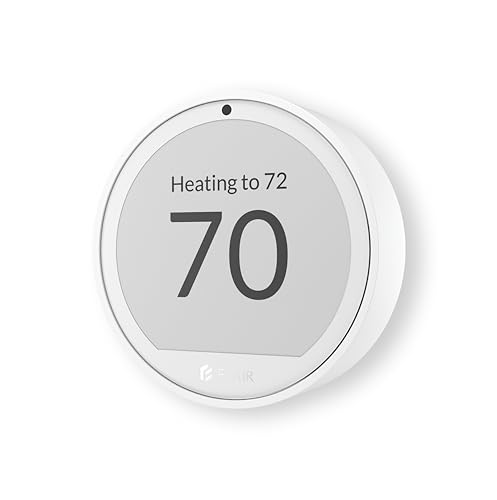
The temperature sensor that tells your Flair vents when to open and close, with a dial to change the room’s temperature.
Best for: Rooms with smart vents that don’t already have an ecobee, Honeywell or Sensi sensor.
What stands out in real use
The Puck 2 measures temperature and humidity in the room and sends them to the Bridge. You can turn its haptic wheel to change that room’s set point, and its e-paper display is three times larger than the original Puck’s. One Puck 2 controls all the Flair vents in its room. It can also replace the remote on a mini-split, window AC or portable AC, which is useful if your home mixes ducted and ductless rooms.
Key specs
- Temperature and humidity sensor
- E-paper display and haptic scroll wheel
- Two AAA batteries (about 10 to 12 months) or USB-C power
- Infrared control for over 200 brands of mini-splits and window ACs
- Successor to the original Puck, announced in November 2025
Pros
- Sets each room’s temperature from the wall or the app
- Easy-to-read display
- Also controls mini-splits and window ACs
Cons
- $124 per room adds up in a large home
- Shorter battery life than the vents
- Can’t act as a hub like the original Puck could, so you need a Bridge
Installation and compatibility notes
Place the Puck 2 on a wall or table away from the vent and direct sunlight. If your ecobee, Honeywell or Sensi thermostat already has a sensor in that room, you don’t need a Puck there. Google Nest temperature sensors don’t work with Flair.
Price: ~$124
Flair Bridge — Required Hub

The small hub that connects your Flair vents and Pucks to your home network.
Best for: Every Flair smart vent system (it’s required).
What stands out in real use
The Bridge is the part people forget to buy. Flair Smart Vents won’t work without one. It connects to your router by Wi-Fi or Ethernet and talks to the vents and Pucks wirelessly. One Bridge covers about 2,500 square feet, and you can add another for a larger home.
Key specs
- Wi-Fi (2.4 GHz) or Ethernet
- USB-C power, or PoE with an optional splitter
- Covers about 2,500 sq ft
- Required for Flair Smart Vents
Pros
- Ethernet option for a stable connection
- One Bridge runs the whole system in most homes
- Simple plug-in setup
Cons
- An extra $99 before you buy any vents
- Needs a power outlet near the center of the home
Installation and compatibility notes
Place the Bridge near the middle of your home. The Flair app and voice control run through Flair’s cloud, so the Bridge needs a working internet connection.
Price: ~$99
Conclusion
Smart vents do work, as long as you use them for what they’re good at: moving air from rooms that get too much to rooms that get too little on a single-zone forced-air system. They won’t add capacity, they can’t close more than a third of your vents, and the energy savings aren’t proven. Check your filter, registers and ducts first. If one or two rooms are still uncomfortable, a Flair smart vent with a Puck and a Bridge costs about $350 to try, and you can add more rooms later. For more on the rest of your system, see our guide to the best smart thermostats.
Do smart vents save money on energy bills?
They can, but the evidence is thin. Flair says its vents save up to 30%, and we couldn’t find an independent study that measured whole-home savings. Any savings come from not heating or cooling rooms you aren’t using, so the main benefit is comfort.
Can smart vents damage my HVAC system?
Closing too many vents raises the pressure in your ducts. A Lawrence Berkeley National Laboratory study warned that closing more than 60% of registers can make a furnace overheat or an AC coil freeze. Flair never closes more than one third of the vents in a zone to avoid this.
Do Flair smart vents need a Bridge?
Yes. Flair Smart Vents need a Flair Bridge ($99) to connect to your network, and one Bridge covers about 2,500 square feet. Every room with a smart vent also needs a temperature sensor, such as a Flair Puck or a compatible ecobee, Honeywell or Sensi sensor.
Do I need a Flair Puck in every room?
Only in rooms with smart vents that don’t already have a supported sensor. Your smart thermostat covers the room it’s in, and ecobee, Honeywell and Sensi room sensors can replace a Puck. Google Nest temperature sensors don’t work with Flair.
Do Flair smart vents work with HomeKit?
Flair works with Amazon Alexa and Google Assistant, but it doesn’t list support for Apple Home (HomeKit) or Matter. You control the vents in the Flair app or by voice through Alexa or Google.
How long do Flair smart vent batteries last?
Flair Smart Vents use two C batteries, which last about 3 to 4 years according to Flair. You can also wire a vent to a 24 VAC transformer instead, and Flair sends an alert when the batteries get low.

Written by Evan Mercer
Founder & Lead Researcher, Smart Home Matrix
Evan digs through spec sheets, firmware changelogs, and thousands of owner reviews so you don’t have to. Every guide starts with a compatibility check and ends with picks he would install in his own home. Read more about Evan and this site, or see exactly how we choose products.