
The best home energy monitor for most homes is the Emporia Vue 3: it measures your whole house plus up to 16 individual circuits, tracks solar, and costs about $200 without a subscription. A home energy monitor clips sensors around the wires in your electrical panel and shows, second by second, how much power the house is using and where it goes.
This guide covers four whole house energy monitors that are on sale in 2026, from a $100 whole-home model to a 16-circuit monitor that runs locally with Home Assistant. If you were looking at the Sense energy monitor, there’s a section below on what happened to it: Sense stopped selling it at the end of 2025.
Quick Recommendations
- Emporia Vue 3 (16 Sensors) — Best overall. Whole-home and 16-circuit monitoring, solar support and a free app for about $200.
- Refoss EM16P — Best for Home Assistant. 16 circuits, a local API and MQTT, and it works without the cloud.
- Emporia Vue 3 (Monitor Only) — Best budget. The same monitor without circuit sensors, for about $100.
- Aeotec Home Energy Meter 8 — Best for SmartThings and Z-Wave. Whole-home readings sent to your Z-Wave hub.
Top Choices at a Glance
| Product | Circuits | Works With | Approx. Price | Best For |
|---|---|---|---|---|
| Emporia Vue 3 (16 Sensors) | Whole home + 16 | Emporia app | ~$200 | Most homes |
| Refoss EM16P | Whole home + 16 | Refoss app, Home Assistant | ~$200 | Home Assistant and local control |
| Emporia Vue 3 (Monitor Only) | Whole home | Emporia app | ~$100 | Lowest price |
| Aeotec Home Energy Meter 8 | Whole home | SmartThings, Home Assistant, Hubitat (Z-Wave) | ~$96 | Z-Wave hubs |
All four install inside your electrical panel and read your mains with two 200A clamps, so they see everything the house uses. The two 16-sensor monitors also show individual circuits such as the HVAC, the water heater or an EV charger. None of them can switch a circuit off, though: for that you need smart circuit breakers or a smart electrical panel.
Compatibility Matrix
| Product | HomeKit | Alexa | Google Home | Matter | Home Assistant | Hub Required | Wiring/Power |
|---|---|---|---|---|---|---|---|
| Emporia Vue 3 (16 Sensors) | No | No | No | No | Via cloud (community integration) | No (Wi-Fi or Ethernet) | In the panel, powered from a breaker |
| Refoss EM16P | No | Not stated | Not stated | No | Yes (native, local) | No (Wi-Fi) | In the panel, powered from a breaker |
| Emporia Vue 3 (Monitor Only) | No | No | No | No | Via cloud (community integration) | No (Wi-Fi or Ethernet) | In the panel, powered from a breaker |
| Aeotec Home Energy Meter 8 | No | No | No | No | Yes (Z-Wave) | Yes (Z-Wave hub) | In the panel, wired to the main breaker |
None of these monitors supports Matter or Apple Home. Emporia’s Alexa and Google Home skills only turn Emporia’s own smart plugs and EV chargers on and off, so you read your energy data in the Emporia app. The Aeotec is the only one that needs a hub, and it’s the only one without its own app.
The Best Home Energy Monitors for 2026
Emporia Vue 3 (16 Sensors) — Best Overall
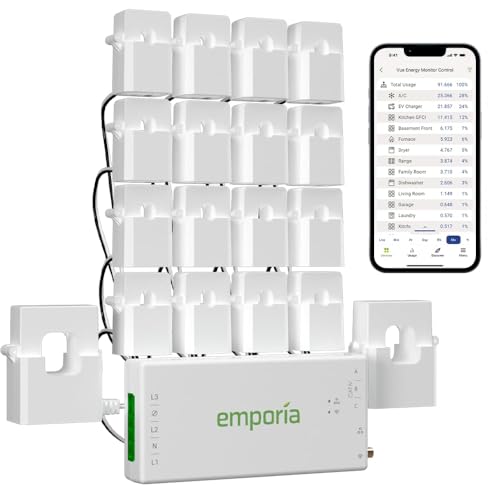
The Vue 3 is the best choice for most homes: it shows your whole-home use and 16 separate circuits in one free app, and it costs about $200.
Best for: Homeowners who want to see which appliances drive the bill, with or without solar.
What stands out in real use
Two 200A clamps go on your service mains and up to sixteen 50A sensors go on individual circuits, so you see the furnace, the dryer, the water heater and the EV charger as separate lines in the app. Emporia samples every second and keeps your history in its cloud for free, with no monthly fee. It also tracks solar production and net metering. If you already use Emporia smart plugs or an Emporia EV charger, they show up in the same app.
Key specs
- 2 x 200A mains sensors + 16 x 50A circuit sensors
- Single-phase, split-phase and 3-phase (wye) service
- Readings every second, unlimited cloud history
- 2.4 GHz Wi-Fi or Ethernet
- Solar and net metering
- UL 61010 and UL 2808, 1-year warranty
Pros
- Circuit-level data for the price of most whole-home monitors
- Free app without a subscription
- Ethernet port for panels far from the router
- Also sold with 8 sensors (about $150) or none (about $100)
Cons
- Needs an internet connection: there’s no local storage
- No official local API for Home Assistant
- Sixteen sensor wires make a crowded panel even busier
- Alexa and Google Home can’t read its energy data
Installation and compatibility notes
The monitor mounts in or next to your panel, and its wire harness connects to a breaker for power and voltage. Emporia says installation should be done by a licensed electrician or another qualified professional, because the service mains stay live even with the main breaker off. The Wi-Fi antenna sits outside the metal panel. For Home Assistant, a community integration reads your data from Emporia’s cloud.
Price: ~$200
Refoss EM16P — Best for Home Assistant

The EM16P monitors as many circuits as the Vue 3, but it can run completely on your local network, which makes it the best option for Home Assistant.
Best for: Home Assistant users who want circuit-level data without depending on a cloud service.
What stands out in real use
Refoss supports Home Assistant natively, without flashing new firmware, and the monitor also offers a local web page, an open API and MQTT. It can run offline without the cloud, the app or an account. If you do use the Refoss app, it keeps five years of daily history for free. The sixteen circuit sensors are rated 60A, a little higher than Emporia’s 50A, and it can report solar export for zero feed-in automations.
Key specs
- 2 x 200A mains sensors + 16 x 60A circuit sensors (up to 18 circuits)
- Single-phase, split-phase and 3-phase (wye) service
- Local API, MQTT and native Home Assistant support
- 2.4 GHz Wi-Fi
- Solar monitoring and zero feed-in
- ±2% accuracy, ETL listed to UL 61010
Pros
- Works locally, without the cloud
- Native Home Assistant support
- Higher-rated circuit sensors than the Vue 3
- Free cloud history if you want the app
Cons
- Wi-Fi only, without an Ethernet port
- The sensor leads are a fixed length
- Refoss doesn’t list Alexa, Google Home or Apple Home support
- Some sensors may need their direction flipped in the app after installation
Installation and compatibility notes
The installation is the same as for the Vue 3: the monitor goes in or next to the panel, the mains clamps go around the service wires and the power harness goes on a breaker, so a licensed electrician is the safe choice. Put the monitor where it gets a good 2.4 GHz signal, because it can’t use a cable. If you’re choosing between platforms, our Home Assistant vs HomeKit comparison explains what each one does well.
Price: ~$200
Emporia Vue 3 (Monitor Only) — Best Budget

This is the same Vue 3 without the 16 circuit sensors. It shows your whole-home use in real time for about $100.
Best for: Anyone who mainly wants to see their total use and solar production, without paying for circuit sensors.
What stands out in real use
The two 200A mains sensors show what the whole house uses every second, so you can watch the total jump when the dryer or the AC starts. That’s often enough to find the big loads, and it shows your standby use at night. Those numbers also help you size a backup battery, as our guide to the best portable power stations for home backup explains. The app, solar support and free cloud history are the same as on the 16-sensor version.
Key specs
- 2 x 200A mains sensors
- Readings every second, unlimited cloud history
- 2.4 GHz Wi-Fi or Ethernet
- Solar and net metering
- UL 61010 and UL 2808
Pros
- Lowest price for a whole-home monitor
- Same free app as the 16-sensor model
- Fewer wires in the panel
Cons
- No circuit-level data, so you have to guess which appliance is running
- Needs an internet connection
- Alexa, Google Home and Apple Home can’t read its energy data
Installation and compatibility notes
Installation is the same as the 16-sensor Vue 3, minus the circuit sensors, and Emporia recommends an electrician here too. If you think you’ll want circuit data later, the 8-sensor kit costs about $150.
Price: ~$100
Aeotec Home Energy Meter 8 — Best for SmartThings and Z-Wave
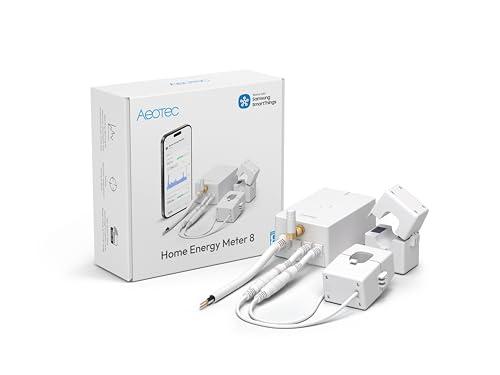
The Home Energy Meter 8 sends whole-home readings to your Z-Wave hub, so you can use your energy data in SmartThings or Home Assistant automations.
Best for: SmartThings, Home Assistant or Hubitat users who already have a Z-Wave hub.
What stands out in real use
Two 200A clamps measure both legs of a split-phase panel, and the meter tracks power coming in from the grid and going out from solar panels. It uses Z-Wave Long Range, which helps when the panel is in a garage or a basement far from the hub. It has no app or cloud of its own: your hub is the app, which keeps the data local.
Key specs
- 2 x 200A clamps, split-phase
- Consumption and production (solar) tracking
- Z-Wave 800 with Long Range, S2 security
- Over 99% accuracy above 0.05A (Aeotec)
- Works with SmartThings, Home Assistant (Z-Wave JS), Hubitat and Homey Pro
Pros
- Data stays on your local hub
- Long Range Z-Wave reaches a distant panel
- Lowest price of the four
Cons
- Needs a Z-Wave hub such as SmartThings, or a Z-Wave stick for Home Assistant
- Whole-home only, without circuit sensors
- No app of its own: everything goes through your hub
Installation and compatibility notes
The clamps go around the incoming service wires and the meter’s power leads connect at the main breaker, and Aeotec says only a licensed electrician should do the installation. Aeotec lists SmartThings, Home Assistant (through Z-Wave JS), Hubitat and Homey Pro among the hubs it works with. If you’re choosing a protocol for the rest of your home, our Zigbee vs Z-Wave vs Matter comparison explains the differences.
Price: ~$96
What Happened to the Sense Energy Monitor?
The Sense energy monitor was one of the best-known whole house energy monitors, mainly because it tried to recognize individual appliances from their electrical signature instead of using a sensor per circuit. Sense stopped selling it at the end of 2025, and is moving its software into the smart meters that utilities install.
If you already have one, Sense says it will keep sending app and firmware updates, security patches and device detection improvements, and that support continues. Sense no longer sells it new, so if you’re buying now, the Emporia Vue 3 is the better choice: circuit sensors measure each circuit directly instead of guessing from the total.
How to Choose a Home Energy Monitor
Whole home or circuit level. A whole-home monitor shows your total use and is enough to spot standby waste and big spikes. Circuit sensors tell you exactly what the HVAC, the water heater or the EV charger uses, which is where most of the useful answers are.
Installation. Every monitor here installs inside the electrical panel, next to wires that stay live with the main breaker off. Emporia and Aeotec both recommend a licensed electrician, and that’s the safe choice for all four. Check the Wi-Fi signal at the panel too: they all use 2.4 GHz, and the panel’s metal box blocks a lot of it.
Solar. All four can track solar production as well as grid use. The Emporia and Refoss monitors show it in their apps, and the Aeotec sends it to your hub.
Your smart home platform. None of the whole-home monitors here works with Matter or Apple Home. If you want energy data in the Home app, use Matter smart plugs with energy monitoring: see our guide to the best HomeKit energy monitor plugs. Not every Matter plug passes its readings to your controller, and our roundup of the best Matter smart plugs says which ones do. Google Home’s Android app has shown those readings since late October 2026, and our guide to the best smart plugs for Google Home names the plugs that pass them on. For Home Assistant, the Refoss EM16P is the most direct option, and for SmartThings, the Aeotec.
If you can’t open the panel. Renters can still measure single appliances with plugs: our guide to the best smart plugs with energy monitoring covers them. Many utilities with smart meters also let you download your usage through Green Button, in 15-minute, hourly, daily or monthly intervals depending on the utility.
Conclusion
The Emporia Vue 3 with 16 sensors is the best home energy monitor for most homes, because it shows your whole house and 16 circuits in a free app for about $200. The Refoss EM16P is the better choice for Home Assistant, since it runs locally. The monitor-only Vue 3 shows your total use for about $100, and the Aeotec Home Energy Meter 8 brings whole-home data to a SmartThings or Z-Wave hub.
Whichever you choose, have it installed by an electrician, and give it a few weeks: the patterns in your data are what show you where to save.
What is the best home energy monitor?
The Emporia Vue 3 with 16 sensors is the best home energy monitor for most homes. It measures your whole house and up to 16 circuits, tracks solar, and costs about $200 without a subscription. For Home Assistant, the Refoss EM16P is the better choice because it works locally.
Is the Sense energy monitor discontinued?
Yes. Sense stopped selling its home energy monitor at the end of 2025, and is moving its software into utility smart meters. Sense says existing monitors keep getting app and firmware updates, security patches and support.
Do I need an electrician to install a whole house energy monitor?
It’s the safe choice. Whole house energy monitors install inside the electrical panel, where the service wires stay live even with the main breaker off. Emporia recommends installation by a licensed electrician or another qualified professional.
Does the Emporia Vue work with Alexa or Google Home?
Not for energy data. Emporia’s Alexa and Google Home integrations only turn Emporia smart plugs and EV chargers on and off. You see your Emporia Vue energy data in the Emporia app.
Do home energy monitors work with Apple Home or Matter?
None of the monitors in this guide works with Apple Home or Matter. If you want energy data in Apple Home, use smart plugs that report energy over Matter, such as the Eve Energy, which show their readings in the Home app.

Written by Evan Mercer
Founder & Lead Researcher, Smart Home Matrix
Evan digs through spec sheets, firmware changelogs, and thousands of owner reviews so you don’t have to. Every guide starts with a compatibility check and ends with picks he would install in his own home. Read more about Evan and this site, or see exactly how we choose products.